The short version: After you install the open-source Blender Agent Skills into Claude Code or Codex, a single prompt lets the AI call Blender in the background and build a game prop through a pipeline of modeling → UV unwrapping → PBR materials → QA → export. In our low-poly treasure chest test, Claude Code delivered a 1028-triangle model in 341 seconds, and Codex delivered a 1836-triangle model in 219 seconds. Both .glb files have UVs and two PBR materials, and the official Khronos glTF Validator reported 0 errors and 0 warnings for both.
Create an API key that works with both →
Who this is for
- Developers building indie games or mini-games who lack art resources, don't know Blender, and need a batch of props to get the game running.
- Front-end developers working on 3D showcases or web 3D who need .glb models and don't want to outsource every small object.
- People already using Claude Code or Codex to write code who want to hand simple 3D assets to the AI too.
When you ask an AI to write bpy scripts directly, the usual problems are clipping geometry, floating parts, and flipped normals, and the AI doesn't notice them itself. These skills write the professional 3D art workflow and its checklists into the skill files. The AI follows them, then runs a QA pass at the end.
Prerequisites
1. Install Blender 5.2 or later
The skills require Blender 5.2+. On a Linux server, you can download the official archive directly and, after extracting it, use blender -b to run it headless, no monitor needed:
curl -LO https://download.blender.org/release/Blender5.2/blender-5.2.2-linux-x64.tar.xz
tar -xJf blender-5.2.2-linux-x64.tar.xz -C ~/opt
ln -s ~/opt/blender-5.2.2-linux-x64/blender ~/.local/bin/blender
After installing, check the version and make sure the AI's command environment can find blender:
blender -b --version
In our test, the download and extraction took 12 seconds. On macOS and Windows, just use the official installer.
2. Connect Claude Code to this site
For Claude Code installation, see Claude Code Setup Guide. Once it's installed, write the global config in ~/.claude/settings.json:
{
  "env": {
    "ANTHROPIC_BASE_URL": "https://api.aicodewith.ai",
    "ANTHROPIC_AUTH_TOKEN": "sk-你的Key"
  }
}
3. Connect Codex to this site
For Codex installation, see Codex Setup and Configuration Guide. The global config goes in ~/.codex/config.toml:
model_provider = "aicodewith"
model = "gpt-6.1-sol"

[model_providers.aicodewith]
name = "aicodewith"
base_url = "https://api.aicodewith.ai/chatgpt/v1"
wire_api = "responses"
experimental_bearer_token = "sk-你的Key"
Both tools can use the same key. In our test, Claude Code ran claude-opus-5-5, and the Codex log showed model: gpt-6.1-sol. For more Codex config options, see config.toml Configuration Explained.Install the Blender skills
The skills repo is EL4CTEO/blender-skills, MIT licensed, with 22 skills in total. Claude Code can install them as a plugin:
/plugin marketplace add EL4CTEO/blender-skills
/plugin install blender-agent-skills@blender-agent-skills
For Codex, OpenCode, Gemini CLI, Cursor, and other tools, clone the repo and run the install script:
git clone https://github.com/EL4CTEO/blender-skills
bash ./blender-skills/install/install.sh --agent all
By default it installs to ~/.claude/skills and ~/.agents/skills, and Codex reads the latter.--agent can be claude, codex, opencode, gemini, copilot, cursor or all. We used --agent all to install into 6 directories at once, 22 skills each, in under 1 second.
If you run./blender-skills/install/install.shand getPermission denied, the script lacks execute permission. As shown above, just prefix it withbash.
The 22 skills, grouped by purpose:
| Purpose | Skills |
|---|---|
| Entry point and scene | blender-core、blender-scene-setup、blender-workflow-recipes |
| Modeling | blender-hardsurface-modeling、blender-sculpting、blender-geometry-nodes、blender-retopology-uv |
| Materials and baking | blender-pbr-materials、blender-texture-baking |
| Characters and animation | blender-character-rigging、blender-facial-shapekeys、blender-animation |
| Games and export | blender-game-optimization、blender-export-pipelines |
| Rendering and atmosphere | blender-rendering、blender-lighting-lookdev、blender-time-of-day、blender-weather-fx、blender-simulation |
| Tools and QA | blender-addon-development、blender-pipeline-automation、blender-asset-qa |
blender-core is the entry point; it runs code and dispatches tasks. blender-workflow-recipes contains the full asset workflow. blender-asset-qa checks for intersections, floating parts, bad normals, and similar problems. For specifics on using the skills, you can also see AI Agent Skills Usage Guide.
Full test: building a low-poly treasure chest
Both tools got the same prompt:
用 Blender 技能(先看 blender-core,再按 blender-workflow-recipes 的道具流程)做一个游戏用的低多边形宝箱:带盖子和金属包边,面数控制在 2000 三角面以内,展 UV,给 PBR 材质(木头+金属),用 blender-asset-qa 检查,最后导出 treasure_chest.glb 到当前目录,并用 EEVEE 渲染一张 1280x720 的 render.png。Blender 用 `blender -b` 后台运行。完成后报告三角面数、UV 层、材质列表、QA 结果。
Claude Code ran non-interactively with claude -p , while Codex ran with codex exec , with no human intervention at any point.
Results comparison
| Item | Claude Code | Codex |
|---|---|---|
| Total time | 341 seconds | 219 seconds |
| Skills read | blender-core、blender-workflow-recipes | blender-core、blender-workflow-recipes、blender-pbr-materials、blender-asset-qa |
| Triangle count | 1028 (chest body 484 + lid 544) | 1836 (chest body 1360 + lid 476) |
| Objects | Two objects, body and lid, with the lid's pivot on the hinge | Two objects, body and lid |
| UV | One UVMap layer per object, within the 0–1 range, no overlaps | One UVMap layer per object, no overlaps, nothing out of bounds |
| Materials | Wood (color + roughness map), iron (Metallic 1.0) | Walnut, antique bronze metal, 4 textures in total |
| Built-in skill QA | Passed, 1 warning (lid underside touches the top face of the body) | Passed, 0 errors, 0 warnings |
| .glb size | About 1.6 MB | About 4.6 MB |
| glTF Validator | 0 errors, 0 warnings | 0 errors, 0 warnings |
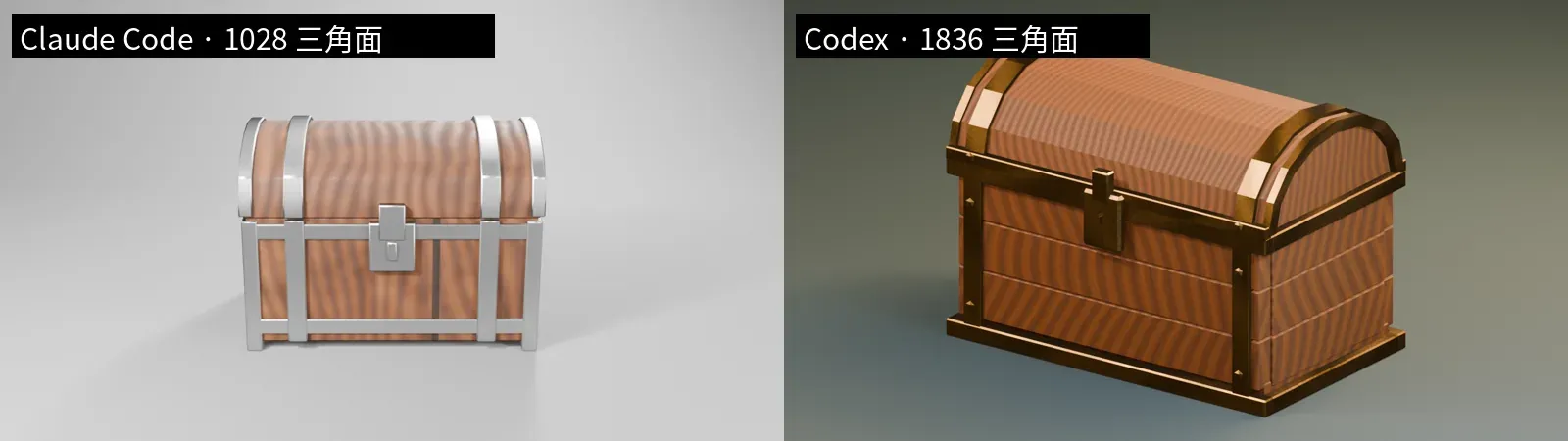
claude-code-blender-treasure-chest-render
On the left is the Claude Code render, on the right is Codex's. Both are EEVEE at 1280×720, with the lighting and camera placement done by the AI itself.
Details worth noting along the way
The first time Claude Code ran the skill's built-in QA, it flagged z-fighting: the wooden side faces of the lid and the body sat on the same plane, which would flicker in the engine. It made the lid 6 mm larger on each side than the body, and the issue disappeared after it reran the whole pipeline. This is where skills beat "just write a bpy script": with checks in place, the AI knows what it got wrong.
It also reduced the bevel from 2 segments to 1, because 2 segments brought the total face count to 2192, over the 2000 budget. The lid's origin sits on the hinge line along the top rear edge, so in the engine a single rotation around the local X axis opens it.
Codex read more thoroughly, and additionally read the PBR materials and QA skills. After exporting, it re-imported the .glb into Blender and confirmed the face count, UVs, and materials matched the pre-export state. It also produced wireframe images and random-color check images from the front, back, side, and three-quarter views.
In its modeling script, Claude Code used an old API on its first try:set_sharpness_by_angle. Blender 5.2 raised an AttributeError and suggested usingset_sharp_from_angleinstead. It fixed this on its own and kept going. Blender 5.x changed quite a few APIs, so the blender-core skill includes a dedicated list of 5.x API rules.
Validating the .glb with the glTF Validator
"Ready to drop into a game" should at least mean passing the glTF spec checks. We used Khronos's official glTF Validator (the npm package gltf-validator) to check both files:
npm i gltf-validator
node validate.js treasure_chest.glb
validate.js does just one thing: it reads the file, calls validateBytes, and prints the error count, warning count, and triangle count. Both files came back with 0 errors and 0 warnings, the triangle counts matched what the AI reported (1028 and 1836), and the generator for both was Khronos glTF Blender I/O v5.2.40. The Claude Code file also had 2 info-level notices, "UNUSED_OBJECT", which don't affect loading.
Common Errors
blender: command not found
The shell the AI uses to run commands may have different environment variables from your terminal. Codex runs commands in a login shell via bash -lc, and in our test it couldn't find blender, so it downloaded its own copy of Blender to /tmp before continuing. Putting blender in /usr/local/bin, or spelling out the full path to Blender in your prompt, saves you this step.
AttributeError: 'Mesh' object has no attribute ...
This usually means the AI used a Blender 4.x or earlier API. Have it read the blender-core skill before writing the script. After an error, it can usually fix the problem itself based on the message.
Permission denied (running install.sh)
The install script lacks execute permission. Run it with bash install/install.sh, or run chmod +x install/install.sh first.
python: command not found
Some Linux distributions only ship python3. Codex hit this once in our test and then switched to python3 to continue. It doesn't affect scripts inside Blender, which bundles its own Python.
FAQ
Do I have to install Blender MCP?
No. The repository docs explain that without Blender MCP, the AI runs Blender in the background; with Blender MCP, the AI can operate directly on the Blender window you have open. Our entire test ran in the background with blender -b.
Can it run on a server without a display?
Yes. We ran it on a Linux server with no desktop, and the modeling, export, and EEVEE rendering all happened in the background.
Claude Code or Codex?
In this test, Codex was faster, read more skills, and checked its own work in more detail. Claude Code used fewer faces and also took the initiative to set the pivot for the lid's opening and closing. Both work with the same Key from this site, so you can try each on one prop before deciding.
Can I export for Unity, Unreal, or Godot?
The skills include blender-export-pipelines, which covers Roblox, Unity, Unreal, Godot, web, and USD. In this article's test, we only exported .glb.
Can I use the models commercially?
The skills repository itself is MIT licensed. The models and wood-grain textures for the two chests in this article were all generated locally by the AI with scripts. If you have the AI download external textures or HDRIs, you need to check the licensing of those assets yourself.
Create an API Key and let Claude Code and Codex build 3D models for you →