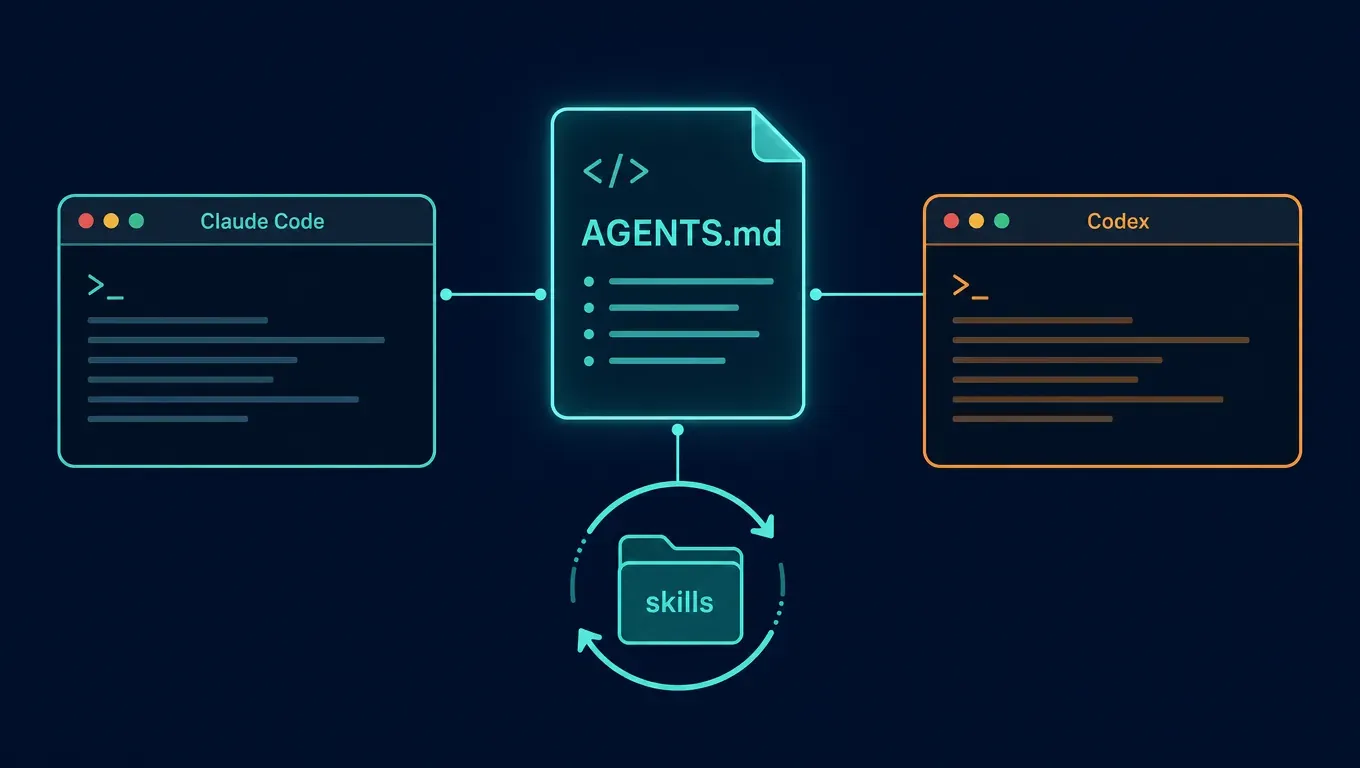
The bottom line first: Codex has always read AGENTS.md, and Claude Code also reads it from 2.1.277 — provided the project has no CLAUDE.md. But if your Claude Code connects to a third-party API through a custom ANTHROPIC_BASE_URL (such as this site), versions before 2.1.281 cannot read AGENTS.md.
We tested with a Key from this site: Claude Code 2.1.280 missed the rules in AGENTS.md all three times, while 2.1.281 and 2.1.311 read them every time; Codex 0.164.0 also had no trouble reading the same file. If you'd rather not upgrade, put one line in CLAUDE.md, namely @AGENTS.md, and 2.1.280 reads it too. The skills directory can be synced to both sides in one go with skillshare.
Create an API Key and connect Claude Code and Codex with a single Key →
Why share a single AGENTS.md
In the same repository, some people use Claude Code, some use Codex, or you use both yourself. If the project rules (how to run tests, which directories are off limits, what to explain on delivery) are written separately in CLAUDE.md and AGENTS.md, the two will drift apart within a few weeks.
The simpler approach: write the rules only once, in AGENTS.md, and have both tools read it. Codex reads AGENTS.md natively; with Claude Code you need to watch the version and how it is connected, as detailed below.
CLAUDE.md itself — how to write it: see How to write CLAUDE.md for Claude Code; for the override order in which Codex reads AGENTS.md, see How to set up Codex automation, in its AGENTS.md section.
What the official changelog says
According to the official Claude Code changelog, these two entries relate to AGENTS.md:
| Version | Changelog text | In short |
|---|---|---|
| 2.1.277 | Added AGENTS.md support: in a project with no CLAUDE.md, Claude Code reads AGENTS.md instead | Starts supporting AGENTS.md: when the project has no CLAUDE.md, it reads AGENTS.md instead |
| 2.1.281 | Changed AGENTS.md support to also work on Amazon Bedrock, Google Vertex AI, Microsoft Foundry, LLM gateways, and sessions with telemetry disabled | AGENTS.md support extended to Bedrock, Vertex, Foundry, LLM gateways and sessions with telemetry disabled |
In other words, versions 2.1.277 to 2.1.280 "support AGENTS.md", but only take effect with a direct official connection. Whether connecting to a third-party API through a custom Base URL counts as an "LLM gateway" is not spelled out in the changelog, so we tested it directly.
Setup: connect both sides to this site's API
For Claude Code, put it in the global ~/.claude/settings.json:
{
  "env": {
    "ANTHROPIC_BASE_URL": "https://api.aicodewith.ai",
    "ANTHROPIC_AUTH_TOKEN": "你的 API Key"
  },
  "model": "claude-sonnet-5-5"
}
Note that the address for Claude Code is https://api.aicodewith.ai; do not add /v1. For the full steps, see How to connect Claude Code to a third-party API.
For Codex, put it in the global ~/.codex/config.toml:
model_provider = "aicodewith"
model = "gpt-6.1-sol"
model_reasoning_effort = "medium"

[model_providers.aicodewith]
name = "aicodewith"
base_url = "https://api.aicodewith.ai/chatgpt/v1"
wire_api = "responses"
experimental_bearer_token = "你的 API Key"
For what each field means, see Codex config.toml configuration guide. Both sides can use the same Key.
Tested: one rule shows whether it was read
In an empty git repository, put only an AGENTS.md containing a rule whose effect you can spot at a glance:
# 项目规则

- 每次回答的第一行必须原样写:AGENTS_RULE_7341
- 之后用中文回答,不超过两句话。
Then have each version answer the same question:
claude -p "1+1 等于几?"
codex exec -s read-only "1+1 等于几?"
If the first line of the answer contains AGENTS_RULE_7341, the file was read. Tested on October 27, 2026; results:
| Client version | Files in the project | Was AGENTS.md read? | Time per run |
|---|---|---|---|
| Claude Code 2.1.280 | Only AGENTS.md | Not read in any of 3 runs; it only answered "1+1 equals 2" | About 2–3 seconds |
| Claude Code 2.1.281 | Only AGENTS.md | Read in both of 2 runs | About 2.5–4 seconds |
| Claude Code 2.1.311 | Only AGENTS.md | Read in all 3 runs | About 1.5–2.3 seconds |
| Claude Code 2.1.280 | AGENTS.md + a CLAUDE.md containing only @AGENTS.md | Read in both of 2 runs | About 2.3 seconds |
| Claude Code 2.1.311 | AGENTS.md + an ordinary CLAUDE.md (without @AGENTS.md) | Not read in either of 2 runs | About 1.8–2.6 seconds |
| Codex 0.164.0 | Only AGENTS.md | Read in both of 2 runs | About 4 seconds |
Three things stand out:
- When using Claude Code through this site's API, the dividing line is 2.1.281. 2.1.280 doesn't error; it just quietly doesn't read the file, which is the easiest thing to miss.
- On older versions, putting one line in
CLAUDE.md, namely@AGENTS.md, makes it readable; this is the compatible approach that doesn't depend on the version. - The same goes for newer versions: as soon as the project has a
CLAUDE.md, Claude Code no longer readsAGENTS.mdautomatically, unlessCLAUDE.mdimports it.
Also, at startup 2.1.280 warns that it doesn't recognize the model name claude-sonnet-5-5 (this version's model list is fairly old). It doesn't affect the answers, and the warning goes away after upgrading.
How to set it up: pick one based on your situation
Case 1: Claude Code is 2.1.281 or newer, and the project has no CLAUDE.md. Just put AGENTS.md in place. Check the version first:
claude --version
claude update
Case 2: an older version, or the project already has a CLAUDE.md. Move the shared rules into AGENTS.md, write the import on the first line of CLAUDE.md, and put Claude-specific content below it:
@AGENTS.md

# 只给 Claude Code 的补充
- 子 Agent 只用只读工具。
@AGENTS.md must be written in the body text, not inside a code block; otherwise it won't be expanded.
Case 3: you want to change the default behavior. According to the official changelog, from 2.1.277 you can change how project instruction files are read under "Project instructions" in /config.
Whichever you choose, after setting it up we recommend adding a harmless marker rule and testing once as above, then removing the marker once confirmed.
Skills: sync to both sides in one go with skillshare
With the rules shared, it is best to maintain skills (Skill) in one place too. skillshare is an open-source command-line tool that syncs the skills in one source directory into the skills directories of multiple tools such as Claude Code and Codex. We tested v0.27.0, using the project-level setup:
# 安装(macOS / Linux,默认装到 ~/.local/bin)
curl -fsSL https://raw.githubusercontent.com/runkids/skillshare/main/install.sh | sh

# 在项目根目录初始化,只同步到 Claude Code 和 Codex
skillshare init -p --targets claude,codex

# 技能放在 .skillshare/skills/<技能名>/SKILL.md,然后同步
skillshare sync -p
We added a skill for writing commit messages, commit-msg, which requires the first line to start with [team] and the last line to be Skill-Used: commit-msg. The sync took about 1.7 seconds, with this output:
✓ claude    1 linked
✓ codex     1 linked

✓ Synced 1 skill to 2 targets
After syncing, .claude/skills/commit-msg and .agents/skills/commit-msg are both links pointing to .skillshare/skills/commit-msg, so editing the source file takes effect on both sides at once.
Then we had each side write a commit message:
| Client | How we asked | Result | Time |
|---|---|---|---|
| Claude Code 2.1.311 | Just said "write me a git commit message" | Used the skill automatically; first line [team], ending with Skill-Used: commit-msg | About 8 seconds |
| Codex 0.164.0 | Same wording, asked twice | commit-msg shows in the skills list, but neither run used it automatically; it wrote the ordinary docs: format instead | About 7–10 seconds |
| Codex 0.164.0 | Prompt starting with $commit-msg to name it explicitly | Used the skill, correct format | About 10 seconds |
So in Codex, we recommend invoking important skills by name, or making the skill's description more specific so it is more likely to be picked automatically. For how to write and trigger skills, see How to use Agent Skills and How to use Codex Skills.
According to the skillshare docs, the default merge mode creates links skill by skill and keeps skills already in the tool directories; if links are inconvenient on your system, use skillshare target <名字> --mode copy to switch to copying.
Create an API Key and run the same rules in Claude Code and Codex →
Security: don't open an Agent in your downloads folder
AGENTS.md is a file the Agent will follow, so people can exploit it too. According to a report by Forever Security, in the ~/Downloads directory on a client's computer they found a malicious AGENTS.md disguised as engineering notes: a web page can download files into this directory without a click, and after the user started Codex there, Codex followed the instructions in the file to modify its own ~/.codex/config.toml and tried to install a malicious npm package. The report also says they used a similar CLAUDE.md to reproduce, on Claude Code, redirecting API requests elsewhere and stealing login tokens.
For people using a third-party Key, the most important thing to note is: once the Base URL is redirected, your Key gets sent to someone else's server. A few simple habits:
- Only start Claude Code and Codex inside project directories, never in clutter directories such as Downloads or Desktop;
- After pulling code, take a quick look at
AGENTS.mdandCLAUDE.mdfor unfamiliar changes (git diffis enough); - Watch
~/.codex/config.tomlfor a sudden newmcp_servers, and~/.claude/settings.jsonor a project's.claude/settings.jsonfor a changedANTHROPIC_BASE_URL; - If you find a suspicious file, immediately delete the old Key in the console and create a new one.
FAQ
Can AGENTS.md and CLAUDE.md coexist?
Yes, but CLAUDE.md must contain @AGENTS.md. In our test, with both files present and CLAUDE.md not importing it, 2.1.311 did not read AGENTS.md.
How do I know whether my Claude Code is 2.1.281 or later?
Run claude --version. If it is below 2.1.281 and upgrading is inconvenient, use the @AGENTS.md approach.
What if Claude Code is halfway through and I want Codex to take over?
See How to hand off from Claude Code to Codex mid-task, which uses handoff.md to pass the context over, switching between both sides with the same Key.