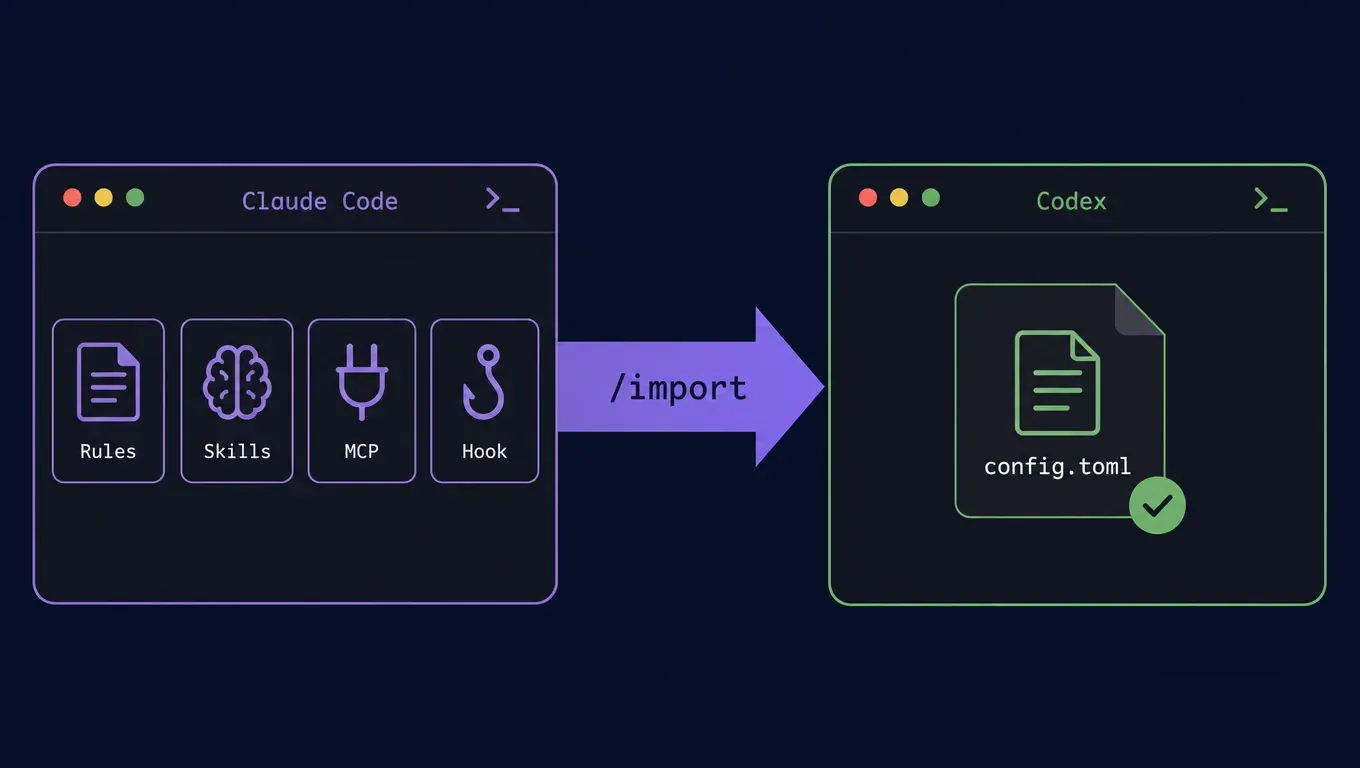
The bottom line first: Codex CLI's /import can move Claude Code's rules (CLAUDE.md), settings.json, hooks, skills, MCP servers, subagents and recent conversations into Codex in one go; this time we imported 7 items in under 10 seconds.
The question people care about most: the already-configured model_provider = "aicodewith" was not changed; model and the whole [model_providers.aicodewith] block were untouched, line for line. After import, Codex kept going through this site's API as usual, and a direct API call returned HTTP 200.
But there is one pitfall to handle by hand: in Claude Code's settings.json, the env block gets written verbatim into Codex's config.toml, including ANTHROPIC_AUTH_TOKEN, which is your Key. After that, every shell command Codex runs can read it. Untick Settings during import, or delete those two lines afterwards; the details are below.
Create an API Key and use the same Key for Claude Code and Codex →
What /import can move
According to OpenAI's official docs, "Import from another agent", Codex CLI can import from Claude Code or Cursor, with this mapping:
| What it is in Claude Code | Where it goes in Codex |
|---|---|
| Rules file (CLAUDE.md) | AGENTS.md |
| settings.json | config.toml |
| Skills | Skills |
| Plugins | Plugins |
| MCP server configuration | Codex MCP configuration |
| Hooks | Codex hooks |
| Slash commands | Skills |
| Subagents | Codex subagents |
| Project memory | Memory |
| Conversations from the last 30 days | Conversations, up to 50 |
The official docs also list a few limits: /import can only be used in the local Codex CLI interactive interface, not while a task is running or in a remote session; importing does not modify or delete Claude Code's original configuration.
Test environment
We tested with Codex CLI 0.164.0 on October 27, 2026. Before importing, Codex already had its global ~/.codex/config.toml set up following this site's guide:
model_provider = "aicodewith"
model = "gpt-6.1-sol"
model_reasoning_effort = "medium"

[model_providers.aicodewith]
name = "aicodewith"
base_url = "https://api.aicodewith.ai/chatgpt/v1"
wire_api = "responses"
experimental_bearer_token = "你的 API Key"
If you haven't set it up yet, see Connecting Codex to AICodeWith and Codex config.toml configuration guide first.
On the Claude Code side, we prepared the following, as in everyday use:
- Global
~/.claude/settings.json:envcontainsANTHROPIC_BASE_URL(https://api.aicodewith.ai) andANTHROPIC_AUTH_TOKEN,modelisclaude-sonnet-5-5, plus onepermissionsentry and onePostToolUsehook; - Global skill
~/.claude/skills/commit-msg; - In the project:
CLAUDE.md,.mcp.json(a filesystem MCP server), the subagent.claude/agents/reviewer.mdand the slash command.claude/commands/hello.md; - One conversation with Claude Code in this project.
Step 1: back up config.toml first
Importing writes to config.toml, so keep a copy before you start:
cp ~/.codex/config.toml ~/.codex/config.toml.bak
Step 2: run /import in the project directory
cd 你的项目目录
codex
The first time you open this directory, it asks whether to trust it; choose Trust and continue. Once in the interface, type /import and press Enter; it lists what it found:
> Import setup
  [x] Tools & setup
      Importing: Settings 1, Hooks 1, Skills 1
  [x] Current project
      Importing: MCP servers 1, Agents 1, Instructions 1
  [x] Chat sessions (1)
      Importing: Chat sessions 1
  Selected 7 of 7 items.
  › 1. Import selected
    2. Customize selection
    3. Cancel
Choose Import selected to import everything; press c to pick items one by one (we recommend this; see "The pitfall to handle" below for why). Import result:
• Import finished: 7 imported, 0 failed.
The slash command we added, .claude/commands/hello.md, did not appear in this import list. If you use slash commands a lot, check Codex's skills list after importing.
Where everything went after import
| Original | After import | Notes |
|---|---|---|
| Project CLAUDE.md | AGENTS.md in the project root | Content copied verbatim; CLAUDE.md left in place |
| ~/.claude/settings.json | ~/.codex/config.toml | Only a shell_environment_policy block was added; see below |
| hooks | ~/.codex/hooks.json | After import it is "pending review" and won't run directly |
| ~/.claude/skills | ~/.agents/skills | Skill files copied verbatim |
| .mcp.json | mcp_servers in the project's .codex/config.toml | Commands and arguments kept verbatim |
| .claude/agents/reviewer.md | The project's .codex/agents/reviewer.toml | Name, description and prompt kept, but the original tools: Read, Grep restriction was not carried over |
| Recent conversations | Codex conversation history | 1 imported successfully |
Two points worth noting:
- Hooks don't run behind your back. When you reopen Codex after importing, a hooks review screen appears first, saying "1 hook needs review before it can run", with PostToolUse showing 1 installed, 0 active. It only takes effect after you confirm it's fine and trust it in
/hooks. - The subagent's tool restrictions were lost. The subagent that only had Read and Grep in Claude Code has no corresponding restriction in the imported
reviewer.toml. The official docs also remind you to check the tool permissions of imported skills and Agents and add them back by hand if needed.
We also checked ~/.claude and the Claude Code files in the project: none were modified by the import, consistent with the official docs.
Was model_provider changed?
Comparing ~/.codex/config.toml before and after import (Key replaced with a placeholder):
 model_provider = "aicodewith"
 model = "gpt-6.1-sol"
 model_reasoning_effort = "medium"

 [model_providers.aicodewith]
 name = "aicodewith"
 base_url = "https://api.aicodewith.ai/chatgpt/v1"
 wire_api = "responses"
 experimental_bearer_token = "你的 API Key"
+
+[projects."/你的项目目录"]
+trust_level = "trusted"
+
+[shell_environment_policy]
+inherit = "core"
+
+[shell_environment_policy.set]
+ANTHROPIC_BASE_URL = "https://api.aicodewith.ai"
+ANTHROPIC_AUTH_TOKEN = "你的 API Key"
(There are also two [tui] lines of interface state, unrelated to the import, omitted here.)
The result is clear: provider, model, base_url and Key were all unchanged, and the model: claude-sonnet-5-5 from Claude Code did not override Codex's model either. The only additions were the trusted directory and the shell_environment_policy block.
Does it still work after import?
Right after import, run a minimal conversation:
codex exec -s read-only "1+1 等于几?"
The startup info still shows provider: aicodewith and model: gpt-6.1-sol; the two runs returned in about 4.8 and 4.4 seconds. The first line of the answer also carried the marker from the test rule in CLAUDE.md, showing the imported AGENTS.md took effect too.
Then call the API directly once with the same Key to confirm:
curl https://api.aicodewith.ai/chatgpt/v1/responses \
  -H "Authorization: Bearer 你的API Key" \
  -H "Content-Type: application/json" \
  -d '{"model": "gpt-6.1-sol", "input": "reply with the word ok"}'
It returned HTTP 200, status was completed, and the whole request took about 3 seconds.
The pitfall to handle: the Key gets written into the shell environment
[shell_environment_policy.set] means that every time Codex runs a shell command, it sets these variables in the command's environment. We had Codex run printenv ANTHROPIC_AUTH_TOKEN | wc -c, and the length returned matched the Key's length, confirming that the Key really was passed to every command it ran.
Codex itself uses experimental_bearer_token to call the API and doesn't need these two variables at all. If you keep them, any script, test or third-party tool Codex runs can read your Key. Two ways to handle it:
Option 1: untick Settings during import. In the /import screen, press c to choose item by item, put the cursor on Settings and press Space to untick it, then choose Review selection and Import selected. We retested: the other 4 items imported as usual, and config.toml only gained the trusted directory and interface state, with no shell_environment_policy.
Option 2: delete the block after import. Open ~/.codex/config.toml and delete [shell_environment_policy.set] along with the ANTHROPIC_BASE_URL and ANTHROPIC_AUTH_TOKEN lines below it. Then reopen Codex.
If the Key has already been used elsewhere and you're not sure whether other programs have read it, the safest move is to delete the old Key in the console and create a new one.
Create an API Key and set up a clean Key →
If the provider really was changed, how to fix it
In our test the provider was not changed. If after importing you find the startup info doesn't show provider: aicodewith, or calls return 401, handle it in this order:
- Restore from the backup:
cp ~/.codex/config.toml.bak ~/.codex/config.toml; - Without a backup, write the
model_provider,modeland[model_providers.aicodewith]block from "Test environment" above back into the global~/.codex/config.toml; remember that the Key and provider can only go in the global file; - Run
codex exec -s read-only "hi"once and check whetherproviderin the startup info isaicodewith.
For troubleshooting 401, see How to fix Codex 401 Unauthorized.
A few things to check after import
- hooks: type
/hooksand review each one before trusting it, especially hooks that run commands; - MCP: use
/mcpto see whether servers can connect; log in again where needed. For configuration details, see Codex MCP setup tutorial; - Skills: confirm the imported skills are in the skills list; for how they trigger, see How to use Codex Skills;
- Rules: the project now has both CLAUDE.md and AGENTS.md with the same content. If you want to edit only one from now on, see Sharing one AGENTS.md between Claude Code and Codex.
FAQ
Will importing break Claude Code?
No. The official docs say importing doesn't change the original configuration, and in our test ~/.claude and the Claude Code files in the project were unchanged before and after import; Claude Code keeps working.
Can I import again?
You can run /import again. On our second run it showed "No compatible setup was found to import."; anything already imported isn't imported twice.
Can I import directly if Codex isn't installed or I'm not logged in yet?
First install Codex and set up config.toml. With no login method configured, Codex opens on the login selection screen and you can't get to /import. For installation, see the Codex installation guide.
Don't want a full migration, just want Codex to pick up a half-finished task?
Handing off context with handoff.md is lighter; see How to hand off from Claude Code to Codex mid-task; to have the two review each other, see How to use Claude Code and Codex together.