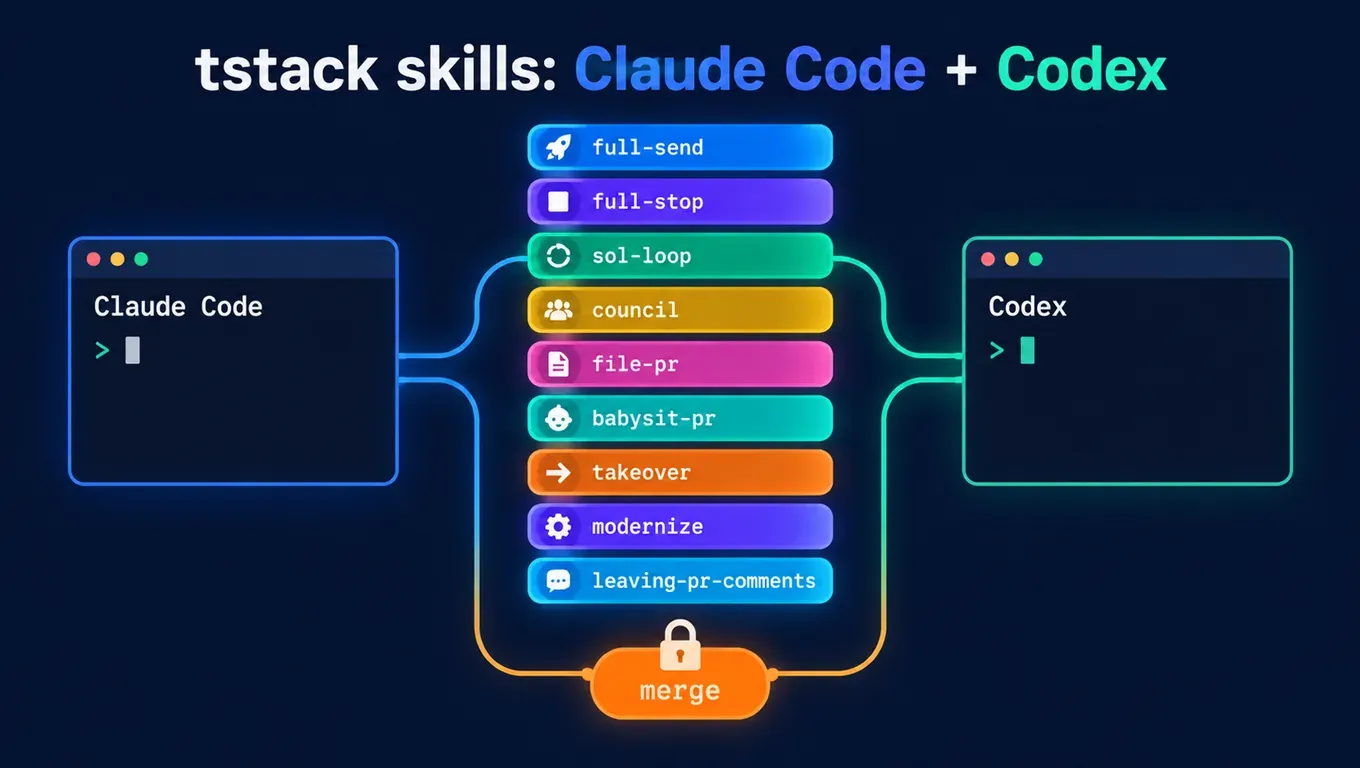
Short answer: tstack is a set of 9 agent skills that Theo (t3dotgg) open-sourced on October 26. Installing it just means copying the folders into ~/.claude/skills/ or ~/.codex/skills/. We connected both Claude Code and Codex with the same API Key from this site. Results:
- Install (clone the repo + copy into both clients): about 3 s;
- In Codex 0.164.0, saying "sol loop" made it start a gpt-6.1-sol subagent to review the code: 2 rounds, 62 s, and it caught and fixed an integer-division bug;
- Claude Code 2.1.310 can't run sol-loop out of the box and honestly reports "no route can run Sol"; after adding a subagent with
model: gpt-6.1-sol, it ran in 2 rounds, 70 s; full-sendlets the Agent merge PRs on its own. We added a rule on both sides to blockgh pr merge, and both blocked it in our test.
Create an API Key and connect Claude Code and Codex with one Key →
What is tstack
According to Theo's launch post on X, tstack is "the skills I use every day," cleaned up and published. When we wrote this, the post had about 440K views and the GitHub repo had about 2,000 stars, under the MIT license. The README says it works in both Claude Code and Codex; some skills use T3 Code features when available and fall back to the client's native tools when not.
The 9 skills and their triggers (according to the repo README):
| Skill | Say | What it does |
|---|---|---|
| full-send | full send | Unattended: finishes the change, proves it, reviews it, files a PR, watches CI, then merges it by itself |
| full-stop | full stop | Same as full-send, but stops at "ready to merge" and does not merge |
| council | council | Gets three models from different providers to review until they agree |
| sol-loop | sol loop | Has GPT Sol review the change in a loop until both agents agree |
| file-pr | file a PR | Files a short PR that leads with the problem, not a list of changes |
| takeover | take over | Finishes someone else's PR, branch or Agent thread and keeps their credit |
| babysit-pr | babysit | Watches a PR through CI and review bots and fixes real findings |
| modernize | modernize | Rebases an old PR and decides whether it should still exist |
| leaving-pr-comments | automatic | Sets the format for comments the Agent posts on your behalf |
The skills depend on each other: full-send uses sol-loop, file-pr and babysit-pr; full-stop uses full-send. The simplest approach is to install them all.
Step 1: configure Claude Code and Codex
Both clients can use the same Key from this site.
For Claude Code, put it in the global ~/.claude/settings.json:
{
  "env": {
    "ANTHROPIC_BASE_URL": "https://api.aicodewith.ai",
    "ANTHROPIC_AUTH_TOKEN": "YOUR_API_KEY"
  },
  "model": "claude-sonnet-5-5"
}
Note that the address is https://api.aicodewith.ai, without /v1. For the full steps, see How to connect Claude Code to a third-party API.
For Codex, put it in the global ~/.codex/config.toml:
model = "gpt-6.1-sol"
model_provider = "aicodewith"

[model_providers.aicodewith]
name = "aicodewith"
base_url = "https://api.aicodewith.ai/chatgpt/v1"
wire_api = "responses"
experimental_bearer_token = "YOUR_API_KEY"
For what each field means, see Codex config.toml explained.
Step 2: install tstack
git clone https://github.com/t3dotgg/tstack
mkdir -p ~/.claude/skills ~/.codex/skills
cp -R tstack/skills/* ~/.claude/skills/   # Claude Code
cp -R tstack/skills/* ~/.codex/skills/    # Codex
These steps took about 3 s in our test. After installing, Claude Code shows the skills at startup, and Codex reads the matching SKILL.md when you say a trigger. For what skills are and where they live, see How to use Skills in AI agents.
Two more requirements: skills that file PRs, such as full-send and babysit-pr, need an authenticated GitHub CLI (gh); the wait script in babysit-pr needs python3.
Step 3: call GPT Sol with the same Key and run sol-loop
First check that the Key reaches Sol. This site's model list includes gpt-6.1-sol. We sent one line to the Responses endpoint and got HTTP 200 back in about 4 s:
curl https://api.aicodewith.ai/chatgpt/v1/responses \
  -H "Authorization: Bearer YOUR_API_KEY" \
  -H "Content-Type: application/json" \
  -d '{"model":"gpt-6.1-sol","input":"Reply with exactly: SOL_OK"}'
The test project is tiny: calc.py in average() gained an empty-list check, but the same edit also changed / to //. The existing tests only check an integer mean, so they stay green. That bug is left for Sol to find.
In Codex
Run this in the project directory:
codex exec --sandbox workspace-write "sol loop: review the current uncommitted changes (no remote, use HEAD as the base). After approval, do not commit or push."
It finished in 62 s. The session log shows Codex first looked for T3 Code's delegate_task, didn't find it, and used its built-in spawn_agent to start a subagent with "model":"gpt-6.1-sol". What happened:
- Round 1: Sol pointed out that
average([1, 2])returns1instead of1.5; - The main Agent changed it back to
/, added atest_average_fractionaltest, and checked that the test fails on the old code; - Round 2: Sol approved. Nothing was committed or pushed.
Codex's final report (translated from the original):
Finished 2 rounds of sol-loop. GPT-6.1 Sol gave final approval; nothing left open.
- Fixed S1: integer division made fractional means wrong; restored /, kept the empty-list handling, and added a regression test.
Not committed, not pushed; the changes stay in the working tree.
In Claude Code
Just saying "sol loop" makes Claude Code refuse to run it. It returned in 11 s (translated from the original):
The Sol review didn't run, so this change has not passed review.
Blocker: there is no route here that can run Sol... Under sol-loop's rules, I won't substitute another model, and I won't treat a missing review as approval.
This is the skill's own rule: in Claude Code it only runs with a subagent set up to run Sol, and it must not switch to another model. The fix is to create ~/.claude/agents/sol-reviewer.md:
---
name: sol-reviewer
description: Read-only code reviewer running GPT Sol. Use for the sol-loop skill.
model: gpt-6.1-sol
tools: Read, Grep, Glob, Bash
---
You are a read-only code reviewer. Never edit, commit, or push. Follow the review brief you are given and reply in its exact format.
This site's Anthropic-compatible endpoint can also call gpt-6.1-sol, so this subagent uses the same Key. Run it again:
claude -p "sol loop: review the current uncommitted changes (no remote, use HEAD as the base). After approval, do not commit or push." --permission-mode acceptEdits
It took 70 s and 2 rounds, with the same result as Codex: in round 1 Sol returned VERDICT: CHANGES and pointed out the division problem; after the fix, round 2 returned VERDICT: APPROVE. The usage stats in the output list both claude-sonnet-5-5 (main Agent) and gpt-6.1-sol (review subagent), which shows that Sol really did the review.
At startup Claude Code prints an unrecognized_model notice because it doesn't recognize the name gpt-6.1-sol. You can ignore it; it doesn't affect the run. For more on subagent setup, see Claude Code subagent configuration.
| Scenario | Result | Time |
|---|---|---|
| Clone + copy into both clients | Success | about 3 s |
| sol-loop in Codex 0.164.0 | 2 rounds, Sol approved | 62 s |
| Claude Code 2.1.310, no Sol subagent | Reports blocker, no review | 11 s |
| Claude Code 2.1.310 with sol-reviewer | 2 rounds, Sol approved | 70 s |
Create an API Key and run sol-loop in Claude Code and Codex →
The risk of full-send: it authorizes the Agent to merge by itself
full-send's SKILL.md is blunt: if you say "full send," you are not watching the thread, and the Agent takes the change all the way to a merge into the main branch. It explicitly grants the Agent three permissions:
- Once the merge gate passes, merge the PR itself;
- After a rebase, force-push the PR's own branch with
--force-with-lease; - Skip "ask me before this kind of test" rules written in the project and just run the tests.
It does have limits: no --admin to bypass branch protection, and deleting data or touching production still requires asking a person. But the merge itself needs no further approval from you. If your repo deploys on merge, saying "full send" means letting the Agent ship to production by itself.
The skill says "if the user did not clearly ask for full send, don't assume full autonomy," but that is left to the Agent's judgment, not a hard switch. As long as the skill is installed, it can be triggered by mistake.
How to turn it off or limit it
From lightest to strongest:
Option 1: don't install full-send
If you only want Sol to review code, copy just the sol-loop folder (it doesn't depend on other skills) and skip full-send and full-stop.
Option 2: use full-stop instead
It runs the same workflow but stops at "ready to merge," and you click merge.
Option 3: block the merge command in Claude Code
Add this to the global ~/.claude/settings.json:
{
  "permissions": {
    "deny": ["Bash(gh pr merge:*)", "Bash(gh api:*)"]
  }
}
gh api must be blocked too, or the Agent can merge by calling the GitHub API directly. When we asked Claude Code to run gh pr merge 1 --squash, it was blocked within 5 s, and the permission_denials field in the result recorded the command.
Option 4: block the merge command in Codex
Create ~/.codex/rules/default.rules:
prefix_rule(
    pattern = ["gh", "pr", "merge"],
    decision = "forbidden",
    justification = "Merging a PR must be done by a human",
)
It was rejected within 8 s in our test, and the log says rejected: Merging a PR must be done by a human. For more on sandbox and approval settings, see Codex sandbox permissions explained.
Option 5: turn on branch protection in GitHub
Require an approval before merging. According to GitHub's docs, a PR's author can't approve their own PR; the Agent uses your gh account, so it can't collect the approval by itself. This layer doesn't depend on client config, so it is the most reliable.
We did not run full-send all the way to a merge on a real repo; we only tested the sol-loop it depends on and the two blocking rules above.
FAQ
Can I use tstack without T3 Code?
Yes. We never installed T3 Code. Codex uses its built-in subagents; Claude Code needs a Sol subagent set up as shown above.
Can sol-loop use a different model for review?
The skill explicitly says not to switch models and to report a blocker if Sol isn't available. To change that, edit SKILL.md yourself; the README also encourages you to "make them yours."
What does council need?
According to the README, council needs flagship models from three different providers reviewing at once, for example Claude Opus, GPT Sol and Gemini Pro. This site's list includes claude-opus-5-5, gpt-6.1-sol and gemini-4-argon, so you can set up one subagent for each the same way as sol-reviewer. We did not test council in this post.
Does sol-loop in Codex only review uncommitted changes?
No. With a remote it uses git merge-base to find the base and reviews the whole branch; it only uses HEAD when there is no remote. If you only want to review working-tree changes, you can also use Codex's built-in review; see Codex review for uncommitted changes.
Test environment
- Claude Code 2.1.310, Codex CLI 0.164.0, Linux;
- tstack commit
92e38e2(2026-10-27); - Main models:
claude-sonnet-5-5for Claude Code andgpt-6.1-solfor Codex; review modelgpt-6.1-sol; - All requests went through the same API Key from this site. We deleted the config and logs containing the Key after testing.