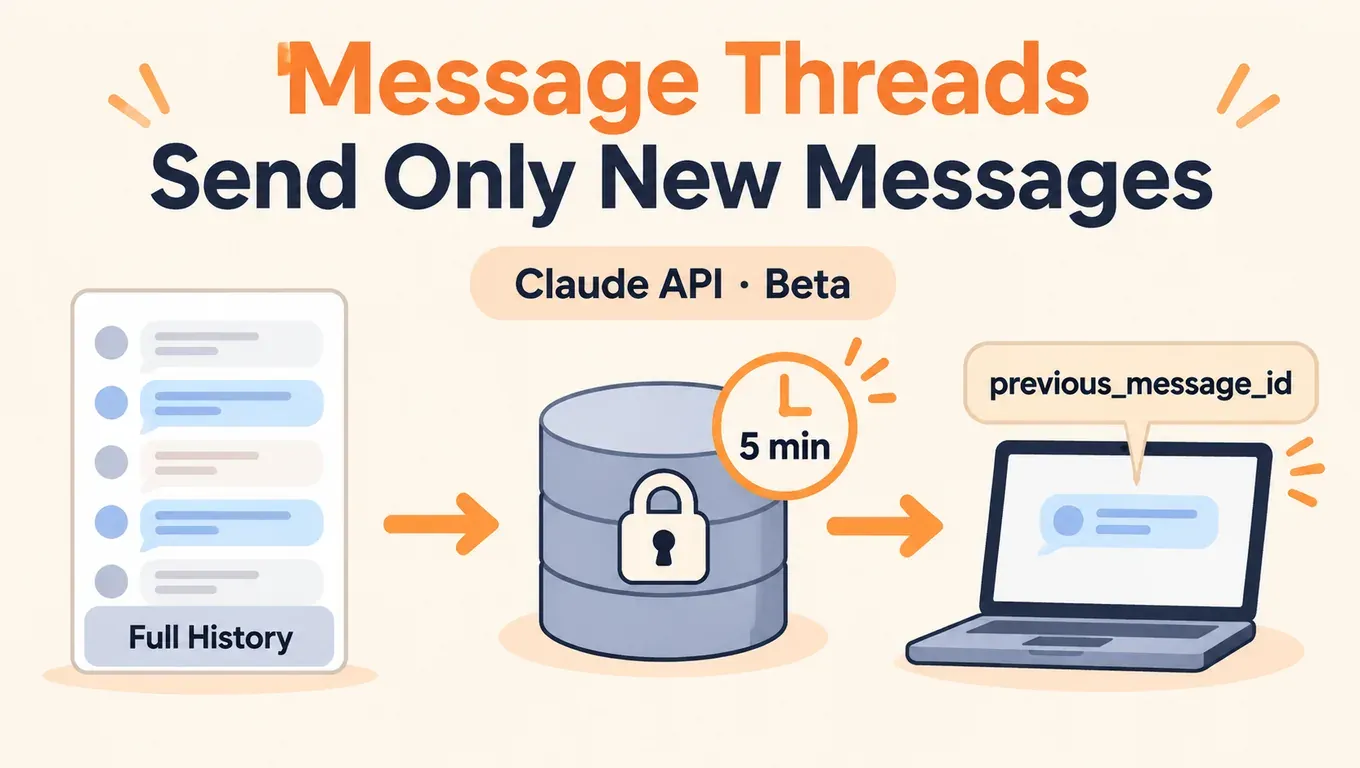
先说结论:Message Threads(消息线程)让 Messages API 在服务端短暂保存对话,之后每轮只需要发新消息和上一条回复的 id,请求变小,长对话里 Claude 开始回复得更快。它省的是延迟,不是 token。
- 据 Anthropic 发布说明,11 月 2 日起 Messages API 支持消息线程公测,请求要带 beta 头
message-threads-2026-08-12,在请求体里加thread参数。线程在最后一次请求后 5 分钟过期,最晚 1 小时内删除。 - 据 Anthropic 官方博客,大多数 Claude Code 用户已经默认开启,50 万到 100 万 token 的请求,首 token 延迟中位数下降约 35%;Claude 每轮仍要读完整对话,token 用量不变,计费和速率限制也不变。
- 我们 11 月 3 日用本站 Key 实测:通过 aicodewith 调用时,
thread字段目前会被忽略。请求都返回 200,但续写那一轮拿不到上文,模型答不出上一轮说过的话。所以走本站接口时不要用线程,照常发完整历史,配合 prompt caching。Claude Code 接本站时不会发线程请求,使用不受影响。
创建 API Key,在 Claude Code、Codex、Cursor 里接入 Claude →
Message Threads 是什么
Messages API 本身不记对话。没有线程时,Agent 每一轮都要把之前所有消息、工具结果从头再发一遍,API 也要把整段对话重新校验、重新分词。对话涨到几十万 token 后,光是这一步就会拖慢首 token。
据 官方文档,消息线程的做法是:第一轮照常发完整对话、system 和 tools,并加上 "thread": {"type": "create"};API 把对话连同 Claude 的回复存在这次回复的 id 下。之后每轮只发上一条回复之后的新消息,加上 "thread": {"type": "continue", "previous_message_id": "..."},API 先把对话拼回完整再调用模型。返回的仍是普通的 message。
| 不用线程 | 用线程 | |
|---|---|---|
| 每轮请求体 | 完整历史 + system + tools | 第一轮完整;之后只有新消息 + 上一条回复 id |
| 首 token 延迟 | 随对话变长而变慢 | 更低、更稳定,对话越长越明显 |
| token 用量 | 每轮读完整对话 | 一样,每轮仍读完整对话 |
| 计费与速率限制 | 标准 | 不变 |
| 对话由谁保存 | 你的程序 | 服务端暂存 5 分钟,你的程序仍要留完整副本 |
另据 @dotey 的中文转述,官方数据里长对话单次请求大小的中位数从约 800 KB 降到 1.8 KB。官方账号 @ClaudeDevs 的公告 截至 11 月 3 日清晨(北京时间)约 20.9 万次浏览、3,681 赞、1,041 收藏,也上了 X 热点。
怎么用:thread 参数和 beta 请求头
线程的每一个请求都要带 anthropic-beta: message-threads-2026-08-12。下面是官方 API 上的写法(请求地址是 Anthropic 官方,见下一节本站的情况)。
curl
# Turn 1: full conversation + system (+ tools), create a thread
curl -sS https://api.anthropic.com/v1/messages \
  -H "x-api-key: $ANTHROPIC_API_KEY" \
  -H "anthropic-version: 2023-06-01" \
  -H "anthropic-beta: message-threads-2026-08-12" \
  -H "content-type: application/json" \
  -d '{
    "model": "claude-opus-5-5",
    "max_tokens": 1024,
    "cache_control": {"type": "ephemeral"},
    "system": "You are a support agent for Acme. Keep replies short.",
    "messages": [{"role": "user", "content": "Hi! I have a question about an order."}],
    "thread": {"type": "create"}
  }'

# Turn 2: only the new message + the id of the turn 1 response
# (no system / tools here: the thread keeps them)
curl -sS https://api.anthropic.com/v1/messages \
  -H "x-api-key: $ANTHROPIC_API_KEY" \
  -H "anthropic-version: 2023-06-01" \
  -H "anthropic-beta: message-threads-2026-08-12" \
  -H "content-type: application/json" \
  -d '{
    "model": "claude-opus-5-5",
    "max_tokens": 1024,
    "cache_control": {"type": "ephemeral"},
    "messages": [{"role": "user", "content": "How long does standard shipping usually take?"}],
    "thread": {"type": "continue", "previous_message_id": "'"$MSG_ID"'"}
  }'
第一轮返回的 id 存成 MSG_ID,第二轮用它续写。之后每一轮都用最新一条回复的 id,每个 id 只能续写一次。
Python
官方 SDK 有线程辅助方法 client.beta.messages.thread(...),会自动加 beta 头、在 continue 时去掉 system 和 tools,遇到 404 自动用完整对话重建线程。也可以自己在 create 里传 thread:
import anthropic

client = anthropic.Anthropic()  # official API, reads ANTHROPIC_API_KEY

# Option A: the SDK thread helper (adds the beta header, replays on 404 for you)
thread = client.beta.messages.thread(
    model="claude-opus-5-5",
    max_tokens=1024,
    cache_control={"type": "ephemeral"},
    system="You are a support agent for Acme. Keep replies short.",
)
thread.send({"role": "user", "content": "Hi! I have a question about an order."})
second = thread.send({"role": "user", "content": "How long does standard shipping usually take?"})
print(second.content[-1].text)

# Option B: send the thread field yourself
first = client.beta.messages.create(
    model="claude-opus-5-5", max_tokens=1024,
    cache_control={"type": "ephemeral"},
    system="You are a support agent for Acme. Keep replies short.",
    messages=[{"role": "user", "content": "Hi! I have a question about an order."}],
    thread={"type": "create"},
    betas=["message-threads-2026-08-12"],
)
second = client.beta.messages.create(
    model="claude-opus-5-5", max_tokens=1024,
    cache_control={"type": "ephemeral"},
    messages=[{"role": "user", "content": "How long does standard shipping usually take?"}],
    thread={"type": "continue", "previous_message_id": first.id},
    betas=["message-threads-2026-08-12"],
)
TypeScript
import Anthropic from "@anthropic-ai/sdk";

const client = new Anthropic(); // official API, reads ANTHROPIC_API_KEY

const thread = client.beta.messages.thread({
  model: "claude-opus-5-5",
  max_tokens: 1024,
  cache_control: { type: "ephemeral" },
  system: "You are a support agent for Acme. Keep replies short.",
});

await thread.send({ role: "user", content: "Hi! I have a question about an order." });
const second = await thread.send({
  role: "user",
  content: "How long does standard shipping usually take?",
});
for (const block of second.content) {
  if (block.type === "text") console.log(block.text);
}
每个请求该发什么
据官方文档,线程里的字段分三类:
| 类别 | 字段 | 规则 |
|---|---|---|
| 只在 create 发 | system、tools | continue 请求里带了(哪怕是 null)会返回 400 |
| 固定不变 | model、tool_choice、thinking、mcp_servers、context_management、output_config、顶层 cache_control、anthropic-beta 的取值等 | 每个请求都要带,且和 create 时一样,否则返回 400 thread_fingerprint_mismatch |
| 可以变 | max_tokens、stop_sequences、stream、metadata 等 | 每轮可改 |
想改 system、工具或模型,只能用完整对话发一个新的 create 请求,开新线程。
线程过期和重放
线程是尽力而为的:最后一次请求 5 分钟后过期,过期后 continue 返回 404,error.details.error_code 是 thread_not_found。这时用你自己保存的完整对话重新发 create,再从新的 id 续写。所以本地一定要留一份完整对话,重放逻辑从一开始就要写好。官方 SDK 的线程辅助方法会自动重放一次。
是否省钱:不省钱,省的是延迟
据官方文档,线程不改变计费和速率限制。请求体变小了,但 Claude 每轮仍要读完整对话,输入 token 和以前一样。
想减少重复处理的 token,要靠 prompt caching。线程不会替你做缓存:官方示例里每个请求都带了顶层 cache_control: {"type": "ephemeral"},这样每轮读前面对话的缓存、写入新一轮。两者是配合关系:线程管上传,缓存管重复计算。
适合用线程的场景(据官方博客):长时间运行的编程 Agent、每轮都有截图的电脑操作 Agent、文档和图片很多的对话。对话很短时,收益不明显。
Claude Code 里有什么变化
据官方博客,大多数 Claude Code 用户已经默认开启消息线程,这是官方 35% 数据的来源。对用户来说不需要改任何设置。
我们用本地代理记录了 Claude Code 2.1.316 接本站接口(自定义 ANTHROPIC_BASE_URL)时发出的请求:一次读两个文件的任务共发了 3 个请求,都没有 thread 字段,beta 头里也没有 message-threads-2026-08-12,消息数按 2、4、6 增长,每次都带完整历史,请求体约 46 KB。任务正常完成。也就是说,接第三方地址时 Claude Code 还是按原来的方式工作,不会因为线程出错。
接入方法:
export ANTHROPIC_BASE_URL="https://api.aicodewith.ai"
export ANTHROPIC_AUTH_TOKEN="你的 API Key"
claude --model claude-opus-5-5
长期保存配置、Windows 设置见《Claude Code 如何接入第三方 API》。长对话里想再快一点,可以调低 effort,见《Claude Opus 5.5 effort 怎么选》。
Message Threads 是 Claude Messages API 的功能,Codex 走 OpenAI 的接口,不涉及。Codex SDK 里也有「线程」,但那是客户端会话的恢复,和这里的服务端暂存不是一回事,写法见《Codex SDK 入门:TypeScript 调用、流式事件与线程恢复》。
通过 aicodewith 能不能用:实测结果
2026 年 11 月 3 日凌晨(北京时间),我们用本站 Key、模型 claude-opus-5-5,带 message-threads-2026-08-12 请求头调用本站的 Anthropic 兼容接口 https://api.aicodewith.ai/v1/messages,按官方文档的示例逐项测:
| 测试 | 官方 API 的预期 | 通过 aicodewith 的实际表现 |
|---|---|---|
| create:完整对话 + thread: create | 200,建线程 | 200,正常回复 |
| continue:只发新消息 + 上一条 id | 200,模型能看到上文 | 200,但 input_tokens 只有 27,模型看不到上文 |
| 同一个 id 续写第二次 | 400 thread_already_continued | 200 |
| previous_message_id 填一个不存在的 id | 404 thread_not_found | 200 |
| continue 时带 system | 400 | 200 |
| Python SDK 2.4.0 线程辅助方法 | 第二轮记得第一轮 | 第二轮答「没有任何订单号」 |
续写那一轮的真实输出(节选):
Turn 1 (create):  "Hi! I have a question about an order."
  -> 200, "Happy to help. What's your order number, and what's the question about it?"
Turn 2 (continue, previous_message_id = turn 1 id):
  "How long does standard shipping usually take? Also, what did I say my question was about?"
  -> 200, input_tokens: 27
  -> "...As for your question, you didn't say what it was about beyond asking about standard shipping..."
结论:本站接口目前不支持消息线程,会把 thread 字段当作没有,每个请求都按独立的单轮请求处理。最需要注意的是它不报错:SDK 的辅助方法收不到 404,不会触发重放,对话会悄悄丢上文。所以通过 aicodewith 调用时,不要在请求里加 thread,也不要用 client.beta.messages.thread(...)。
替代方案:完整历史 + prompt caching
照常每轮发完整历史,加顶层 cache_control 开启自动缓存。我们用同一个本站 Key 跑了三轮(system 约 7,500 token):
| 轮次 | 输入(未缓存) | 写入缓存 | 读取缓存 | 耗时 | 回复 |
|---|---|---|---|---|---|
| 1 | 24 | 7,568 | 0 | 4.0 秒 | 正常 |
| 2 | 8 | 1,541 | 6,163 | 4.4 秒 | 正常 |
| 3 | 8 | 1,560 | 6,240 | 3.5 秒 | 「Your order number is A-1042.」 |
第 2、3 轮都命中了缓存,第 3 轮正确答出第 1 轮给的订单号。Python 写法:
import anthropic

client = anthropic.Anthropic(
    base_url="https://api.aicodewith.ai",
    api_key="你的 API Key",
)

SYSTEM = "You are a support agent for Acme. Keep replies short.\n\n" + open("policy.md").read()
history = [{"role": "user", "content": "Hi! My order number is A-1042 and it hasn't shipped yet."}]

def turn(next_user_message=None):
    r = client.messages.create(
        model="claude-opus-5-5",
        max_tokens=1024,
        cache_control={"type": "ephemeral"},  # automatic caching: moves forward each turn
        system=SYSTEM,
        messages=history,                       # full history, no thread field
    )
    history.append({"role": "assistant", "content": [b.model_dump(exclude_none=True) for b in r.content]})
    if next_user_message:
        history.append({"role": "user", "content": next_user_message})
    u = r.usage
    print(u.input_tokens, u.cache_creation_input_tokens, u.cache_read_input_tokens)
    return r

turn("When will it ship?")
turn("What was my order number again?")
turn()
TypeScript 写法一样,只是把完整历史放进 messages:
import Anthropic from "@anthropic-ai/sdk";

const client = new Anthropic({
  baseURL: "https://api.aicodewith.ai",
  apiKey: "你的 API Key",
});

const history: Anthropic.MessageParam[] = [
  { role: "user", content: "Hi! My order number is A-1042 and it hasn't shipped yet." },
];

const r = await client.messages.create({
  model: "claude-opus-5-5",
  max_tokens: 1024,
  cache_control: { type: "ephemeral" },
  system: "You are a support agent for Acme. Keep replies short.",
  messages: history, // full history every turn, no thread field
});
history.push({ role: "assistant", content: r.content });
console.log(r.usage);
怎么判断一个接口是否真的支持线程
用一个不可能存在的 previous_message_id 发 continue。官方 API 会返回 404 thread_not_found;如果返回 200 和正常回复,说明这个接口忽略了 thread:
# continue from an id that cannot exist
curl -sS https://api.aicodewith.ai/v1/messages \
  -H "x-api-key: 你的 API Key" \
  -H "anthropic-version: 2023-06-01" \
  -H "anthropic-beta: message-threads-2026-08-12" \
  -H "content-type: application/json" \
  -d '{"model":"claude-opus-5-5","max_tokens":200,"cache_control":{"type":"ephemeral"},
       "messages":[{"role":"user","content":"Hi"}],
       "thread":{"type":"continue","previous_message_id":"msg_doesnotexist123"}}'
# official API: 404, error.details.error_code = "thread_not_found"
# a gateway that ignores thread: 200 and a normal reply
以后本站接口支持线程时,用这条命令就能确认,不用改业务代码去试。
常见报错
据官方文档,下面这些错误在模型运行前返回,不消耗 token,线程和过期时间也不变。
404 thread_not_found
线程过期了(超过 5 分钟没请求)、上一条回复没被保存、上一条是 fallback 模型写的、上一条还在生成中,或者换了 API Key、组织、工作区。处理:用完整对话发 create 重建线程。注意请求一个不存在的模型也返回 404,先看 error.details.error_code 再决定是否重放:
{
  "type": "error",
  "error": {
    "type": "not_found_error",
    "message": "...",
    "details": { "error_code": "thread_not_found" }
  },
  "request_id": "req_..."
}
400 thread_fingerprint_mismatch
固定字段和 create 时不一样,比如换了 model、thinking,改了顶层 cache_control,或者多加、少加了一个 beta 头。错误信息会列出不一致的字段。要改就开新线程。
400 thread_already_continued / thread_continue_in_flight
同一个回复 id 只能续写一次;或者上一次 continue 还在跑。始终用最新一条回复的 id。流式请求要等到 message_stop 事件再续写,提前续写可能拿到 404。
400 thread_unsupported_request
用了线程不支持的功能:超过 4 个 cache_control 断点(顶层的也算一个)、按需压缩(compaction)、大部分 context editing、开了 HIPAA 或 Inference hooks 的组织。Message Batches 和 token 计数接口也不支持 thread。去掉该功能,或者不带 thread 发完整对话。
continue 请求带了 system 或 tools
返回 400,且没有 error_code。continue 时只发新消息,system 和 tools 由线程保存。
通过 aicodewith 调用时续写丢了上文
这是本站接口目前忽略 thread 导致的,不会报错。去掉 thread,改回完整历史 + cache_control,见上一节。
数据保留和限制
- 据官方文档,线程内容加密存在内存里,不写入持久存储,最晚在最后一次使用 1 小时后删除;不符合零数据保留(ZDR)和 HIPAA 要求。
- 没有列出、读取或删除线程的接口。
- 可用平台:Claude API、Claude Platform on AWS、Claude Models on Google Cloud(Anthropic managed)、Claude in Microsoft Foundry,全部模型都是 beta。
- 另据报道,11 月 3 日起 Claude 文本水印覆盖更多模型,这和线程无关、不用改请求,见《Claude 水印 11 月 3 日生效》。
小结
Message Threads 解决的是长对话「每轮重传整段历史」的延迟问题:第一轮建线程,之后只发新消息和上一条回复 id,首 token 更快,token 用量和计费不变,本地仍要留完整对话以便 5 分钟过期后重放。直连官方 API 的长时间 Agent 值得开;通过 aicodewith 调用时,thread 目前会被忽略,照常发完整历史并加 cache_control,Claude Code 接本站则不用做任何改动。