When you ask an AI to review your code for security problems, two things can go wrong: it reads a few files and declares "no issues," or it reports a pile of plausible-looking problems as high severity. In June, in its blog post Build your own vulnerability harness, Cloudflare open-sourced a skill: security-audit. According to the README, it is where Cloudflare's vulnerability discovery system began, before it grew into a pipeline covering whole fleets of repositories.
The skill splits an audit across several isolated Agents: some do reconnaissance, some hunt by attack class, one looks specifically for what was missed, and every candidate vulnerability goes to a fresh Agent that had no part in finding it, whose job is to refute it. We ran it in Claude Code with an API Key from this site against two targets: one with deliberate vulnerabilities and one mature library.
The bottom line first:
- Installing takes one line:
npx skills add https://github.com/cloudflare/security-audit-skill --skill security-audit. In our test it landed in~/.claude/skills/security-auditin under 3 seconds. - Saying "security audit this codebase" in a project directory triggers it. The README lists six phases: reconnaissance, coverage-driven hunting, candidate validation, structured output, independent record review, and the report.
- On DVNA, a Node practice project with deliberate vulnerabilities, a standard run took 52 min 57 s and used 49 Agents: 14 candidates, 4 confirmed (3 high, 1 medium), 10 needs_validation, 0 rejected.
- Obvious bugs such as command injection and SQL injection were classed as needs_validation rather than confirmed, because the run only read source code and never executed it. That is the skill's rule: when a conclusion depends on runtime behavior, it only counts as confirmed once it has actually been run.
- Mature libraries serve-static + send: the quick profile took about 4 minutes, and on the standard profile 6 hunters reviewed 12 coverage units, with zero findings both times. It does not invent problems just to have something to report.
What the security-audit skill is
According to the Cloudflare blog, the skill started at roughly 450 lines and ran against a single repository. The team kept tuning the prompts until it surfaced real vulnerabilities, and only then wrapped orchestration around it, which became the later vulnerability discovery system. What was open-sourced is a cleaned-up version. In the README's words:
This is the skill that seeded Cloudflare's vulnerability discovery harness … this skill is the single-repo starting point it evolved from.
Where it fits:
- you want the AI to do a documented, reviewable security audit of your own project before it ships;
- you want to know which parts of the code the AI actually looked at, not just get a line saying "no issues found";
- you want to model your own audit process on how Cloudflare does it.
The six phases (from the README)
The README says "The skill runs a structured audit in six phases":
| Phase | README wording | What it does |
|---|---|---|
| 1 | Reconnaissance | Maps the architecture, trust boundaries and input surface, and writes architecture.md and the coverage ledger coverage-ledger.json |
| 2 | Coverage-led hunting | Dispatches isolated hunter Agents per ledger unit, then uses a coverage critic Agent to find what was not covered |
| 3 | Candidate validation | Hands each candidate to a new validation Agent that tries to disprove it |
| 4 | Structured output | Writes confirmed, needs_validation and rejected into findings.json, validated against the schema with bundled scripts |
| 5 | Independent record verification | Uses fresh Agents to check the source each final record cites |
| 6 | Target-neutral reporting | Generates REPORT.md, FINDINGS-DETAIL.md and NEEDS-VALIDATION.md |
A side note: the Cloudflare blog says "The skill was written to run a 7-phase audit in one session." The extra step submits the reviewed results to their internal ingest API. The open-source README describes six phases, and this article follows the README.
How the three verdicts differ, in the README's words:
confirmedhas a complete source trace and bounded observed result,needs_validationhas an exact unresolved fact and no severity, andrejectedrecords a disproved candidate.
In other words: confirmed needs a complete source trace and an observed result; needs_validation must say exactly which fact it is stuck on and carries no severity; rejected is a candidate that was disproved, kept so it is not reported again next time.
Three profiles: quick, standard, deep
The wording in SKILL.md (standard is the default):
| Profile | SKILL.md wording (excerpt) | Best for |
|---|---|---|
| quick | a bounded pass for small targets, re-runs, or a fast first look … run exactly one hunter wave followed by exactly one final coverage-critic pass | Small repositories, a quick first look |
| standard | the workflow as written | Most projects |
| deep | for high-stakes or large targets … run critic waves to a clean pass | Large or high-risk projects |
SKILL.md also requires that a quick run, or a run over only some directories, "must present itself as partial coverage": the report has to say that only part of the code was covered.
Step 1: point Claude Code at this site
In the global ~/.claude/settings.json, add:
{
  "env": {
    "ANTHROPIC_BASE_URL": "https://api.aicodewith.ai",
    "ANTHROPIC_AUTH_TOKEN": "你的 API Key"
  },
  "model": "claude-sonnet-5-5"
}
ANTHROPIC_BASE_URL should not include /v1. We tested with Claude Code 2.1.310 + claude-sonnet-5-5. For other ways to configure it, see Claude Code third-party API setup guide.
This skill starts many sub-Agents in parallel. A single standard audit can easily involve dozens of Agents, so it uses far more quota than a normal conversation. For choosing a model for sub-Agents, see Configuring Haiku 5.5 sub-Agents in Claude Code.
Step 2: install the skill
# 装到用户级(所有项目可用)
npx skills add https://github.com/cloudflare/security-audit-skill \
  --skill security-audit \
  --global

# 只装给 Claude Code,跳过交互确认
npx skills add https://github.com/cloudflare/security-audit-skill \
  --skill security-audit --global --agent claude-code -y
We used the second command. It installed in under 3 seconds, and the terminal printed ✓ security-audit (copied) → ~/.claude/skills/security-audit. The README lists three requirements: a model that supports tool calls and parallel sub-Agents, Node.js (to run two zero-dependency validation scripts), and a system-level sandbox for running target code.
Pay particular attention to the sandbox. From the README:
Without these controls, the workflow keeps the lead as needs_validation instead of executing target code.Without an isolated environment it will not execute target code, and the related candidates can only stay at needs_validation. For both targets this time we did a static source review only: no dependencies installed, no services started, no network access. That is why the results lean toward needs_validation, as you will see below.
Skills such as Hallmark install the same way; compare Hallmark v2 web design skill, tested.
Test 1: DVNA, deliberately vulnerable, standard profile
Choosing the target
We picked appsecco/dvna (Damn Vulnerable NodeJS Application), an Express practice project built to demonstrate the OWASP Top 10. It is MIT-licensed and its core code is only a few hundred lines. After cloning it, we deleted the vulnerability write-ups in the repository's docs/ folder so the Agents could not simply copy the answers, then made a local commit to keep the working tree clean.
Everything happened locally and read-only: the app was never run and no online service was touched.
Starting the run
Start Claude Code in the repository directory and enter:
对这个仓库做一次安全审计(full audit),profile 用 standard,按 skill 写的完整流程走(侦察、猎手、覆盖评审、候选逐条交给新的验证 Agent 反驳、结构化输出、记录复核、报告),输出到 /workspace/sa/audit/dvna-run-1。只做源码静态审计:不要运行、构建或测试目标代码,不要安装依赖,不要启动服务,不要访问任何网络服务。Bash 可以用来读文件和运行 skill 自带的 node 校验脚本。
We hit a snag with the permission mode. We started in auto mode, and after Claude Code had been reading this "catalog of vulnerabilities" repository for a while, it blocked every file write and Bash call. The error read:
Error: Auto mode could not evaluate this action and is blocking it for safety — a safety check separate from auto mode blocked this request because of earlier conversation content
As the message suggests, the fix is to leave auto mode or start a new session. We switched to --permission-mode dontAsk, used --allowedTools to allow Read, Write, Bash, Agent and so on, and used --disallowedTools to block npm, npx, curl, wget, docker and network tools. Note that Bash has to be allowed as a whole: when we only allowed prefixes such as Bash(node:*), compound commands containing && were rejected, and the model simply skipped the sub-Agents and handed in a report that never went through the workflow.
Reconnaissance and coverage: critic Agents keep looking for what was missed
First, 4 reconnaissance Agents wrote architecture.md and the coverage ledger, and then hunting began. This stage shows best how it differs from "having an AI look over the code":
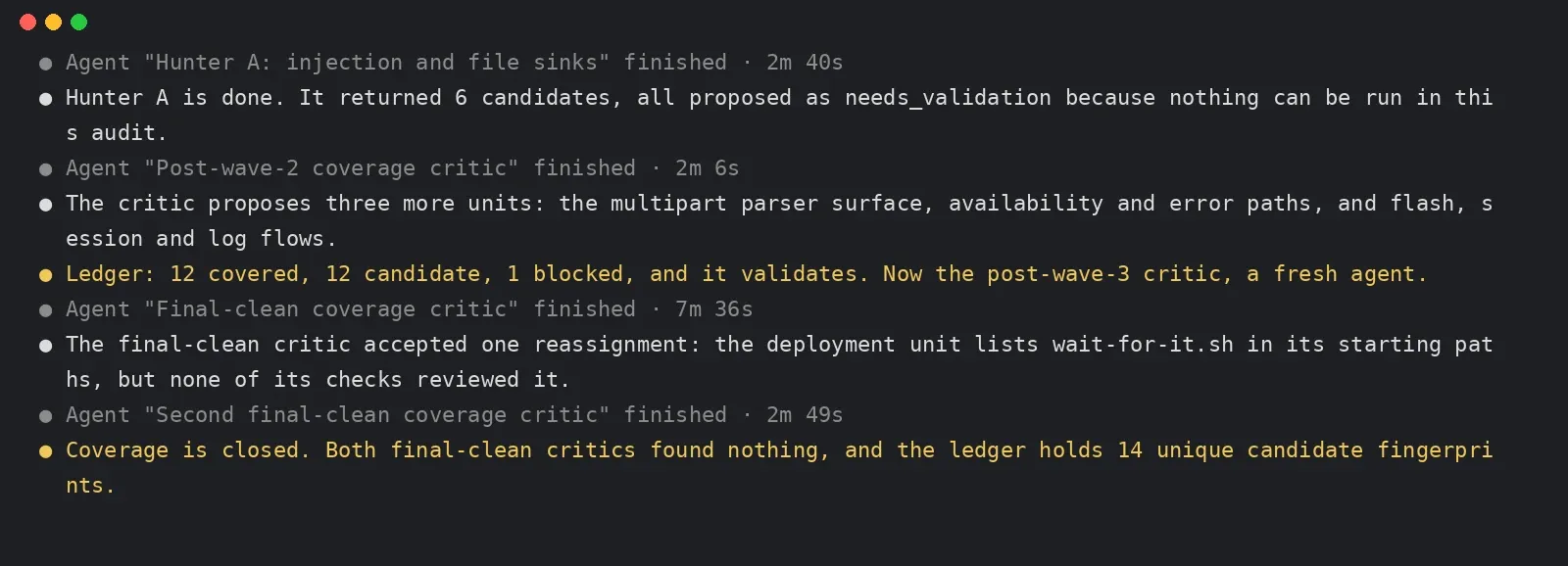
- Wave 1 had 4 hunters (injection and files, rendering and authorization, authentication and sessions, configuration and supply chain), and hunter A returned 6 candidates;
- after each wave, a coverage critic Agent that took no part in hunting checked the ledger. The critic after wave 2 added 3 units: upload parsing, availability and error paths, and flash and session logging;
- the "final clean" critic noticed that the deployment unit listed
wait-for-it.shbut nobody had reviewed it, so a 4th wave of hunters was sent back in; - coverage was declared complete only after two critics in a row read all 25 units and raised no further gaps.
The final ledger had 25 units: 12 covered, 12 candidate, 1 blocked. The blocked unit was express-fileupload's multipart parsing: with no node_modules or lockfile in the repository, there was no way to see how it merges fields into req.body.
Here is the terminal output from this stage (Claude Code verbatim, excerpt):
security-audit-skill-coverage-critic-terminal
A fresh Agent tries to refute each candidate
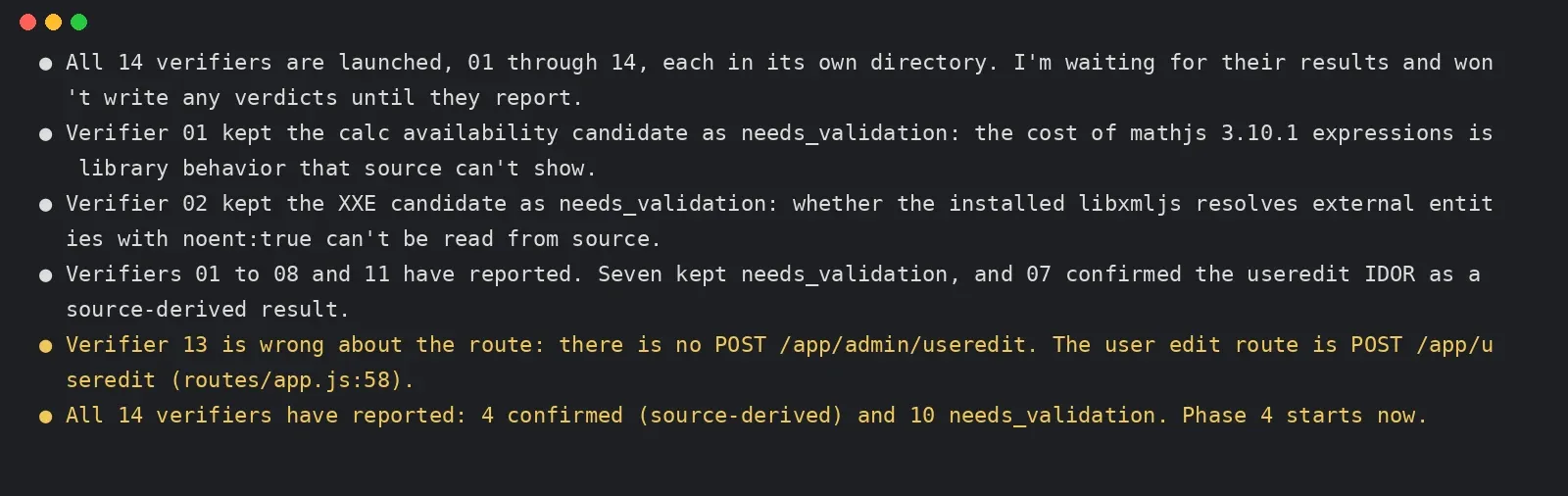
Once coverage was complete, each of the 14 candidates went to a new validation Agent. The prompt for the validation Agents says "You did not write this candidate. Try to refute it from repository source," and sets a rule: if the deciding fact is the behavior of a third-party library, the browser or the deployment environment, which the source cannot show, the verdict is needs_validation along with exactly where it is stuck; only when the source can disprove it is the verdict rejected.
security-audit-skill-verifier-terminal
A few things worth noting:
- Validation 01 kept the mathjs computation-time candidate at needs_validation, reasoning that "the overhead of a mathjs 3.10.1 expression is library behavior that the source does not show"; validation 02 did the same for XXE, since whether
noent:trueactually resolves external entities depends on the installed libxmljs version. - Validation 07 marked the candidate where
/app/usereditchanges any user based on the id in the request body as confirmed, because the whole chain is in this repository's code. - Validation 13 got a route wrong itself: its record referred to a nonexistent
POST /app/admin/useredit. The main session searched the source, confirmed the real route isPOST /app/useredit(routes/app.js:58), and corrected it in the final record.
Phase 5 then started 14 more fresh Agents to check every final record: 13 passed unchanged, and 1 (innerHTML on the adminusers page) was replaced by a narrower blocker. Both validation scripts (validate-findings.cjs and validate-coverage-ledger.cjs) passed.
Results
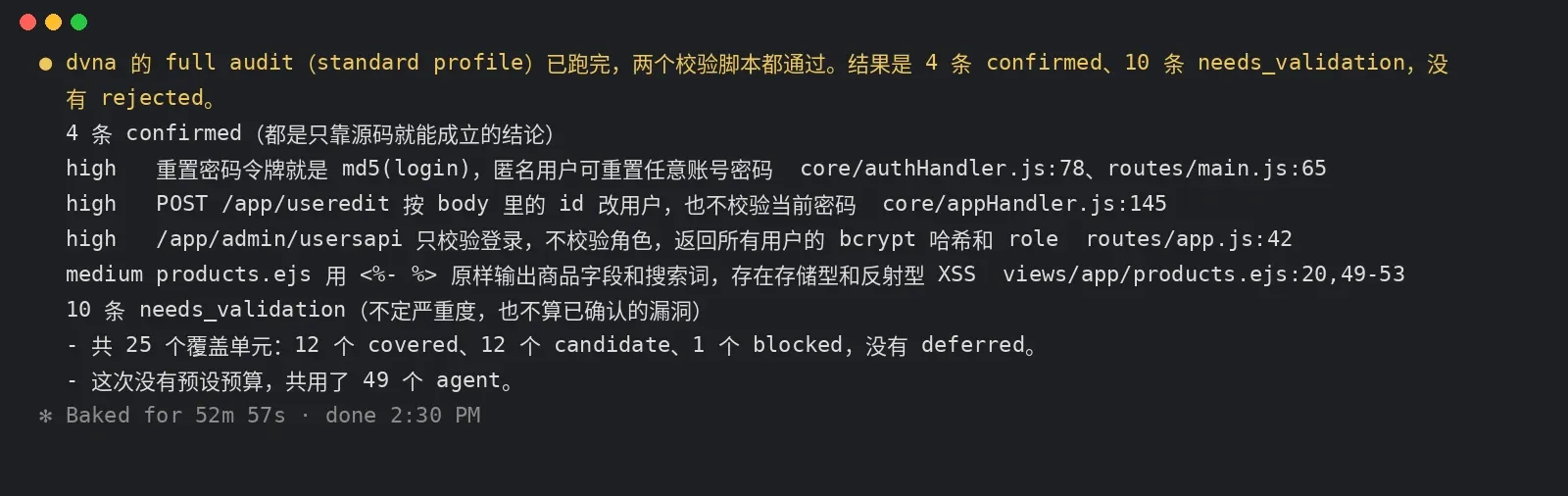
security-audit-skill-dvna-result-terminal
4 confirmed:
| Severity | Issue | Location |
|---|---|---|
| high | The password reset token is just md5(login), so anyone who knows a username can reset that account's password | core/authHandler.js:78, routes/main.js:65 |
| high | POST /app/useredit changes users based on the id in the request body and does not check the current password, so any logged-in user can take over someone else's account | core/appHandler.js:145 |
| high | /app/admin/usersapi checks only that you are logged in, not your role, and returns every user's bcrypt hash and role | routes/app.js:42 |
| medium | products.ejs uses <%- %> to output product fields and search terms unescaped, allowing stored and reflected XSS | views/app/products.ejs:20,49-53 |
10 needs_validation: SQL injection (usersearch), command injection (ping), code execution via mathjs eval, node-serialize deserialization, XXE, open redirect, missing CSRF protection on /app/useredit, innerHTML XSS on the adminusers page, memory exhaustion from anonymous sessions, and mathjs computations saturating the event loop.
NEEDS-VALIDATION.md records the exact fact each one is stuck on, plus a step for verifying it with fake data in an isolated environment. For the command injection, for example, the blocker is "the shell behavior of exec was not actually observed and the process privileges are unknown," and the local step is to submit 127.0.0.1; id in a sandbox with networking disabled.
So to push these to confirmed, you need to prepare an offline, resource-limited sandbox as the README requires and let it actually execute. When it can only read source, it would rather draw fewer conclusions.
Test 2: mature libraries serve-static + send, zero findings
For a control group we picked Express's official static file middleware serve-static and the library underneath it that enforces path restrictions, send 1.2.1. Both are MIT-licensed and have been in use for years. Again, source reading only.
Round 1, quick profile (serve-static repository only): about 4 minutes with a single reviewer, 0 confirmed and 0 needs_validation. Of 3 coverage units, 2 were covered and 1 blocked, because the checks for path traversal, hidden files and symlinks all live in send, which is not in this repository. The report honestly states "This is partial coverage."
Round 2, standard profile (with the send 1.2.1 source also in scope): 4 reconnaissance Agents + 6 hunter Agents reviewed 12 coverage units, including URL-path-to-file-path conversion, Range and conditional requests, redirects and error page rendering, and response headers and MIME types, all covered, 0 candidates. The hunters also listed a few things they could not see (the behavior of fresh, range-parser and parseurl, dependencies that were not on disk) and handed them to the coverage critic to judge.

security-audit-skill-serve-static-terminal
At 18 min 31 s into this round, the coverage critic Agent was interrupted because the test account ran out of quota and the API returned 402, so it never reached the final report. This section therefore only covers up to the hunting phase: over two rounds, the mature libraries showed no issues at the source level.
That is a normal result. serve-static and send have been used by huge numbers of projects for years, and problems like path restriction have been reviewed again and again. Finding nothing at least shows it does not make things up to have something to report; taken together with the 14 candidates on DVNA above, it also shows it does report real problems in code that has them.
Test time summary
| Target | Profile | Time | Agents | Result |
|---|---|---|---|---|
| Install skill | npx skills add | Under 3 seconds | — | Installed to ~/.claude/skills/security-audit |
| DVNA | standard | 52 min 57 s | 49 (reconnaissance 4, hunters 11, coverage critics 6, candidate validation 14, record review 14) | 14 candidates: 4 confirmed, 10 needs_validation, 0 rejected |
| serve-static | quick | About 4 minutes | Single | 0 confirmed, 0 needs_validation |
| serve-static + send | standard | Interrupted at 18 min 31 s | Reconnaissance 4, hunters 6 | All 12 units covered, 0 candidates |
All runs used Claude Code 2.1.310 + claude-sonnet-5-5.
Recommendations
- Get a first look with quick, then run standard: quick runs only one hunter wave and one critic pass and finishes in minutes; standard keeps filling coverage gaps round after round, and both of our small projects ran past 18 minutes.
- Prepare a sandbox if you want confirmed findings: without an offline, resource-limited isolated environment, candidates that depend on runtime behavior will stay at needs_validation. Do not simply allow execution on your own development machine.
- Do not use auto mode to audit a vulnerable repository: in our test, auto mode blocked all file writes and Bash because of the conversation's content. Use
dontAskwith an allowlist, and block install and network commands. - Run it several times: the README says "In our test runs, a single run found roughly half of the vulnerabilities that repeated runs found in total," meaning one run finds only about half of what several runs find combined. Rerun it with the same output directory and it reads the previous ledger and focuses on the gaps.
- Spot-check line numbers yourself: this time the main session itself caught the route a validation Agent got wrong. The review Agents pass things quickly, so it is worth checking the key line numbers cited in the report yourself.
If you want long tasks to run in the background and stop to ask you questions along the way, see Claude Code MCP Tasks and Elicitations.
FAQ
What is the security-audit skill?
An open-source code security audit skill from Cloudflare, for coding clients such as Claude Code that can run sub-Agents in parallel. It splits an audit into six phases in which isolated Agents handle reconnaissance, vulnerability hunting, coverage gap checks, candidate refutation and record review, then produce a report. It is MIT-licensed.
How do I install and trigger it?
npx skills add https://github.com/cloudflare/security-audit-skill --skill security-audit; add --global to install it at the user level. Saying "security audit this codebase" or "find security vulnerabilities in ./src" in a project directory triggers it. If you do not specify an output directory, it writes to ~/security-audit-skill/<仓库名>/run-<N> by default.
Six phases or seven?
The open-source README says six phases. The "7-phase audit" in the Cloudflare blog adds one step: submitting the reviewed results to their internal ingest API.
What is the difference between confirmed, needs_validation and rejected?
confirmed has a complete source trace and an observed result, and carries a severity; needs_validation states exactly which fact it is stuck on and has no severity; rejected is a candidate disproved by a validation Agent, kept so it is not reported again.
Why does command injection only count as needs_validation?
This time we did not allow the target code to run. exec's actual shell behavior and the process privileges were not observed, so under the skill's rules it can only stay at needs_validation, with steps attached for verifying it in an isolated environment. Only a run with a sandbox in place can push it to confirmed.
Is it normal for a library audit to find nothing?
Yes. Both of our runs on serve-static + send found nothing. Mature libraries have been reviewed again and again, and finding nothing shows it does not force problems into existence. The report states which units were covered and which could not be seen, so you can judge how far the audit went.
Can I run it with a third-party API Key?
Yes. We pointed Claude Code's ANTHROPIC_BASE_URL at https://api.aicodewith.ai, and reconnaissance, multiple hunter waves, coverage critique, candidate validation, record review and the report all ran end to end. A single standard audit starts dozens of sub-Agents, so it uses much more quota than a normal conversation. Codex and Cursor can also install the skill via npx skills; for configuring a custom provider in Codex, see Codex config.toml configuration guide.