Ask an AI to write a landing page, and eight out of ten come out looking about the same: a six-card grid with rounded corners, gradient buttons, one lone colored word in the headline, and an email signup box at the bottom. Hallmark from Together AI targets exactly these habits. According to author @nutlope's Oct. 23post, after v1 reached 30,000 stars and 60,000 installs, Hallmark was rewritten from scratch and released as v2, which works in Claude Code, Codex, and OpenCode.
The bottom line first:
- Hallmark is a web design skill. One line of
npx skills add nutlope/hallmarkinstalls it.README states that it supports Claude Code, Codex, Cursor, and OpenCode. - v2 ships with 48 themes. For each request, it first picks 3 for you to choose from, and only starts writing the page after you choose.
- After writing, it uses
sloplint --renderto check the page in a real Chrome (the README says 8 widths). It looks for "AI look" patterns, contrast, focus rings, and mobile layout, and fixes the page itself if it fails. - We tested with this site's API Key. In Claude Code, generating 3 themes took 26 seconds, and writing the full page and fixing it to sloplint 0 FAIL took 3 minutes 40 seconds;
/hallmark auditon a typical AI landing page found 41 FAILs;/hallmark redesigna full redo took 6 minutes 11 seconds, with 0 FAIL afterward. In Codex,$hallmarkgenerated 3 themes in 34 seconds.
What an AI-flavored web page looks like
Hallmark's README lists the patterns models fall into most, and it doesn't soften them. You've probably seen several of these:
| Pattern | What it looks like |
|---|---|
| Small English eyebrow above headings | Every heading has a line of small text above it, an eyebrow, usually an all-caps, wide-tracked English label |
| A single colored word in the headline | “Log an expense in three seconds,no fuzzy math at month's end”, with only half the line tinted in the primary color |
| An email signup at the bottom, every time | Whatever the product, the page ends with “Leave your email for updates” |
| All empty boxes or all photos | A page of empty cards, or just a pile of images with no information |
| First screen not filled | On large screens the first-screen content takes up only half the screen, with blank space below |
| Fake form submit | Clicking “Submit” shows a thank-you message, but nothing was actually sent |
Hallmark sorts its checks into three tiers:Floor must pass (contrast, focus, reduced motion, fabricated facts, mobile layout);Reflex covers the model's habitual defaults, which can be waived with a reason on record;Finish is detail polish and doesn't block release.
If what you need to fix is the AI feel of an article rather than a web page, seeRewriting AI articles with Claude Code.
What's in Hallmark v2
Based on the Hallmark README and theofficial site:
| Capability | Description |
|---|---|
| 48 themes | Each is a kind of “material”: paper, typefaces, palette, components, and texture, paired with a finished sample image. The site groups them as Editorial 20, Modern minimal 11, Atmospheric 8, and Playful 9 |
| Layout by task | A booking page exists to get bookings, and a store page exists to sell goods. The primary action goes where it belongs, and the page ends on it |
| Custom | Say custom to skip themes. It designs only from your description, with the same rules and checks |
| Uses your real product | Give it a URL, dev server, or app, and it takes the screenshots itself |
| Real photos | Ships with 755 openly licensed photos, picks them by theme, and credits them on the page |
| redesign and audit | /hallmark redesign <路径> redoes the page, keeping content and links;/hallmark audit <路径> only produces a report and changes no files |
The site's FAQ says Hallmark itself doesn't need a separate API Key. Photos come from its own openly licensed library, and an image-generation key is optional. What actually uses up quota is the model you run in Claude Code or Codex.
Step 1: Point Claude Code / Codex at this site
Claude Code
In the global ~/.claude/settings.json write:
{
  "env": {
    "ANTHROPIC_BASE_URL": "https://api.aicodewith.ai",
    "ANTHROPIC_AUTH_TOKEN": "你的 API Key"
  },
  "model": "claude-sonnet-5-5"
}
ANTHROPIC_BASE_URL do not include /v1. This test used Claude Code 2.1.309 + claude-sonnet-5-5.
A single Hallmark build calls the model over multiple rounds, runs scripts, and revises the page repeatedly, so it uses more quota than ordinary chat. If you're on a Claude subscription, first seeWhat to do when Claude Code runs out of quota.
Codex
In the global ~/.codex/config.toml write a custom provider, in the same format as theCodex config.toml setup guide:
model = "gpt-6.1-sol"
model_reasoning_effort = "medium"
model_provider = "aicodewith"

[model_providers.aicodewith]
name = "aicodewith"
base_url = "https://api.aicodewith.ai/chatgpt/v1"
wire_api = "responses"
experimental_bearer_token = "你的 API Key"
In our test we used Codex CLI 0.164.0 + gpt-6.1-sol.
Step 2: Install Hallmark
# 装给所有项目(-g),Claude Code 和 Codex 都装
npx skills add nutlope/hallmark -g

# 只装给一个客户端
npx skills add nutlope/hallmark -g --agent claude-code
npx skills add nutlope/hallmark -g --agent codex
It requires Node 18 or later. Installing it on its own for Claude Code took 14 seconds in our test. Install locations and how to invoke it:
| Client | Install location | Invocation |
|---|---|---|
| Claude Code | ~/.claude/skills/hallmark | /hallmark <需求> |
| Codex CLI | ~/.agents/skills/hallmark | $hallmark <需求> |
| Cursor, OpenCode | Read the two locations above | /hallmark <需求> |
The browser self-check (sloplint --render) also needs Chrome and puppeteer-core:
npm i -g puppeteer-core
Without these two, Hallmark runs only static checks. Our machine has /usr/bin/google-chrome, and the script found it on its own.
Step 3: Build a landing page for an expense-tracking app, starting by picking 3 themes
Start Claude Code in an empty directory and enter:
/hallmark 给记账 App「账小记」做一个落地页,写成 /workspace/hm/build/index.html。先给我 3 套主题挑。
Hallmark first runs theme.mjs deal, and picks 3 of the 48 themes to fit the request: Grid (grid poster), Formwork (concrete construction sign), and Studio (design studio proof). Each comes with a palette, typefaces, and a note on whether it suits an expense-tracking app. It also asks about assets: app screenshots, real user counts, pricing, and reviews. If you have none, it says plainly that it won't make them up and leaves placeholders for the images. This round took 26 seconds.
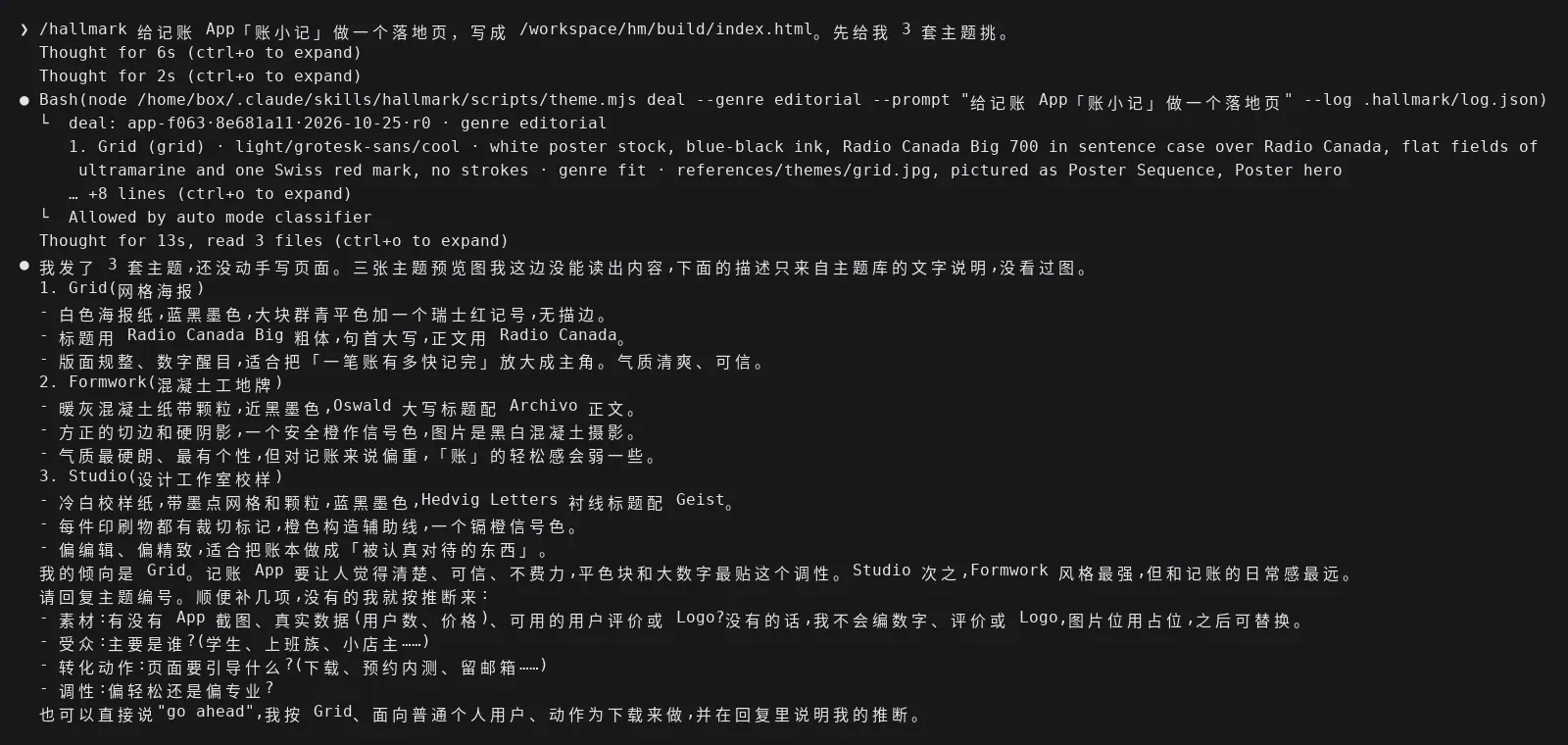
Claude Code 里 /hallmark 先发 3 套主题并追问素材的终端输出
We replied:
选 1 Grid。受众是上班族,转化动作是下载 App,调性偏轻松。没有截图和真实数据,用占位,不要编数字。
Next it did the following:
- Used
theme.mjs scaffoldto generatetokens.cssandbase.css, with all colors, font sizes, and spacing going into tokens. - Added Chinese fallbacks (PingFang SC, Noto Sans SC, Microsoft YaHei) to Grid's English font stack.
- Wrote only the first screen at first and ran
sloplint.mjs --render, once, taking screenshots at three first-screen sizes (1280, 1440, 1920) and two full-page sizes (1440, 375). - The first check flagged problems such as a 1.00:1 contrast ratio on the “sample data” label and a download section that was too thin. It fixed them one by one until
sloplint: clean. 0 FAIL, 0 REFLEX, 0 WARN.
The whole round took 3 minutes 40 seconds. The finished first screen: the headline is a single color, with no eyebrow and no individually tinted word, and the numbers in the phone mockup are all ¥ 00.00 and labeled “sample data”.

Hallmark 用 Grid 主题做出的记账 App 落地页首屏(headless Chrome 截图)
It works the same way in Codex. We entered $hallmark 给记账 App「账小记」做一个落地页。这一步只发 3 套主题让我挑,不要写页面。, in Codex, and it likewise began by running theme.mjs deal, and this time it drew Newsprint, Hedgerow, and Editorial, in 34 seconds. The seed is different on each draw, which is why the two clients gave different sets of 3.
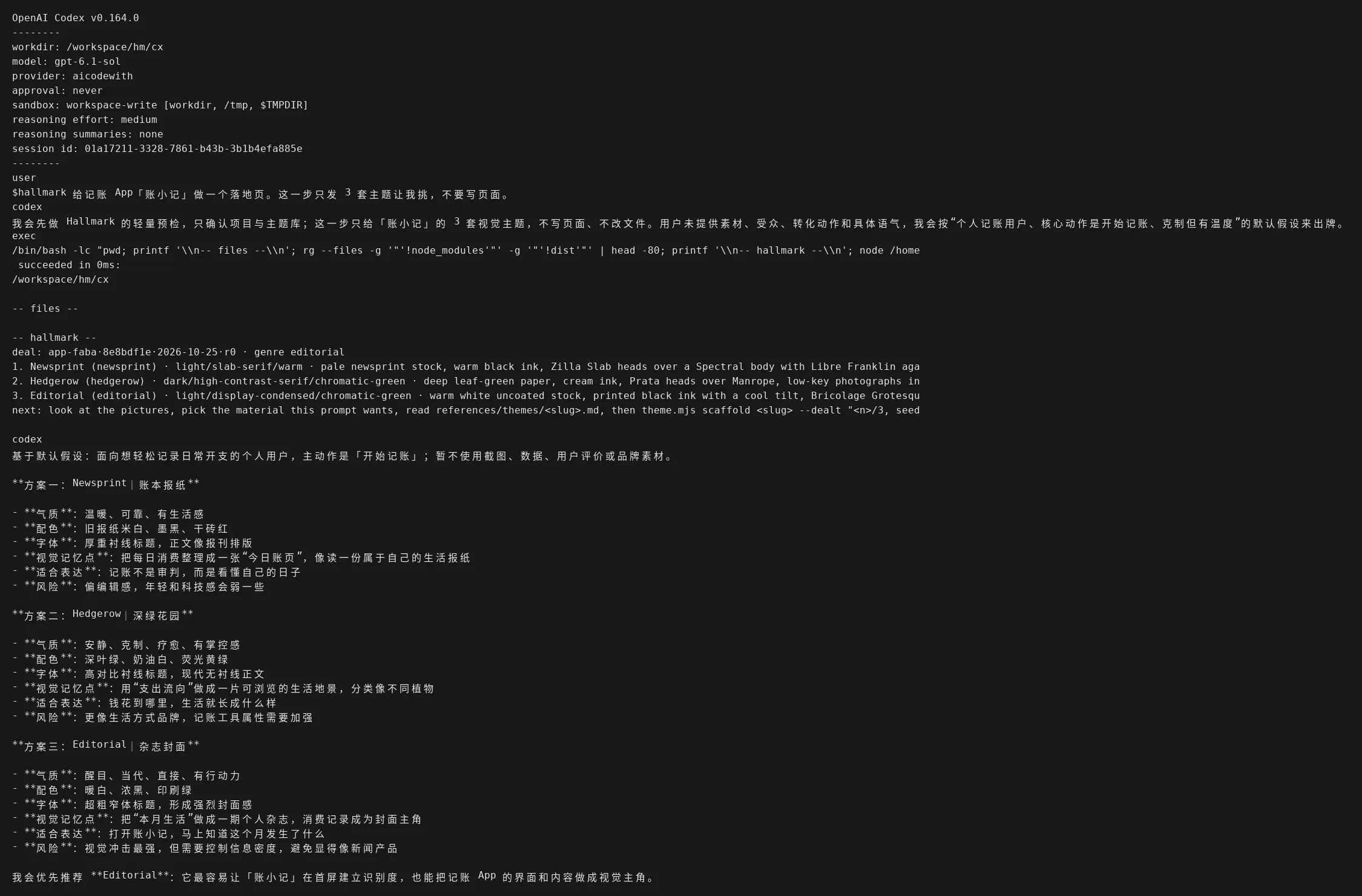
Codex 里 $hallmark 发出 3 套主题的终端输出
Step 4: /hallmark audit scores an existing page
To have a baseline, we first skipped Hallmark and had Claude Code build "a single-page landing page for an expense-tracking app" directly. It finished in 28 seconds: green theme, a phone mockup in the hero, a six-card feature grid, a three-step onboarding section, an FAQ, and a download banner. It also made up a pricing policy on its own. We deleted that invented text and the related button copy before auditing.
/hallmark audit /workspace/hm/bare/index.html
audit only produces a report and doesn't touch any files. After 50 seconds it returned 41 FAIL, 18 REFLEX, and 5 WARN. Here are a few representative ones:
- Floor: colors and fonts hardcoded outside the tokens; 10 emoji used as icons; focus ring contrast of only 1.60:1; white text on a green button at 3.45:1.
- Reflex 38iii: "no fuzzy math at month's end" is colored on its own, which is exactly the "single colored word in the headline" pattern mentioned at the start.
- Hero: on a 1440×900 screen, the hero content ends at 575px, and 4 text blocks are stacked before the button.
- Invented numbers: "three seconds," "¥ 2,368.50," "68% of budget used," and "within a minute" are all stated as fact on the page. The script can't judge whether they're true, so it lists them for you to confirm.
- Formulaic structure: the six-card feature grid, three-step onboarding, FAQ, and CTA banner would work just as well with any other expense app's name swapped in.
Finally, it tells you which tier can fix the page: restyle (keep the layout, swap the style system) clears most Floor issues; hero, volume, and structure problems can only be handled by full (rebuild the layout).
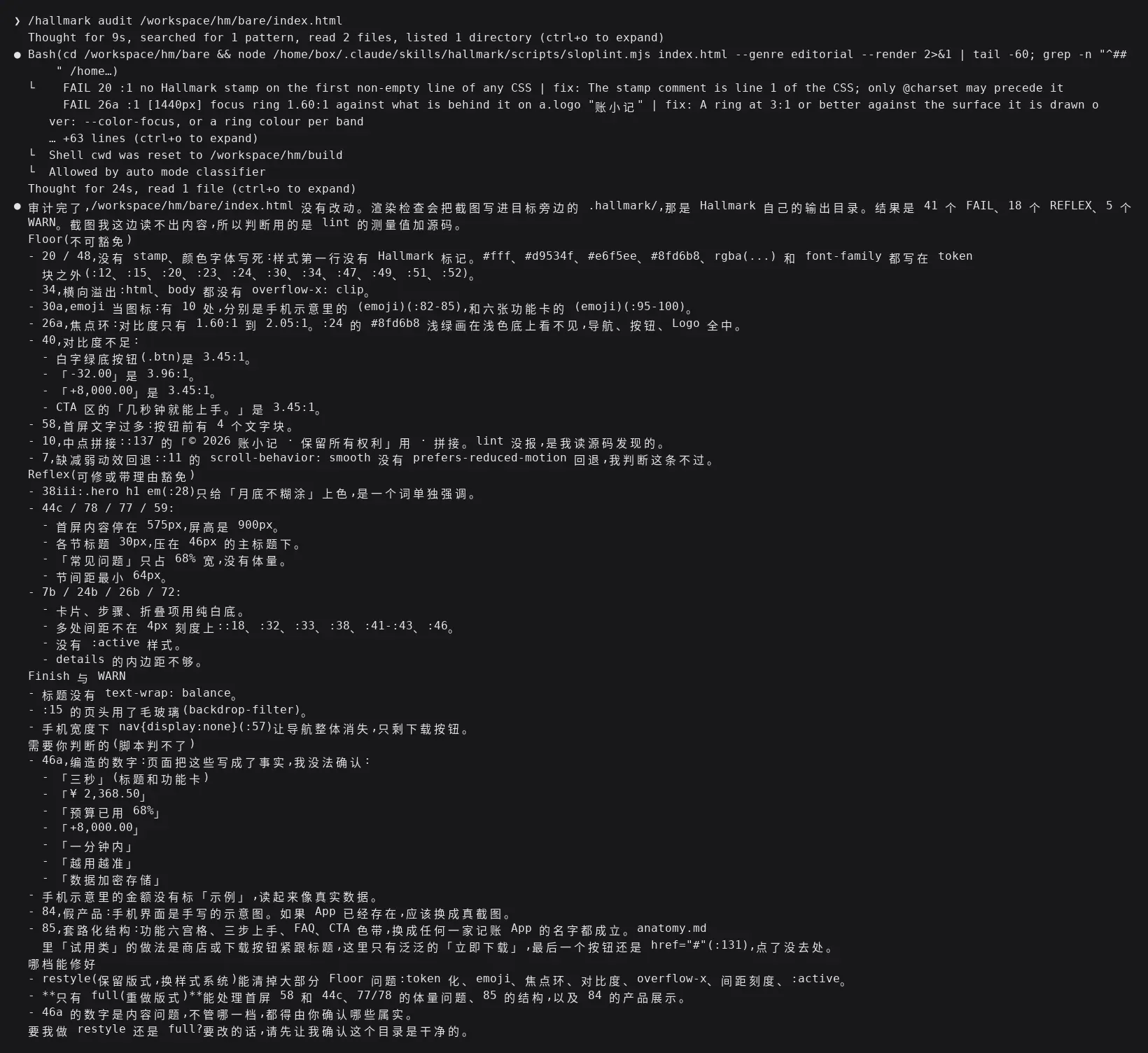
/hallmark audit 对普通 AI 落地页的审计报告终端输出
Step 5: /hallmark redesign rebuilds and compares
We copied this page and had it do a full redo:
/hallmark redesign /workspace/hm/redo/index.html 做 full 重做,这个目录是干净的副本。页面里的编造数字一律改成占位或删掉。
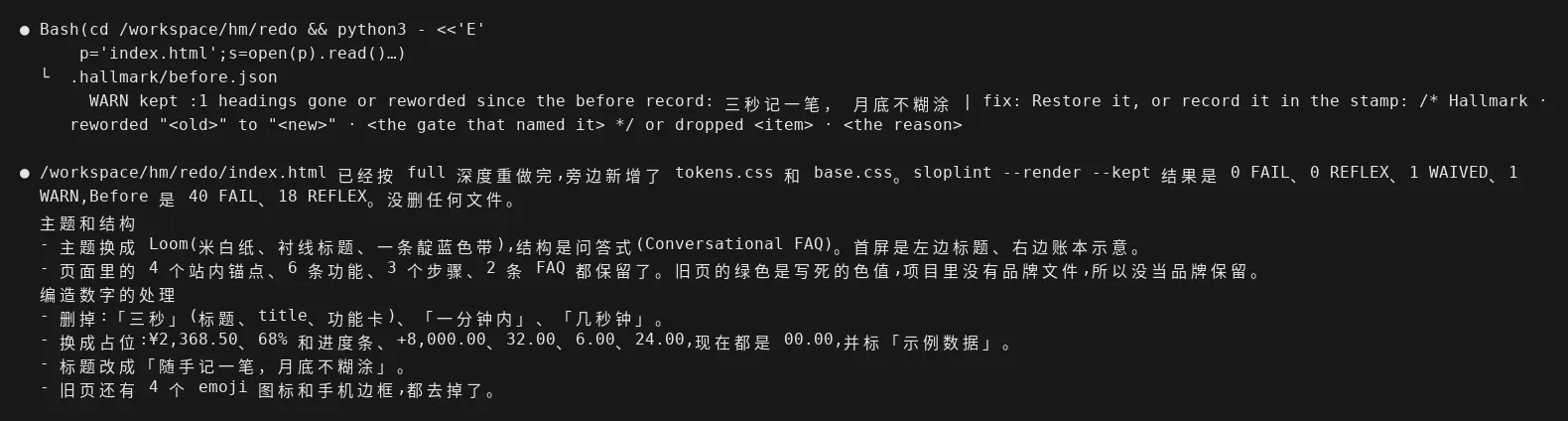
The key to redesign is "keep the content and links." It first uses sloplint --before to record the original page's links, fields, and headings, then runs sloplint --kept after the redo to compare, and it flags anything missing. In our test it changed the original headline "Log an expense in three seconds, no fuzzy math at month's end" to "Jot it down when you think of it, no fuzzy math at month's end",--kept and immediately flagged it with headings gone or reworded. It only let the change through after writing the reason into the Hallmark record on the first line of the page's CSS.
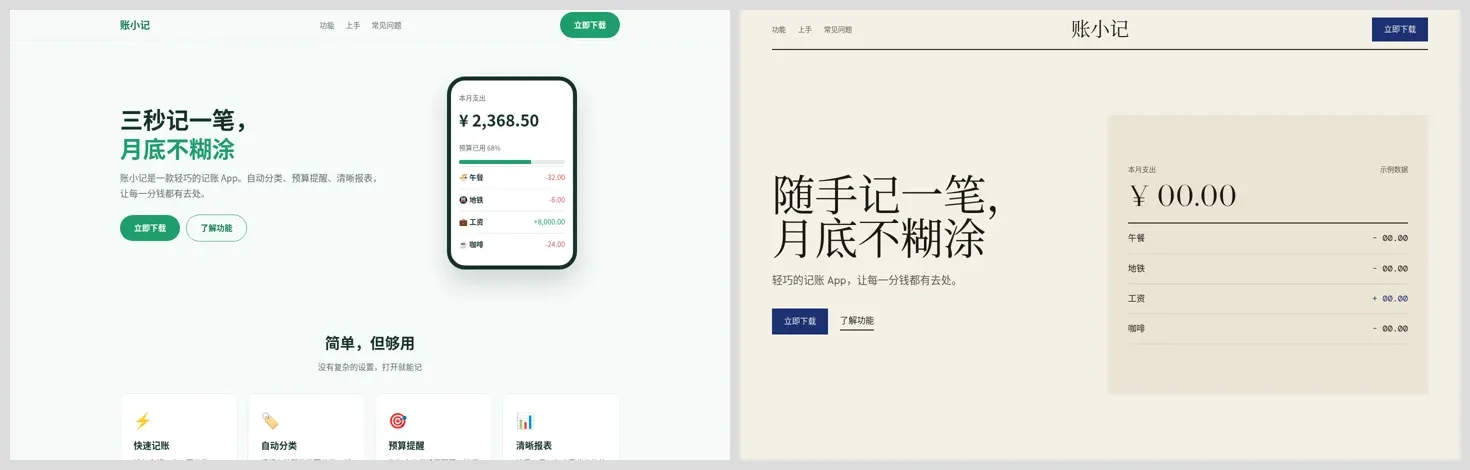
This time it picked the Loom theme (off-white paper, serif headings, and one indigo band). The results:
- All 4 on-page anchors, 6 features, 3 steps, and the FAQ were kept.
- Claims such as "three seconds" and "within a minute" were removed, and ¥2,368.50, 68%, and +8,000.00 were replaced with 00.00 and labeled "sample data."
- The emoji icons and phone bezel were removed.
sloplint --render --kept: 0 FAIL, 0 REFLEX, 1 WAIVED, 1 WARN. The WAIVED item is the FAQ being a bit thin, and its reasoning was that a redesign shouldn't add content the original page didn't have. The WARN is the lint splitting "8,000" on the comma so it didn't match; that number no longer appears in the body text.
The whole round took 6 minutes 11 seconds.
/hallmark redesign 全量重做后的终端输出
Before the redesign on the left, after on the right, same content (headless Chrome screenshots, 1440×900 hero):
普通 AI 落地页与 Hallmark redesign 后的首屏对比(headless Chrome 截图)
Measured timing summary
| Step | Client / model | Time | Result |
|---|---|---|---|
| Install Hallmark | npx skills | 14 seconds | Installed to ~/.claude/skills/hallmark |
| Offer 3 themes | Claude Code / claude-sonnet-5-5 | 26 seconds | Grid, Formwork, Studio |
| Write the full page and self-check | Claude Code / claude-sonnet-5-5 | 3 min 40 sec | sloplint 0 FAIL, 0 REFLEX, 0 WARN |
| Write directly without Hallmark | Claude Code / claude-sonnet-5-5 | 28 seconds | Baseline page |
| audit the baseline page | Claude Code / claude-sonnet-5-5 | 50 seconds | 41 FAIL, 18 REFLEX, 5 WARN |
| redesign the baseline page (full) | Claude Code / claude-sonnet-5-5 | 6 min 11 sec | 0 FAIL, 0 REFLEX, 1 WAIVED, 1 WARN |
| Offer 3 themes | Codex 0.164.0 / gpt-6.1-sol | 34 seconds | Newsprint, Hedgerow, Editorial |
Writing a page with Hallmark is much slower than writing it directly. Most of the time goes into the loop of "revise once, render and check once."
Tips
- Provide material first: Hallmark doesn't invent user counts, ratings, or reviews. The more you give it (screenshots, real numbers, brand colors), the more the page looks like your product.
- Name it when changing an existing site: it won't edit existing pages on its own, so you have to use
/hallmark redesign <路径>. To keep the layout and only swap the styling, say keep the layout; to only clear out the formulaic patterns, say polish. - Back up or use a copy before redesign: we copied the page and then redid it, which makes comparison easier.
- Name it if it doesn't trigger: if it doesn't kick in automatically, just say "use hallmark to build ...".
- Install Chrome: without Chrome and puppeteer-core you only get static checks, and problems that need rendering to measure, such as hero height and contrast, won't be caught.
FAQ
What is Hallmark?
A web design skill from Together AI for Claude Code, Codex, Cursor, and OpenCode. It first picks 3 themes out of 48 for you to choose from, then lays out the page around the task it needs to accomplish, and finally checks for AI-flavored patterns and accessibility problems in a real browser.
How do I install the Hallmark skill?
npx skills add nutlope/hallmark -g, which requires Node 18 or later. Install just one client plus --agent claude-code or --agent codex. Browser checks also need npm i -g puppeteer-core and Chrome.
How do I invoke it in Claude Code and Codex?
Claude Code uses /hallmark <需求>, and Codex uses $hallmark <需求>. Simply describing "build a landing page" usually triggers it too.
Can I pick from the 48 themes?
Yes. It offers 3 first, and you just reply with the number. If you don't want a theme, say custom, and it designs strictly from your description.
What's the difference between audit and redesign?
audit only produces a report, listing issues by Floor, Reflex, and Finish tier, and doesn't change any files. redesign rebuilds the page, keeps the content and links by default, and uses sloplint --kept to check whether anything was left out.
Can I run Hallmark with a third-party API Key?
Yes. We pointed Claude Code's ANTHROPIC_BASE_URL at https://api.aicodewith.ai, and pointed Codex's custom provider at https://api.aicodewith.ai/chatgpt/v1. In Claude Code, install, theme selection, page writing, audit, and redesign all worked, and theme selection also worked in Codex. Hallmark itself doesn't need an extra Key.
Can the generated page go live as is?
You still need to fill in real content. In our test, the download button links, footer contact info, and App screenshots were all placeholders, and Hallmark lists at the end what you need to supply. Review the page yourself in a browser before launch.