On October 23, OpenAI released Codex CLI 0.164.0. According to @thsottiaux's October 24post, changing reasoning effort mid-session in Codex no longer invalidates the cache. In hisfollow-up, he summarized this CLI update: prompt presets, inline model and permission settings, enterprise MCP login, a fix for long-session resume failures, and Windows corporate proxy authentication. He also noted that CLI usage has doubled since DevDay.
The short version:
- Adds
/presets: ten numbered slots for saving frequently used prompts or slash commands. Open the menu and press a number key to run one directly. /modelnow supports inline arguments,/model gpt-6.1-sol --reasoning=highswitches both model and reasoning effort in one line;/permissionsalso accepts arguments.- We tested with this site's API Key and a custom provider. When we switched reasoning effort from medium to high and then to low mid-session, the next request still got cache hits each time; after
codex resume --last, the reasoning effort switched mid-session was kept instead of being overwritten by the global default. - On Windows, HTTPS and WebSocket connections can authenticate through a corporate proxy using the signed-in user's Negotiate or NTLM credentials.
0.164.0 Update Overview
| Update | Original release text | Who it's for |
|---|---|---|
| /presets Presets | Save reusable prompts and slash commands in ten numbered /presets slots, with a keyboard menu for quick access. | People who often repeat the same prompt or command |
| Inline /model and /permissions | Set model, reasoning effort, speed, and permission profiles directly with inline /model and /permissions arguments. | People who frequently switch reasoning effort or permissions |
| Credential masking in remote Bash | Mask credentials during supported remote Bash commands and Zsh snapshot sessions, including credentials from custom providers. | People running Codex in remote environments or using custom providers |
| resume restores settings | Resuming sessions now finds compressed histories and restores saved thread settings instead of replacing them with global defaults. | People who often pick up work with resume |
| Windows corporate proxy | Windows HTTPS and WebSocket connections now handle proxy authentication challenges using the signed-in user’s Negotiate or NTLM credentials. | Windows users behind an authenticated proxy on a corporate network |
Other changes include: image preview in the full-screen transcript when the terminal supports Kitty or Sixel; enterprise MCP connections can authorize with a Codex account or log in separately; the Amazon Bedrock setup wizard is on by default; failed compaction no longer leaves a half-written summary in history;-c or --config no longer loses overrides when it appears in multi-level subcommands.
Versions and Prerequisites
First, confirm your version:
codex --version
# 低于 0.164.0 就升级
npm i -g @openai/codex@latest
If you haven't installed it yet, see theCodex installation guide. This test used the custom provider in the global ~/.codex/config.toml , written the same way as in theCodex config.toml configuration guide:
model = "gpt-6.1-sol"
model_reasoning_effort = "medium"
model_provider = "aicodewith"

[model_providers.aicodewith]
name = "aicodewith"
base_url = "https://api.aicodewith.ai/chatgpt/v1"
wire_api = "responses"
experimental_bearer_token = "你的 API Key"
For network and Key setup in China, seeUsing Codex in China.
/presets: 10 Prompt Preset Slots
How to save
In Codex, type /presets. The first time you open it, it shows No presets saved. Press n to create one.. The keys at the bottom of the menu are:
n · new s · from settings e · edit d · delete esc · close
- Press
nto create a preset: enter a prompt or slash command, press Enter, then pick a slot. Slots are 1 through 9 and 0, ten in total. After saving, it shows a number likeSaved preset 1.. - Press
sto generate from current settings: it lists the full commands for the current model, permissions, terminal title, and status bar. Pick one to save it as a preset.

codex-0-164-presets-from-settings-terminal
This list also shows the full inline-argument syntax. For example, the current permissions correspond to /permissions :workspace --approval-policy=on-request --reviewer=user.
In our testing, presets are saved in ~/.codex/config.toml , one section per slot:
[tui.presets.1]
input = "Review the staged diff and list bugs as a numbered list."
label = ""
So you can also edit this file directly to maintain presets in bulk.
How to run
Type /presets to open the menu, then press the number key for a slot to run that preset directly, with no need to press Enter to confirm.
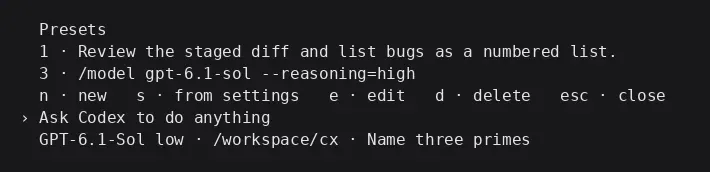
codex-0-164-presets-terminal
When a preset holds a slash command, it runs the same as typing it by hand. Watch the argument syntax, though: we first saved /model gpt-6.1-sol high, and at run time the client reported an error:
Unexpected argument 'high'. Use '--reasoning=<level>' or '--speed=<tier>'.
We changed it to /model gpt-6.1-sol --reasoning=high and switching worked.
Switching Reasoning Effort in One Line with /model
Usage
/model gpt-6.1-sol --reasoning=high
/model --reasoning=low
You can also write just --reasoning without a model name. It keeps the current model and only changes reasoning effort. After switching, it prints:
Model changed to gpt-6.1-sol high for this session only
Note that for this session only: the inline switch applies only to the current session and doesn't change the default in config.toml. The status bar at the bottom updates to show the new reasoning effort.
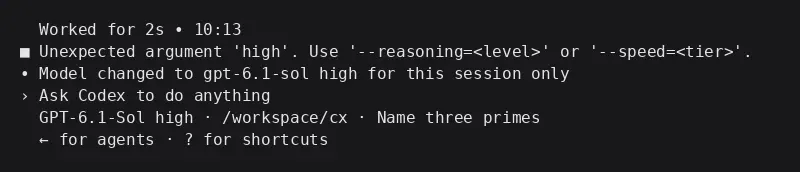
codex-0-164-model-inline-terminal
Shortcuts work too: press ? to open the shortcut table, wherealt+, is Less reasoning andalt+. is More reasoning.
Does the cache still hit after switching?
In one session, we sent several short questions in a row, switched reasoning effort twice in between, and read each turn's cached_input_tokensfrom the session log:
| Turn | Reasoning effort | Input tokens | Cached tokens |
|---|---|---|---|
| 1 | medium | 15996 | 1642 |
| 2 | medium | 16037 | 12120 |
| 3 | Switched to high | 16074 | 10041 |
| 4 | Switched to low | 16135 | 6232 |
| 5 | low after resume | 16162 | 12218 |
Turn 1 is a cold start, so few cache hits is normal. Turns 3 and 4 are the first turns right after switching reasoning effort, and they still got cache hits instead of dropping back to cold-start levels. This matches what @thsottiaux said: changing reasoning effort no longer invalidates the cache. Hits per turn will vary, so go by the numbers in your own session.
Each of the few Q&A turns took 2 to 11 seconds.
resume restores session settings
Original release notes: Resuming sessions now finds compressed histories and restores saved thread settings instead of replacing them with global defaults.
Test steps: the global default is medium, and in the session I used /model --reasoning=low to switch to low, then ran this after exiting:
codex resume --last
After resuming, the status bar showed GPT-6.1-Sol low. I sent another turn, and the session record shows that this turn's reasoning effort is still low. It wasn't overridden by the global medium, and the cache still hit as usual (see turn 5 in the table above).
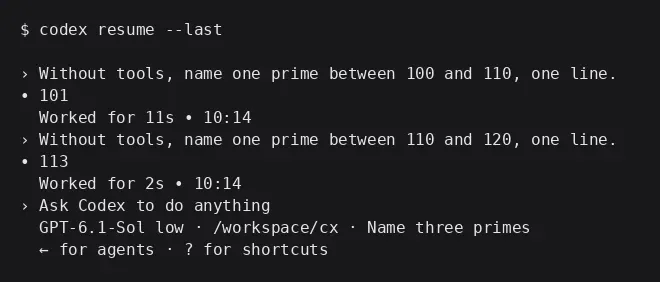
codex-0-164-resume-terminal
Masking Credentials in Remote Bash
Original release notes: Mask credentials during supported remote Bash commands and Zsh snapshot sessions, including credentials from custom providers.
For anyone who uses experimental_bearer_token to configure a custom provider, this means provider credentials are also masked in supported remote Bash commands and Zsh snapshot sessions. Even so, keep your Key only in config.toml. Don't write it into project files or paste it into a conversation.
Windows Corporate Proxy Negotiate/NTLM
Starting with 0.164.0, when an HTTPS or WebSocket connection on Windows hits a proxy authentication challenge, Codex responds with the Negotiate or NTLM credentials of the currently logged-in Windows user. If you use Codex on Windows, you may also want to check out theCodex VS Code Windows tutorial.
What to Watch for with Third-Party APIs
- All the testing in this article used this site's Key plus a custom provider in the global config.toml, with the model
gpt-6.1-sol,/presets,/model, inline parameters, and resume all worked normally. - Custom providers use
experimental_bearer_tokento hold the Key, so no extra environment variables are needed. - Inline
/modelonly changes the current session. To change the default reasoning effort long-term, edit this setting in config.toml:model_reasoning_effort. - For common day-to-day operations, seeHow to Use Codex.
FAQ
How do I upgrade Codex CLI to 0.164?
npm i -g @openai/codex@latest, then run codex --version to confirm you're on 0.164.0 or higher.
Where are /presets stored?
In the global ~/.codex/config.toml file, in the [tui.presets.N] section, where N is the slot number. In the menu you can press e to edit andd to delete, or you can edit the file directly.
How do I run a preset quickly with /presets?
Type /presets to open the menu, then press the slot's number key to run it directly.
How do I switch reasoning effort in Codex?
/model --reasoning=high as a one-line switch, or use the alt+,,alt+. shortcuts. Writing it as /model gpt-6.1-sol high throws Unexpected argument 'high'.
Does switching reasoning effort mid-session invalidate the cache?
In our tests with a third-party Key, the first turn after switching to high and the first turn after switching to low both still got cache hits.
Are model settings still there after resume?
Starting with 0.164.0, the settings saved in the session are restored. In our test, after codex resume --last the low we had switched to mid-session was kept, and it didn't revert to the global default.
Does a Windows corporate proxy need extra configuration?
The release notes say Codex automatically answers proxy authentication challenges with the currently logged-in user's Negotiate or NTLM credentials, and they don't mention any new config options.