According to the @ClaudeDevsmain postpublished on October 24, Claude Code now supports MCP Tasks: an MCP server can turn a long-running tool call into a "task" and run it on the server itself, while Claude takes the task ID and moves on to other work.A replyintroduces Elicitations, where a prompt pops up mid-task asking for your input; anotherreplysays the CLI is ready to use.
The short version:
- MCP Tasks is currently in public beta. The official wording is: MCP tasks are in public beta in the Claude Code CLI and require Claude Code v2.1.304 or later.
- A call only becomes an MCP task when several conditions are all met: the server supports tasks, the connection negotiates the 2026-07-28 protocol, the session can fetch feature flags, and the call comes from the main conversation.
- We tested with this site's API Key on Claude Code v2.1.309. The protocol negotiated to 2026-07-28, MCP calls running longer than 2 minutes moved to the background automatically, progress showed up in /tasks, and the Elicitation mid-task confirmation prompt worked. However, server-side MCP tasks were not enabled, which is related to feature flags and is explained in detail below.
- Our older tutorial doesn't ask you to set DISABLE_TELEMETRY or CLAUDE_CODE_DISABLE_NONESSENTIAL_TRAFFIC. In testing, the behavior above was the same whether or not they were set.
What problem it solves
Previously, when an MCP tool call ran for a long time, such as exporting a report or running a build, Claude could only sit and wait. The official docs define an MCP task like this:
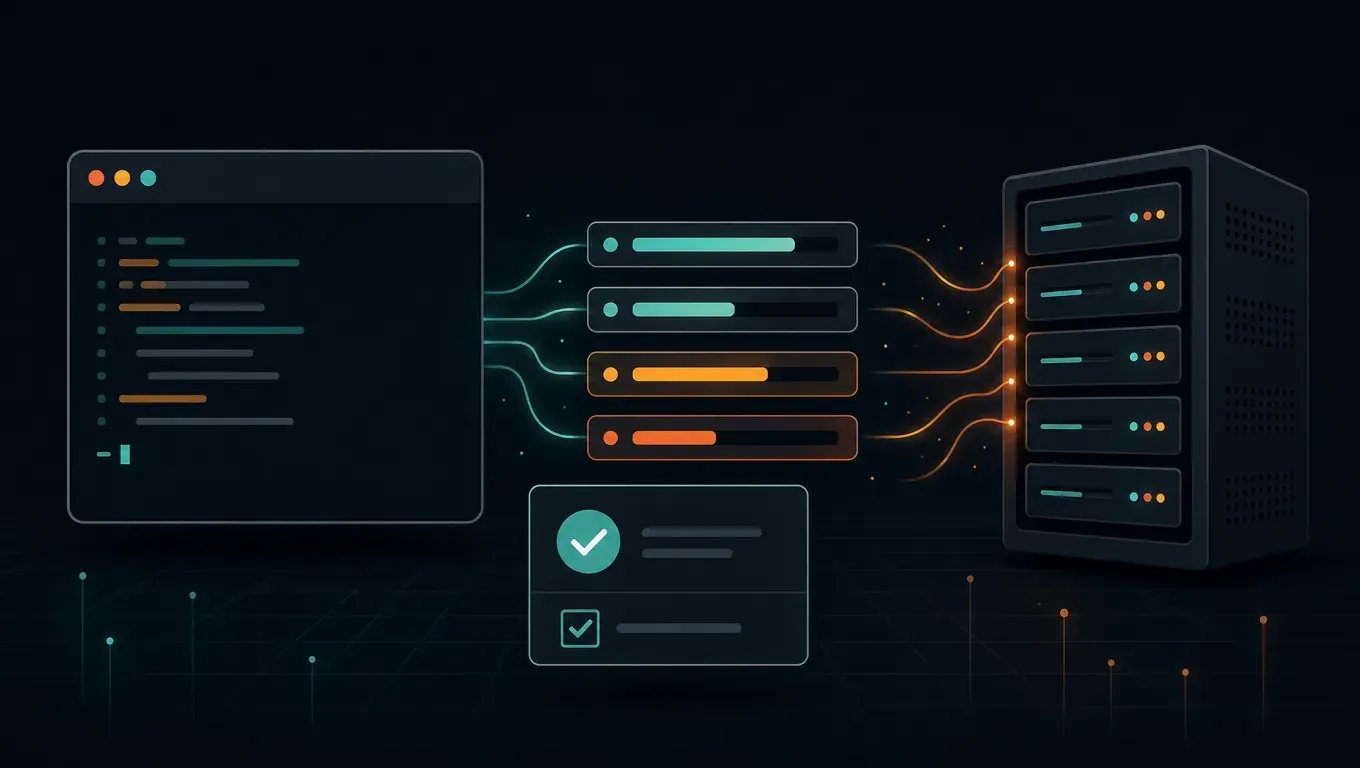
An MCP task is a long job, such as a report export or a build, that an MCP server runs itself using the MCP tasks extension. Claude's tool call returns once the server accepts the job, so Claude keeps working unless you make Claude wait.
In other words, as soon as the server accepts the job, the tool call returns and Claude keeps working. When the task finishes, a line appears in the conversation and Claude gets the result. The status bar at the bottom shows a count like 1 MCP task count. Tasks on a remote server keep running after you quit Claude Code, and you can pick them back up by resuming the same session.
Elicitations solves a different problem: the task reaches a point where it needs your call, such as "deploy to staging now?" The server can show you a form to ask, instead of failing or guessing.
Not the same as "calls over 2 minutes automatically move to the background"
This is the easiest thing to mix up. Claude Code has an earlier mechanism: an ordinary MCP call in the main conversation that runs longer than two minutes is moved to the background automatically, so it no longer blocks the session. From the docs:
An MCP tool call in the main conversation that is still running after two minutes moves to a background task instead of blocking the session.
The differences:
| Ordinary call auto-moved to background | MCP task (server-side task) | |
|---|---|---|
| Who runs it | It's still the same tool call, and Claude Code waits for it in the background | The MCP server runs the task itself, and Claude Code polls its status at intervals |
| When it moves to the background | After running for 2 minutes | The server returns as soon as it accepts the job |
| After you exit Claude Code | From the docs: it doesn't survive exiting the session | The task on the remote server keeps running, and claude --resume brings you back to fetch the result |
| /tasks details | No runs on the server text | Shows runs on the server; survives exiting this session |
| Requirements | No special requirements | Version, protocol, feature flags, server support, and so on. See the next section |
The docs also give a way to tell: if the details of a background call in /tasks show runs on the server; survives exiting this session, it is a server-side MCP task.
Versions and prerequisites
The "What a call needs to become an MCP task" section of the official docs lists every condition. A tool call becomes an MCP task only if it meets all of them:
- The server supports tasks.
- The server is HTTP, stdio, or a claude.ai connector, and is connected over the 2026-07-28 protocol. From the docs: Setting
MCP_SDK_GENERATION=v1orMCP_PROTOCOL_NEGOTIATION=legacyrules that out. - The session fetches feature flags. From the docs: so not on a third-party provider such as Amazon Bedrock, and not with telemetry or flag fetching turned off.
- Anthropic has enabled MCP tasks for your kind of session. Starting with v2.1.304, this covers the terminal CLI, the Agent SDK, and GitHub Actions. From the docs: Other surfaces, such as the VS Code extension and the desktop app, don't have MCP tasks.
- The call comes from the main conversation, not a subagent.
- The session is interactive, or it is the Agent SDK, reading
--input-format stream-json'sclaude -p, andCLAUDE_AUTO_BACKGROUND_TASKSis 1,CLAUDE_CODE_DISABLE_MCP_TASK_BACKGROUNDis not 1, andCLAUDE_CODE_MCP_AUTO_BACKGROUND_MSis not 0.
Note the last one: a plain one-shot claude -p "..." can't get MCP tasks. The docs say: A one-shot claude -p "" run doesn't get MCP tasks.
Check your version first:
claude --version
# 低于 2.1.304 就先升级
claude update
How to enable and use it
1. Connect an MCP server that supports tasks
You add it the same way as any other MCP server. There's no extra toggle:
# 远程 HTTP 服务器
claude mcp add --transport http my-server https://mcp.example.com/mcp
# 本地 stdio 服务器
claude mcp add --transport stdio my-server -- python3 /path/to/server.py
The server has to implement the MCP tasks extension. According to the docs, on a 2026-07-28 connection, Claude Code includes, in every request's params._meta["io.modelcontextprotocol/clientCapabilities"] , extensions and its "io.modelcontextprotocol/tasks": {}; for requests that can't become tasks, tools/call doesn't carry this extension. The server can only reply with "resultType": "task" if it sees that extension. If it returns a task anyway, Claude receives Unsupported result type 'task' for tools/call.
If you haven't connected an MCP server yet, start with the Codex-sideMCP setup guideto learn how to add, remove, and list servers, or seeClaude Code controlling Unreal Enginefor a complete MCP integration example.
2. Check progress with /tasks and press x to stop
Once a task is running, type /tasks to open the list. The docs describe how to stop one:
To stop a running task, select it in /tasks and press x, or ask Claude to.
A few details:
- Pressing
Escdoes not stop background tasks. - After you stop a task, Claude Code asks the server to cancel it, but the server may still run it to completion.
- If the server has disconnected, reconnect it in
/mcpfirst. Otherwise the cancel request can't be sent, and Claude Code stops tracking the task.
When a task finishes, a line like this appears in the conversation:
MCP task <server task id> (<server>/<tool>) completed.
The result goes to Claude and isn't printed into the conversation. Ask Claude if you want to see it. If Claude is idle when the result arrives, it picks it up and continues on its own.
3. Use claude --resume to get results after exiting
Tasks on remote servers keep running after you exit. When you come back, resume the session the task belongs to:
claude --resume
The server name and connection settings must stay the same. A new session or --fork-session won't follow the original task, and neither will a one-shot claude -p run with --resume . Also, a stdio server's process stops when Claude Code exits. Even though /tasks still shows survives exiting this session, the docs recommend letting the task finish or stopping it before you exit, unless the server's docs say the work outlives the process.
4. Make Claude wait for results before continuing
By default, Claude doesn't wait. To make it wait, in settings.json under env , set one of these two:
CLAUDE_CODE_MCP_AUTO_BACKGROUND_MSset to0: Claude waits for every MCP call to finish, and this also turns off the 2-minute auto-backgrounding of regular calls.CLAUDE_CODE_DISABLE_MCP_TASK_BACKGROUNDset to1: Claude waits for task results, but auto-backgrounding of regular calls stays on. Calls that run past 2 minutes still get moved to the background, but what gets moved is a regular background call, not an MCP task, and it's gone when you exit.
{
  "env": {
    "CLAUDE_CODE_MCP_AUTO_BACKGROUND_MS": "0"
  }
}
Setting CLAUDE_CODE_DISABLE_BACKGROUND_TASKS=1 on its own, or using bare mode, doesn't make Claude wait for MCP tasks.
5. Elicitation: confirm mid-task
An elicitation dialog can pop up while a task runs. Two things to note:
/tasksis open, the dialog is hidden. You have to close/tasksbefore you can answer.- Choosing Decline or pressing Esc also counts as an answer. The server decides whether the task continues.
In a non-interactive session, a task is canceled as soon as it requests input. The docs say: In a non-interactive session, Claude Code asks the server to cancel a task that requests input, without running your Elicitation hooks or calling the Agent SDK's onElicitation callback.
What to watch for with third-party APIs
We followed theClaude Code third-party API setup guideand configured this site's key in the global ~/.claude/settings.json (ANTHROPIC_BASE_URL does not include /v1):
{
  "env": {
    "ANTHROPIC_BASE_URL": "https://api.aicodewith.ai",
    "ANTHROPIC_AUTH_TOKEN": "你的 API Key"
  }
}
Then we connected a minimal stdio MCP server we wrote ourselves, using Claude Code v2.1.309. It implements the tasks extension and offers two tools: a slow build, and a deploy that needs confirmation midway. Here are the results.
Test 1: protocol and MCP tasks
- The connection works, and the debug log records
negotiatedProtocolVersion":"2026-07-28", which means the new protocol is in use. - The debug log also records
mcp runtime arm: v2 (source: default). Per the docs, sessions that haven't fetched feature flags default to the v2 runtime, and this line's source is default rather than flags. - In the
tools/callthe server received,clientCapabilitiescontains only roots and elicitation, withoutio.modelcontextprotocol/tasks. So the server can't reply with a task, and the call runs as a regular MCP call.
Conclusion: with this site's key, server-side MCP tasks weren't enabled in this test, which matches the docs' requirement that the session be able to fetch feature flags. The official post and docs still describe this as a public beta, and we'll update this article if the rollout changes.
Test 2: regular long calls auto-background, and /tasks
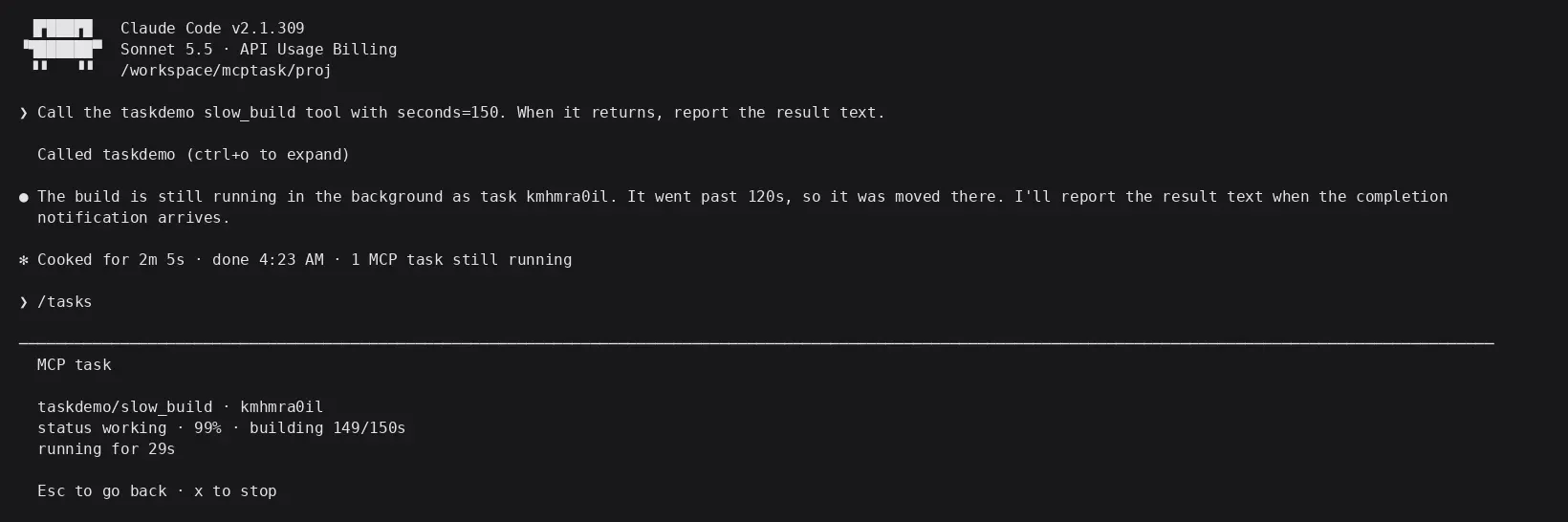
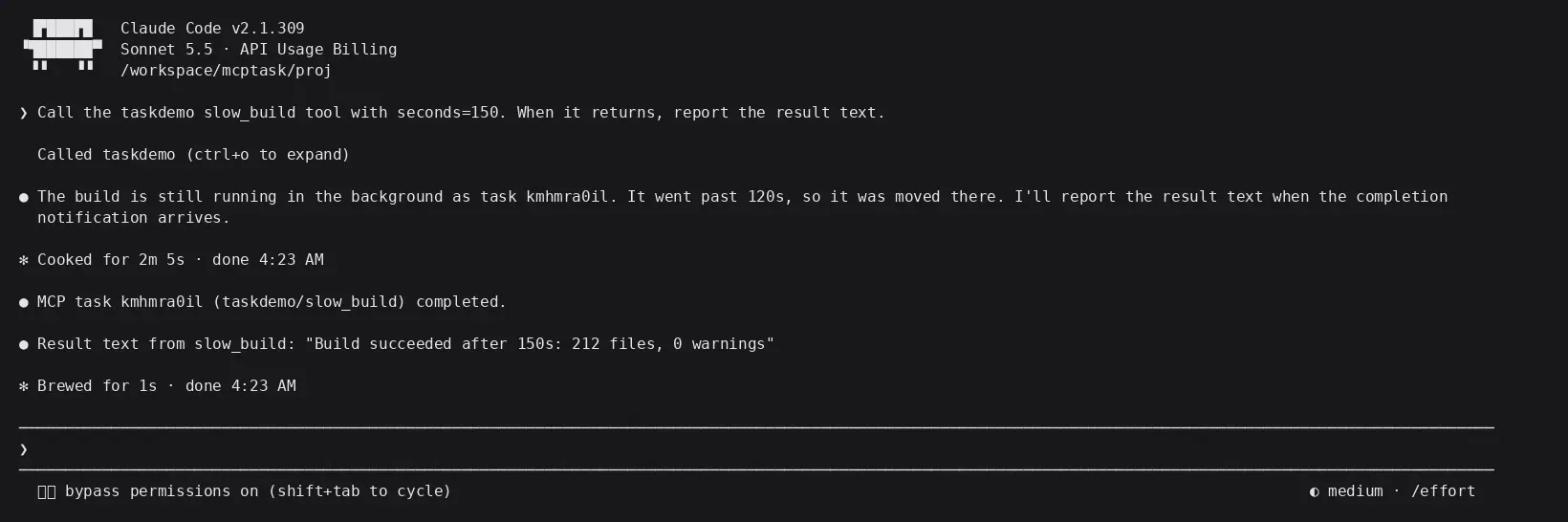
We ran the slow build tool for 150 seconds:
- At about 2 minutes, the call was moved to the background, Claude replied that the task had gone to the background, and the bottom showed
1 MCP task. - Opening
/tasksshows the progress and the progress messages the server reports, and the bottom hint readsEsc to go back · x to stop. - At 150 seconds a completion notice appeared, and Claude reported the result right away.
claude-code-mcp-tasks-tasks
claude-code-mcp-tasks-done
Note: this is auto-backgrounding of a regular call. Although /tasks labels it MCP task too, the details don't include the text runs on the server, and it's gone when you exit the session. Either finish long tasks before exiting, or use CLAUDE_CODE_MCP_AUTO_BACKGROUND_MS to adjust the threshold.
Test 3: Elicitation mid-task confirmation
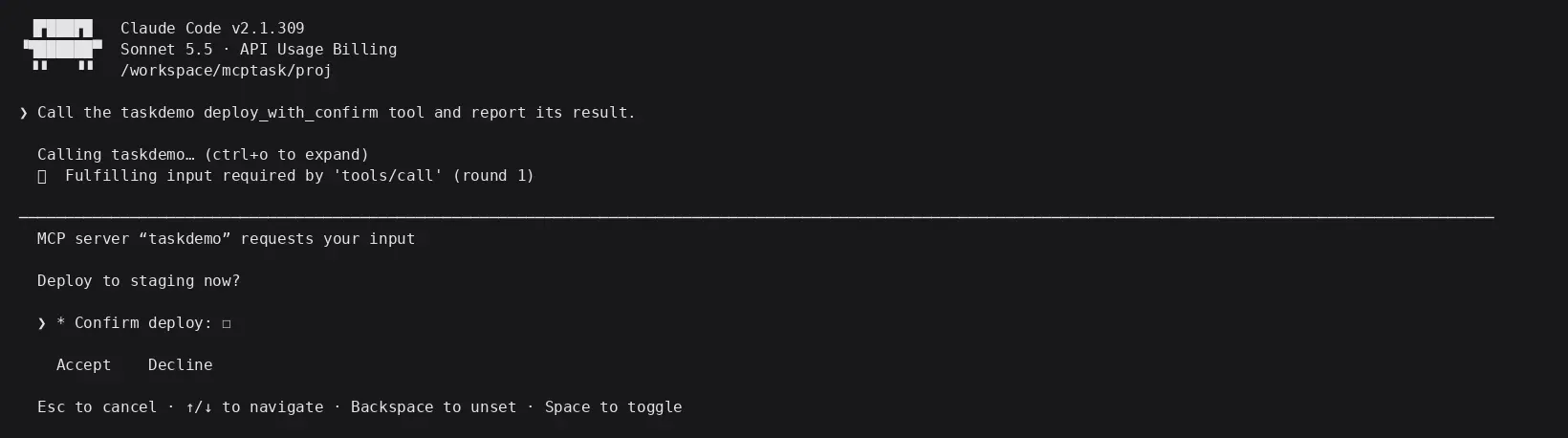
We called the deploy tool. Under the 2026-07-28 protocol, the server returned a result requiring input, and Claude Code showed a form:
claude-code-mcp-tasks-elicitation
After we checked the confirmation box and chose Accept, the server received confirm: true, and the tool returned its result. From question to result took about 7 seconds. In other words, mid-call confirmation on regular MCP calls works with a third-party key.
Choosing on the telemetry variables
To cut down on requests, some readers set one of these two variables:
export DISABLE_TELEMETRY=1
# 或
export CLAUDE_CODE_DISABLE_NONESSENTIAL_TRAFFIC=1
We reran the test with each variable set. The runtime was still v2 (source: default), the server still didn't receive the tasks extension, and the Elicitation dialog worked as usual. So for third-party key users, setting either variable makes no difference to MCP behavior.
Recommendations:
- If you use an official account and want server-side MCP tasks: per the docs, don't turn off telemetry or flag fetching.
- If you use a third-party API key: these two variables don't affect the features we tested here. Decide based on your own privacy and network needs. Our Claude Code tutorial never asked you to set them.
- Don't set
MCP_SDK_GENERATION=v1orMCP_PROTOCOL_NEGOTIATION=legacyfor the sake of "compatibility." That rules out MCP tasks outright.
If what you're seeing is slow responses or stalls rather than a task problem, seeTroubleshooting slow Claude Code responses.
Common statuses and errors
These messages appear in /tasks entries or on the line when a task ends. Their meanings come from the status table in the official docs. The task may still be running while a message is shown, and Claude Code keeps checking its status.
| Message | Meaning | What to do |
|---|---|---|
| reconnecting… | The server hasn't responded after resume, or the status query got no reply | If it doesn't go away, reconnect in /mcp |
| needs a sign-in to … | The server rejected the status query | Log in via /mcp |
| status requests come back with errors; retrying… | The server, or a proxy in front of it, returned an error | Wait for Claude Code to retry |
| server '…' did not reconnect within 300s | No successful query in 5 minutes | Reconnect in /mcp |
| server '…' is not configured in this session; the task may still be running on it | No server with this name in the session | Restore the server under its original name, then resume the session |
| server '…' was reconfigured to a different transport since this task was created -prefixed messages | The server's URL, command, arguments, environment variables, headers, or timeout changed | Change them back, then resume the session |
| the server rejected this task's id; asking again… | The server says it doesn't recognize the task ID; ask again for up to 5 more minutes | Waiting |
| Ending with outcome unknown. on its own line | Claude Code has stopped tracking it | Ask what the server actually did before deciding whether to call it again, so you don't run the same work twice |
Two common tool errors from server authors, quoted from the docs:
- The client didn't send the tasks extension, but the server replied with a task:
Unsupported result type 'task' for tools/call. - The task ID is invalid (at most 128 printable ASCII characters, no spaces): the error starts with
MCP serverand containsreturned a malformed task handle for tool.
FAQ
Which version of Claude Code do I need for MCP Tasks?
v2.1.304 or later. It's currently in public beta in the CLI. The Agent SDK and GitHub Actions are covered too; the VS Code extension and the desktop app don't have it yet.
Can I use MCP Tasks with a third-party API Key?
When we tested with this site's Key on v2.1.309, server-side MCP tasks were not enabled, and the client did not declare the tasks extension to the server. Auto-backgrounding after 2 minutes, viewing and stopping tasks with /tasks, and confirming midway with Elicitation all worked normally.
Does it still work if I set DISABLE_TELEMETRY?
Per the docs, sessions with telemetry or flag fetching turned off won't get MCP tasks. With a third-party key, we tested with the setting on and off and saw the same behavior, and Elicitation still worked.
Do sub-agents and claude -p turn calls into tasks?
Calls started by a sub-agent don't. A one-off claude -p "" won't either. The Agent SDK, or a --input-format stream-json that reads claude -p with CLAUDE_AUTO_BACKGROUND_TASKS=1 and similar conditions met, can do it, as long as you keep the input open.
Are tasks still there after I exit Claude Code?
MCP tasks on a remote server stay alive. Use claude --resume to resume the same session and pick up the result. The server name and connection settings can't change. Ordinary calls that were auto-backgrounded disappear on exit. The process of a stdio server stops when you exit.
How do I make Claude wait for a task result before continuing?
Set CLAUDE_CODE_MCP_AUTO_BACKGROUND_MS=0(waits for all MCP calls), or CLAUDE_CODE_DISABLE_MCP_TASK_BACKGROUND=1(waits for task results, but anything running longer than 2 minutes still turns into an ordinary background call).
What if the Elicitation dialog doesn't show up?
First make sure /tasksisn't on. The dialog is hidden while it's enabled. In non-interactive sessions, a task that asks for input is canceled outright.