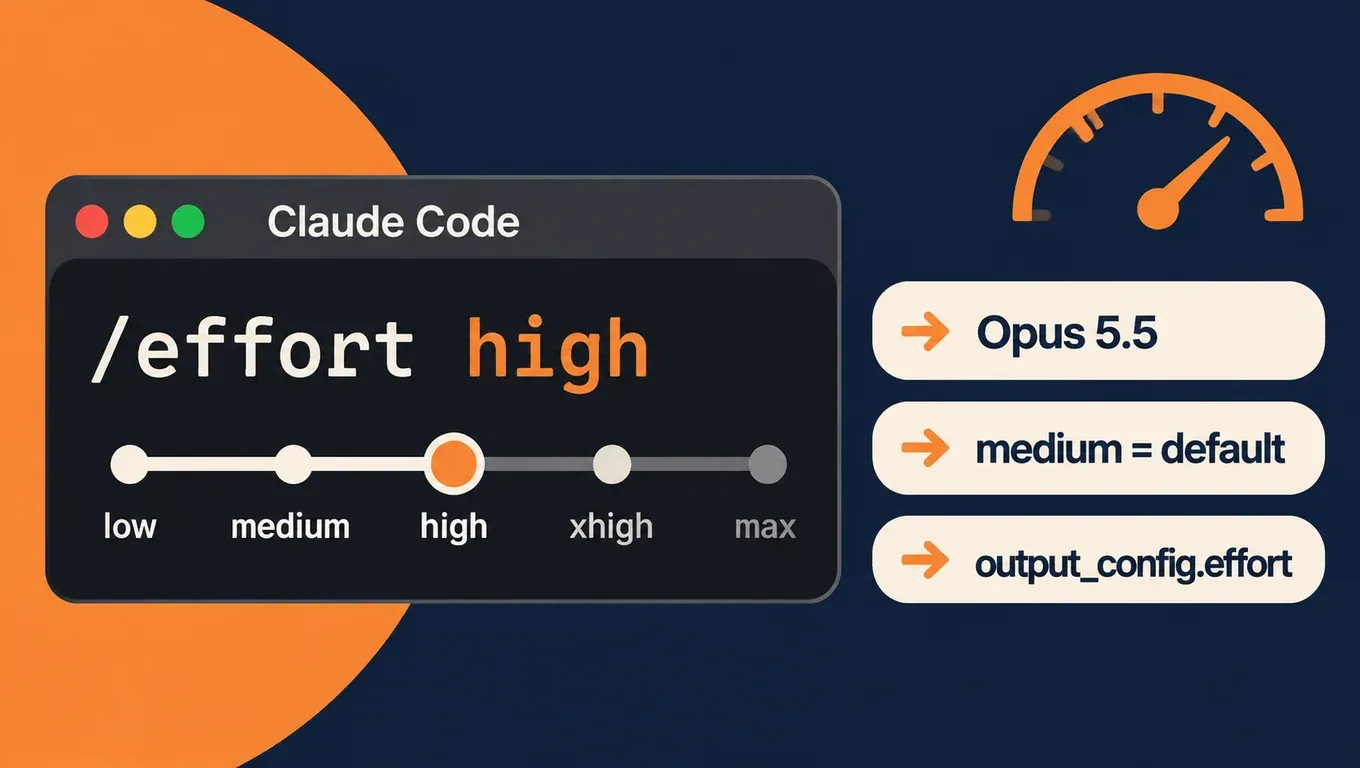
Short answer: effort controls how long Opus 5.5 thinks and how much it checks its own work. There are five levels, low, medium, high, xhigh and max, and the default is medium, one step below Opus 5's default of high.
- Use the default
mediumfor day-to-day work with a clear scope, such as implementing a feature. Switch tohighfor bug fixes in an existing codebase and other work with many edge cases. Keepxhighandmaxfor long tasks where the model needs to verify things on its own. That split comes from the Claude Code docs. - According to user reports, many people who moved Opus 5.5 from
xhighdown tohighsaw equal or better results. Artificial Analysis measured about 100M output tokens forxhighacross its full evaluation suite against 56M forhigh: about 1.8x the tokens for 5 more points (57 vs 52). - A Claude Code trap: the old top-level
"effortLevel": "high"in~/.claude/settings.jsondoes not apply to Opus 5.5, which keeps running atmedium. Run/effort highonce while on Opus 5.5 and Claude Code saves it per model undermodelSettings. We confirmed this in our own test. - In the API, send
"output_config": {"effort": "high"}. If you leave it out, you getmedium.
Create an API Key and use Opus 5.5 in Claude Code, Codex or Cursor →
What the five effort levels mean
Effort is not a hard token budget. It tells the model how much work the task deserves, which affects how long it thinks and how much it writes and calls tools. The official docs say that at lower levels Claude still thinks on hard enough problems, just less. Adaptive thinking is always on in Opus 5.5 and can't be turned off, so effort is the main control for how deeply it reasons.
The table puts Anthropic's guidance next to Artificial Analysis results for each level on its Intelligence Index v5 (see the low / medium, high and xhigh / max comparison pages):
| Level | Where Anthropic suggests using it | AA index score | Output tokens for the full suite | Average time per task |
|---|---|---|---|---|
| low | Brainstorming, first sketches, small changes like a rename; subagents | 35 | about 21M | about 153 s |
| medium (default) | Day-to-day engineering with a clear scope, such as a new feature | 48 | about 43M | about 347 s |
| high | Work where verification matters or edge cases are likely, such as fixing a bug in an existing codebase | 52 | about 56M | about 474 s |
| xhigh | Deeper reasoning; long-running tasks over 30 minutes | 57 | about 100M | about 793 s |
| max | Hard problems you want Claude to work through alone, such as finding security vulnerabilities; may overthink | 58 | about 218M | about 1141 s |
Going from high to xhigh takes about 1.8x the tokens for 5 points. Going from xhigh to max more than doubles tokens again for 1 point. AA also notes that medium, high, xhigh and max all sit on its intelligence-versus-spend Pareto frontier, so each of those four has workloads it suits and none is simply the best.
Why people are turning effort down
The discussion took off on October 31. According to Theo (t3.gg), his colleague Julius convinced him to move Opus 5.5 from extra high to high a week or two earlier, and it has been "better almost all of the time". The next day he posted an effort tier list with high at the top, medium and xhigh next and max at the bottom.
Other typical reactions:
- According to @zwb44, who charted the AA numbers, "xhigh: 1.8x the tokens for 5 more points"; after switching to
highas his main level, the difference in usage and speed was noticeable. - According to swyx, throughput-constrained users can go further:
loweffort plus a critique loop. - According to @jayleaton, he uses
medium95% of the time and only reaches forhighon hard CUDA kernel optimization passes. - Others disagree and say only
highorxhighis good enough for coding, withlowtoo weak.
The X summary of the story also says "Anthropic recommends high as the best balance for most work". We went through the official docs and did not find that statement for Opus 5.5. Opus 5.5 defaults to and starts from medium; the line about high often being the best balance of quality and token efficiency appears in the guidance for Opus 4.7. This article follows the Opus 5.5 docs.
What Anthropic says
- Default to medium, don't carry over Opus 5 settings: the Opus 5.5 prompting guide says that in Anthropic's testing Opus 5.5 at
mediummatches or exceeds Opus 5 athighon coding and knowledge-work evaluations, and on several coding evaluationslowcomes close. At the same level Opus 5.5 thinks more per turn than Opus 5, especially atxhighandmax, so keeping your old setting means longer turns and more tokens. - Use
xhighandmaxonly where you measured a gain: run several levels on your own tasks before you settle. To get less thinking, lower effort first; it works more reliably than prompt instructions. - How the blog author uses it: on the official claude.dev blog, Thariq Shihipar writes in Spending your effort that for new features he has Claude interview him about the spec, implements on
low, reviews the result, then verifies and tests onhigh. In his tests, higher effort meant more edge cases tested and more decisions made by Claude on its own, whilelowreturned a starting point sooner, which suits work where you stay in the loop.
Step 1: Create an API Key and connect Claude Code
- Sign up at aicodewith.ai, open Key management, create a Key and copy the full string shown when it is created.
- Set the base URL and Key in your terminal and start Claude Code on Opus 5.5:
export ANTHROPIC_BASE_URL="https://api.aicodewith.ai"
export ANTHROPIC_AUTH_TOKEN="YOUR_API_KEY"
claude --model claude-opus-5-5
For a permanent setup, Windows, or login conflicts, see How to connect Claude Code to a third-party API. Codex and Cursor can use Claude models too; the same article covers them.
Step 2: Set and switch effort in Claude Code
The Claude Code footer shows the current level, for example ◐ medium · /effort. The commands you need:
/effort status      # Effort level: auto (currently medium)
/effort high        # Set effort level to high (saved as your default for new sessions)
/effort             # interactive slider: low / medium / high / xhigh / max
/effort auto        # clear the saved level for the current model
- A level typed after
/effort, or pressing Enter in the/effortslider or the/modelpicker, is saved as your default for that model and survives restarts. Pressingsin the slider applies it to the current session only. maxis never saved; it applies to the current session only, unless you set it through the environment variable.- A new level takes effect from your next message.
To switch temporarily without touching your saved default:
# one session only
claude --model claude-opus-5-5 --effort high

# headless run (-p), this run only
claude -p "Fix the failing test" --model claude-opus-5-5 --effort low

# environment variable, overrides everything else
export CLAUDE_CODE_EFFORT_LEVEL=high
Claude Code picks the level in this order: the CLAUDE_CODE_EFFORT_LEVEL environment variable, then a level picked in the session with /effort or /model, then the --effort launch flag, then your settings, then the model default.
Trap: the old effortLevel key is ignored for Opus 5.5
/effort used to write a single top-level effortLevel line to ~/.claude/settings.json. Claude Code now saves the level per model. After /effort high, our file looked like this:
{
  "modelSettings": {
    "claude-opus-5-5": {
      "effortLevel": "high"
    }
  }
}
If your user settings still use the old form:
{
  "effortLevel": "high"
}
In our test, starting Opus 5.5 with that file gave Effort level: auto (currently medium) in /effort status, so the old high was ignored. Starting Opus 5 with the same file showed high. That matches the docs: a top-level effortLevel in your user settings doesn't count for Opus 5.5 and later models, while a top-level effortLevel in project, local or managed settings applies to every model. After moving from Opus 5 to Opus 5.5, run /effort status to see which level you are really on.
You can also set effort in the frontmatter of a skill or subagent file to give that skill or subagent its own level. To get deeper reasoning on a single turn, put ultrathink in your prompt instead of changing the session level.
Step 3: Set effort in an API request
Effort goes inside output_config and needs no beta header. With our Key, the curl version is:
curl https://api.aicodewith.ai/v1/messages \
  -H "x-api-key: YOUR_API_KEY" \
  -H "anthropic-version: 2023-06-01" \
  -H "content-type: application/json" \
  -d '{
    "model": "claude-opus-5-5",
    "max_tokens": 32000,
    "output_config": { "effort": "high" },
    "messages": [{ "role": "user", "content": "Write parse_duration(s) ..." }]
  }'
Python SDK:
import anthropic

client = anthropic.Anthropic(base_url="https://api.aicodewith.ai")
resp = client.messages.create(
    model="claude-opus-5-5",
    max_tokens=32000,
    output_config={"effort": "high"},   # low / medium / high / xhigh / max
    messages=[{"role": "user", "content": "Write parse_duration(s) ..."}],
)
text = "".join(b.text for b in resp.content if b.type == "text")  # thinking block comes first
Things to watch:
- Without
output_config.effortyou get the model default,mediumon Opus 5.5. Sending"medium"explicitly behaves exactly the same as leaving it out. - The higher the level, the larger
max_tokensshould be: thinking counts towardmax_tokens. Anthropic says 128000, the Opus 5.5 maximum, has worked well for long agentic coding turns. - The first block in
contentis usuallythinking. Read the reply by finding blocks withtype == "text"rather than taking the first block. - Changing top-level effort partway through a conversation invalidates the prompt cache. Opus 5.5 supports a per-message effort change (beta, header
mid-conversation-output-config-2026-07-01) that keeps the cache; see the official docs.
Test: every effort level through our API Key
Tested on November 1, 2026 with claude-opus-5-5, all calls through our Key.
API: one task at every level
The task was a parse_duration(s) function that turns strings like "1h30m" or "2d4h" into seconds, handling case, spaces, wrong order, repeated units, decimals, negative numbers and other invalid input. We graded each level's code with 25 cases (10 valid, 15 invalid):
| effort | Time | Output tokens | 25 cases |
|---|---|---|---|
| not set (default) | about 9.8 s | 411 | all pass |
| low | about 9.7 s | 410 | all pass |
| medium | about 10.7 s | 512 | all pass |
| high | about 12.1 s | 473 | all pass |
| xhigh | about 19.8 s | 798 | all pass |
| max | about 258.5 s | 5980 | all pass |
Default and low came out almost the same because this task is easy for Opus 5.5, so even the default level thinks only briefly. At max the model thought for over four minutes and produced more than ten times the output tokens of high, for the same 25/25. Our non-streaming max request was disconnected after a little over four minutes; switching to streaming ("stream": true) returned the result, so use streaming for xhigh and max.
Claude Code: one bug fix at four levels
A range-merging function had a bug: touching and adjacent ranges were not merged, and 2 of 6 tests failed:
# ranges.py
def merge_ranges(ranges):
    """Merge overlapping or touching [start, end] integer ranges."""
    ranges = sorted(ranges)
    out = []
    for s, e in ranges:
        if out and s < out[-1][1]:
            out[-1][1] = max(out[-1][1], e)
        else:
            out.append([s, e])
    return out
We ran Claude Code 2.1.310 at low, medium, high and xhigh:
claude -p "Fix merge_ranges in ranges.py so all tests in test_ranges.py pass, then run python3 -m unittest. Reply with one short summary line." \
  --model claude-opus-5-5 --effort high \
  --permission-mode acceptEdits --allowedTools "Bash(python3 -m unittest*)"
| effort | Enter to result | Result |
|---|---|---|
| low | about 8.8 s | all 6 tests pass |
| medium | about 10.2 s | all 6 tests pass |
| high | about 14.2 s | all 6 tests pass |
| xhigh | about 30.3 s | all 6 tests pass |
All four levels changed the same line:
-        if out and s < out[-1][1]:
+        if out and s <= out[-1][1] + 1:
That lines up with the user reports: on a small, well-scoped task with tests, a higher level only makes it slower, not better. The difference between levels shows on work with many edge cases, no existing tests, or a need for the model to verify on its own. That is when to go up.
Create an API Key and run your own tasks at a few levels →
Which level to pick
| Task | Start with | Notes |
|---|---|---|
| Questions, renames, drafts, subagents | low | Fast; you review and steer each step |
| Well-scoped features, everyday development | medium (default) | Anthropic says it matches Opus 5 at high |
| Bug fixes in an existing codebase with tests to run | high | According to user reports, most people who moved down from xhigh find this enough |
| Long tasks of tens of minutes, migrations, audits | xhigh | Many more tokens; set a large max_tokens and stream |
| Security reviews and other hard problems Claude works alone | max | Anthropic warns it can overthink; try on a small scope first |
On a subscription, higher levels use more tokens and so use up your allowance faster. With an API Key, token usage rises with the level, and you can see each request's usage in your call records.
Common errors and questions
Error "Opus 5.5 effort 必须为 low、medium、high、xhigh 或 max"
When we sent "ultra" or "adaptive" as the effort value, our endpoint returned (the message means effort must be low, medium, high, xhigh or max):
HTTP 400
Opus 5.5 effort 必须为 low、medium、high、xhigh 或 max
Only those five level names are valid. adaptive is a thinking mode, not an effort level, and Claude Code's ultracode is not an API level either, so neither belongs in output_config.effort.
I set high but Opus 5.5 still runs at medium
Most likely the old effortLevel issue above. Run /effort high while on Opus 5.5 and confirm with /effort status. Also check whether CLAUDE_CODE_EFFORT_LEVEL is set, since it takes priority over everything else.
thinking disabled or budget_tokens returns 400
Per the effort docs and the Opus 5.5 migration guide, thinking is always on in Opus 5.5, and thinking: {"type": "disabled"} and budget_tokens are rejected by the official API. Remove the thinking field and use effort to control thinking depth. Remove temperature, top_p and top_k as well.
The reply is cut off or contains only thinking
max_tokens is too small and thinking used it up. Raise max_tokens at higher levels and stream long tasks.
Choosing xhigh on Opus 4.6 or Sonnet 4.6
Those two models have no xhigh. Claude Code falls back to the highest supported level at or below the one you chose, so xhigh runs as high on Opus 4.6.
Is Fast mode the same as effort?
No. Effort decides how much the model thinks and verifies; Fast mode is a separate switch. For how to turn it on and when it helps, see How to use Claude Opus 5.5 Fast Mode.
Opus 5.5 on a low level, or just Sonnet 5.5?
Both save time and tokens. Which fits depends on the task, so run your own tasks on each and compare. For the model comparison, see Claude Sonnet 5.5 vs Opus 5.5.
Related reading
- How to use Claude Opus 5.5 Fast Mode in Claude Code
- Claude Sonnet 5.5 vs Opus 5.5 for coding
- Which model for Claude Code: Opus 5.5 or Sonnet 5.5
- How to connect Claude Code to a third-party API: base URL, API Key and models
- Claude text watermark from November 3: are Claude Code and API outputs marked?
Sources
- Anthropic docs: Effort
- Claude Code docs: Model configuration (Adjust effort level)
- Anthropic: Prompting Claude Opus 5.5 (Calibrate effort)
- Thariq Shihipar: Using Claude Code: Spending your effort
- Artificial Analysis: Claude Opus 5.5 takes the top spot, plus the xhigh vs max, high and medium vs low comparison pages
- Posts by Theo, Theo's tier list, swyx, @zwb44 and @jayleaton
- The X story summary