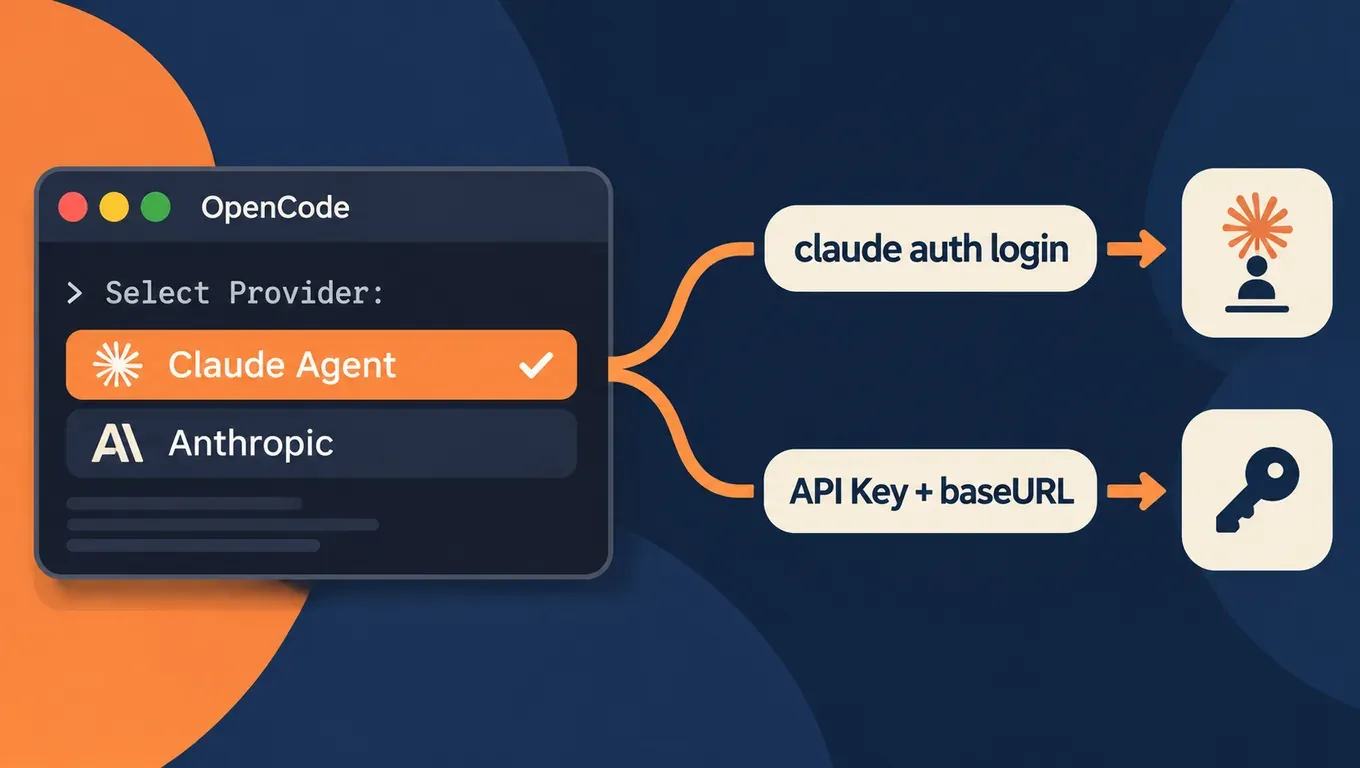
Short answer: since OpenCode 2.2.3, OpenCode ships a built-in provider called Claude Agent. Install Claude Code (2.1.248 or newer), run claude auth login in your terminal, then choose Claude Agent in OpenCode's /connect, and you get your Claude Code login and models inside OpenCode. The @opencode post announcing it ("you can now use your claude subscription in OpenCode") passed 620K views within a day.
It is not the only route. There have always been two ways to use Claude in OpenCode:
- Subscription login:
/connect→ Claude Agent. Usage counts against your Claude account. - API Key:
/connect→ Anthropic, or setbaseURLand a Key for theanthropicprovider inopencode.json. Usage is metered per Key.
Below: how the two differ, how to set up each one, and why your CLAUDE.md seems to stop working after the switch.
Create an API Key and share it across OpenCode, Claude Code, Codex and Cursor →
The two routes side by side
| Claude Agent (subscription login) | Anthropic (API Key) | |
|---|---|---|
| Versions | OpenCode 2.2.3+, Claude Code 2.1.248+ installed locally | Any OpenCode version |
| Sign-in | claude auth login in a terminal | Paste an API Key (or read it from an env var) |
| Who sends requests | Your local claude program, via the official Claude Agent SDK | OpenCode itself |
| Tools, permissions, history | All on the OpenCode side | All on the OpenCode side |
| CLAUDE.md | Claude Code's CLAUDE.md loading is turned off; rules come through AGENTS.md | OpenCode's own rule loading (AGENTS.md first) |
| Remote / hosted workspaces | Not supported; claude must run on the same machine | Supported |
| Temperature and other sampling options | Not supported | Supported |
Everything in this table comes from the provider's design doc claude-agent-provider.md and PR #58782 in the OpenCode repo.
Which one to pick:
- You already have a Claude plan and only run OpenCode on your own computer: use Claude Agent.
- You run OpenCode on servers, remote workspaces or CI, or you want OpenCode, Claude Code, Codex and Cursor to share one Key with one place to check usage records: use the API Key route.
- You can set up both and switch in
/models. Per the design doc, OpenCode's history is the source of truth: when you switch back to Claude Agent, everything it missed is sent to it as one message.
Route 1: Claude Agent subscription login (OpenCode 2.2.3+)
Step 1: check versions
opencode --version   # 2.2.3+
claude --version     # 2.1.248+
Upgrade if needed:
# OpenCode
opencode upgrade
# or: curl -fsSL https://opencode.ai/v2/install | bash
# or: npm i -g @opencode/cli@latest

# Claude Code
claude update
# or: curl -fsSL https://claude.ai/install.sh | bash
Claude Code must be 2.1.248 or newer. Per the design doc, OpenCode tells Claude Code to skip the context it normally adds each turn (nested CLAUDE.md files, skill lists, reminders), and that option only exists from 2.1.248.
Step 2: sign in to Claude Code in a terminal
claude auth login
claude --version
opencode
Run claude auth login in a terminal, not /login inside Claude Code. The 2.2.4 release notes specifically replaced a misleading /login hint with claude auth login.
Per the design doc, OpenCode never reads Claude Code's saved login. /connect only records that you picked this login method, and your local claude sends the requests itself. Any login claude supports works: a subscription, an API key or a cloud account.
Step 3: run /connect in OpenCode and choose Claude Agent
/connect
  → Claude Agent      (Claude Code login)
  → Anthropic         (API Key)
/models
Choose Claude Agent, not Anthropic. Anthropic is the API Key entry and only shows a box asking for a Key. From 2.2.4, choosing Claude Agent starts a guided setup: copy the claude auth login command, install Claude Code, verify the connection, then pick a model. In the desktop app you can also recover from Needs sign-in there.
If claude is not on your PATH, or you have several versions installed, point OpenCode at the right one:
export OPENCODE_CLAUDE_PATH="$HOME/.local/bin/claude"
opencode
What changes after the switch
Per the design doc:
- Claude Code's built-in tools are off. Claude uses OpenCode's tools, and every tool call goes through OpenCode's permission prompts. There is one permission system.
- Claude Code's own config is not read: settings in
~/.claudeand the project's.claudefolder, CLAUDE.md files, hooks, MCP servers and skills are all turned off; OpenCode uses its own versions. Auto compaction and auto memory are off too; OpenCode handles compaction. - The system prompt is Claude Code's own, plus OpenCode's instructions: AGENTS.md, skills, MCP instructions, the selected agent's prompt and so on.
- Not supported: Claude plan
/usage, cloud sessions and/teleport,/loop, auto mode, computer use and more./usagein OpenCode shows OpenCode Console usage. - Each session keeps one long-running
claudeprocess. It exits after 5 idle minutes, and the next message resumes the saved Claude session.
The terms question
The replies under the announcement are full of people asking whether this breaks Anthropic's terms:
- The official Claude Agent SDK overview says that unless previously approved, Anthropic does not allow third-party developers to offer claude.ai login or rate limits for their products, including agents built on the Claude Agent SDK, and points to API key authentication instead.
- OpenCode's own design doc lists, under "Open Questions", whether they need to discuss this with Anthropic or get approval.
- According to @grok, Anthropic has not publicly confirmed or approved this use; according to @schulzfel, it is built on the official Agent SDK; according to @jimmyyangrz, because it relies on the Claude login it is fine to tinker with but risky to build a workflow on.
As of publishing, Anthropic has not commented publicly on OpenCode's provider. For account-risk issues with subscription logins, see Why Claude accounts get banned and how to move Claude Code to an API Key.
Route 2: Anthropic provider + API Key
This route does not need Claude Code; OpenCode sends the requests directly. Here is the setup with an AICodeWith Key.
Step 1: put the Key in an environment variable
export AICODEWITH_API_KEY="YOUR_API_KEY"
Step 2: set baseURL in opencode.json
Use opencode.json in the project root, or the global ~/.config/opencode/opencode.json:
{
  "$schema": "https://opencode.ai/config.json",
  "provider": {
    "anthropic": {
      "options": {
        "baseURL": "https://api.aicodewith.ai/v1",
        "apiKey": "{env:AICODEWITH_API_KEY}"
      }
    }
  },
  "model": "anthropic/claude-sonnet-5-5"
}
Notes:
- OpenCode's
baseURLincludes/v1:https://api.aicodewith.ai/v1. Claude Code is different: itsANTHROPIC_BASE_URLishttps://api.aicodewith.aiwithout/v1. apiKeyreads{env:AICODEWITH_API_KEY}from the environment, so the Key never lands in project files or git.- You can also leave
apiKeyout and paste the Key via/connect→ Anthropic. - Use
/modelsto list the Claude models you can pick, and writemodelasanthropic/<model id>.
For keeping Keys and endpoints separate when several clients share one account, see Codex, OpenCode and WorkBuddy multi-tool setup. For the Claude Code side, see Claude Code third-party API setup.
Test run: OpenCode 2.2.5 fixes a small bug with an AICodeWith Key
We installed OpenCode 2.2.5 on a Linux machine, used the config above, and asked it to fix a slugify function. The project had an AGENTS.md that says to run the tests after changing any .py file:
# slug.py
def slugify(title):
    return title.lower().replace(" ", "-")

# test_slug.py
def test_basic(self):  self.assertEqual(slugify("Hello World"), "hello-world")
def test_punct(self):  self.assertEqual(slugify("OpenCode + Claude: Setup!"), "opencode-claude-setup")
def test_spaces(self): self.assertEqual(slugify("  a   b  "), "a-b")
Command:
opencode run -m anthropic/claude-sonnet-5-5 \
  "Fix slugify in slug.py so all tests in test_slug.py pass. Follow AGENTS.md. Reply with one short summary line."
It finished in about 11 seconds from Enter to exit. OpenCode read both files, rewrote slug.py, ran the tests as AGENTS.md asked, and all 3 tests passed. Real output:
> build · claude-sonnet-5-5
→ Read slug.py
→ Read test_slug.py
← Write slug.py
Wrote file successfully: slug.py
$ python3 -m unittest 2>&1 | tail -5
...
Ran 3 tests in 0.000s
OK
I rewrote `slugify` in `slug.py` to turn each run of non-alphanumeric characters into one hyphen and strip hyphens from both ends, and `python3 -m unittest` now passes all 3 tests.
The fixed code:
import re


def slugify(title):
    # Collapse every run of non-alphanumeric characters into a single hyphen
    return re.sub(r"[^a-z0-9]+", "-", title.lower()).strip("-")
We don't have a Claude subscription account to test with, so the Route 1 steps above follow OpenCode's release notes and design doc.
Create an API Key and run the opencode.json above yourself →
Moving CLAUDE.md to AGENTS.md
With Claude Agent, Claude Code's own CLAUDE.md loading is off, so project rules have to come through OpenCode. OpenCode's rule order (see the OpenCode Rules docs):
- If a project has both AGENTS.md and CLAUDE.md, only AGENTS.md is used.
- CLAUDE.md is only a fallback when there is no AGENTS.md.
- The global
~/.config/opencode/AGENTS.mdwins over~/.claude/CLAUDE.md.
The simplest fix: move the rules into AGENTS.md and leave a one-line import in CLAUDE.md, so OpenCode, Claude Code and Codex all read the same file:
git mv CLAUDE.md AGENTS.md
printf '@AGENTS.md\n' > CLAUDE.md
git add AGENTS.md CLAUDE.md
Claude Code pulls the content in through @AGENTS.md. For a fuller shared setup, see Sharing AGENTS.md between Claude Code and Codex.
Common errors
/connect only shows an API Key input box
You picked Anthropic, which is the API Key entry. For subscription login, go back and pick Claude Agent. If Claude Agent isn't in the list, OpenCode is older than 2.2.3: run opencode upgrade.
Claude Agent won't connect or asks you to sign in
Check in order: claude --version is 2.1.248+; you ran claude auth login in a terminal; claude is on your PATH (if not, set OPENCODE_CLAUDE_PATH). The provider is not available in remote workspaces or hosted OpenCode.
"不支持的请求路径" (unsupported request path)
On the API Key route, baseURL is missing /v1. When we deliberately set it to https://api.aicodewith.ai, this is what came back:
Error: 不支持的请求路径,请检查 API 地址是否正确
Change it to https://api.aicodewith.ai/v1.
"请在请求中提供有效的 API Key" (no valid API Key)
{env:AICODEWITH_API_KEY} resolved to an empty value, usually because you exported it in a different terminal or misspelled the name. The error we got after clearing the variable:
Error: 请在请求中提供有效的 API Key。
Editing CLAUDE.md has no effect
When the project already has AGENTS.md, OpenCode only uses AGENTS.md, and with Claude Agent, Claude Code's CLAUDE.md loading is off as well. Move the rules to AGENTS.md as shown above.
Hitting the plan limit
Per the design doc, Claude Code retries on its own and OpenCode does not retry for this provider, so a plan-limit error shows once. Wait for your allowance to reset, or switch to the API Key route in /models.