
At the end of the month, the most annoying part of expense reports is sorting invoices: a folder holds dozens of e-invoices, and you have to open each one to copy the number, date, and amount, while also making sure the same invoice wasn't downloaded twice and claimed twice.
This post covers how to organize invoices with AI: use Claude Code with the invoice-organizer skill to turn a folder of XML e-invoices into an Excel ledger with one sentence, automatically checking for duplicates and verifying amounts, without touching a single original file. We tested it on 6 XML e-invoices, and it finished in 63 seconds: it found a pair of duplicate invoices and one invoice whose total including tax was overstated by 0.50, and generated an xlsx ledger. Once the environment is connected to AICodeWith, it's ready to run.
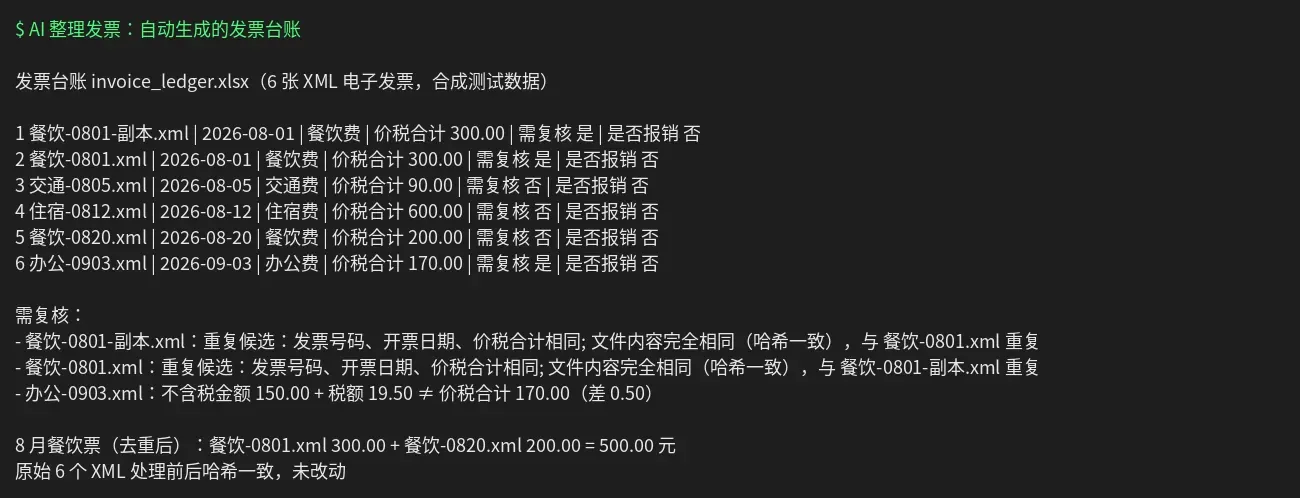
AI 整理发票:自动生成的发票台账
The test output: 6 invoices organized into a ledger, with the two duplicates and the one with mismatched amounts all marked "needs review," and "reimbursed" defaulting to "no" everywhere. The test used synthetic invoices.
Set up the environment first: connect AICodeWith in two steps
You only configure the environment once, and it works for every scenario afterward:
- Install Claude Code: Follow the official Claude Code installation docs to install it. In the terminal, enter
claude --versionand you're good if you see a version number. - Create a key and edit the global config: After logging in, go to "Key Management" in the console and click "Create Key." Then open the global config
~/.claude/settings.jsonand fill in the Base URL and Key underenv:
{
  "env": {
    "ANTHROPIC_BASE_URL": "https://api.aicodewith.ai",
    "ANTHROPIC_AUTH_TOKEN": "sk-你的Key"
  }
}
Don't add/v1to the end of the Base URL. After editing, reopen the terminal and runclaude. If you can chat normally, the connection works. For what each field means and more error handling, see "How to Connect Claude Code to a Third-Party API".
You also need to install the invoice-organizer skill once: download the skill archive from SkillHub and unzip it into Claude Code's skills directory:
mkdir -p ~/.claude/skills/invoice-organize
curl -L -o /tmp/invoice-organize.zip "https://api.skillhub.cn/api/v1/download?slug=invoice-organize"
unzip -o /tmp/invoice-organize.zip -d ~/.claude/skills/invoice-organize
Theslug=invoice-organizein the download URL is SkillHub's download ID, not the skill name, so copy it as is. The skill name isinvoice-organizer.
After unzipping, if you can see SKILL.md in the directory, the install worked.Once installed, the name shown in the skill list is invoice-organizer.Step 1: Organize with one sentence
Put the XML e-invoices into a 发票 folder and run claude from its parent directory. The request we used in testing:
用 invoice-organizer 技能整理 ./发票 文件夹里的发票,生成报销台账(查重、校验金额),然后找出 8 月的餐饮票。不要改动原始文件。
We recommend always including the line "don't modify the original files." In testing, the hashes of all 6 XML files were identical before and after processing, so the originals were not changed.
Step 2: What you get
It generated these files under 发票/发票台账/:
invoice_ledger.xlsx: The main ledger, one row per invoice, including invoice date, invoice number, seller, category, amount excluding tax, tax amount, total including tax, whether review is needed, and whether it has been reimbursed. Rows that need review are highlighted in light red.invoice_ledger.csv: The same content as a CSV, for importing into other systems.needs_review.csv: A list of invoices that need manual review.duplicate_candidates.csv: Suspected duplicate invoices.
Two problems found in testing:
| Problem | What it found | Recommendation |
|---|---|---|
| Duplicate invoice | 餐饮-0801.xml and 餐饮-0801-副本.xml have identical content and are the same invoice | Claim it only once; neither file was deleted |
| Amount mismatch | 办公-0903.xml The amount excluding tax of 150.00 plus tax of 19.50 is 169.50, but the invoice shows a total including tax of 170.00, which is 0.50 too much | Confirm with the issuer |
The August dining invoices came to 2 after deduplication, totaling 500.00.
It only organized the ledger. It didn't mark any invoice as "reimbursed" and didn't take it upon itself to generate a reimbursement package. Instead, it first asked whether to build one from those two August dining invoices. For anything involving money, asking first is the right call.
Step 3: Keep talking and let it continue
- "Generate a reimbursement package from these two August dining invoices."
- "Summarize the amounts by category for each month."
- "List the September invoices in a separate table."
- "After reimbursement, mark these as reimbursed."
Common errors and self-checks
| Symptom | What to do |
|---|---|
| The same invoice appears twice | Check duplicate_candidates.csv and keep only one per invoice number for reimbursement |
| Total including tax doesn't match | Check the notes in needs_review.csv and confirm with the issuer |
| Worried the original files were changed | Put "don't modify the original files" in your request, and after organizing, ask it to compare the hashes before and after processing |
| 401 or request failed | Check that the Key is complete and the Base URL is https://api.aicodewith.ai (without /v1), then reopen the terminal after editing |
FAQ
Does automatic invoice ledger generation modify the original invoices?
Not if you state "don't modify the original files" in your request. In testing, the hashes of the 6 XML files were the same before and after processing, the originals were unchanged, and the duplicate file wasn't deleted.
Which invoice formats are supported?
We tested XML e-invoices.
How long does it take?
In testing, 6 XML invoices took 63 seconds from organizing to producing the ledger. More invoices take longer.
Does it decide on its own which invoices can be reimbursed?
It won't make that decision for you. "Reimbursed" defaults to "no" throughout the ledger, and duplicate or mismatched invoices are marked as needing review, so you decide how to handle them.
Can the ledger go straight to finance?
The ledger is a standard xlsx and csv that you can open directly. Before handing it to finance, deal with the invoices marked "needs review."
Related reading
- If you need further analysis on the ledger, see "AI for Excel: Clean Up a Messy Spreadsheet with One Sentence".
- To do Q&A against your own reimbursement policy, see "Local Q&A over Your Own Documents".
- To write your reimbursement rules as standing rules, see "How to Write CLAUDE.md for Claude Code".
Sign up for AICodeWith → View all models →
References
- Claude Code Skills: code.claude.com/docs/en/skills
- Claude Code installation: code.claude.com/docs/en/setup
Similar scenarios
For the full usage of invoice organizing and more ideas, see the AI invoice organizing scenario page.