The short version: the safest way to clean up dead code with Codex is to have it produce a report first, with evidence for each item, then have a human confirm, then delete one item per PR and run the tests.
We tested two of the prompts on the open-source project jmespath.py using an AICodeWith Key: report-only took 133 seconds and found 8 pieces of code that can be deleted; direct cleanup took 43 seconds and deleted 7, with all tests passing. We checked every item by hand and nothing was deleted by mistake.
How OpenAI's Engineers Do It
In the OpenAI blog post “Maintaining software with the GPT-6 family”, the engineer in charge of the experimentation platform shared their experience using Codex for code maintenance:
| What was done | Result |
|---|---|
| 5 engineers part-time, about two weeks | Merged 1,400+ PRs, deleted 800,000+ lines of code |
| Cleaning up dead code in one service | Container image shrank from 3.31GB to 1.72GB, 48% smaller |
| Cleaning up dead code in tests | Deleted about 400 visual snapshots |
| Cleaning up a feature flag marked “permanent” | Estimated 0.42% CPU saved on the main service |
The last example deserves its own mention. One feature flag was mapped onto all the other features, causing a lot of extra CPU overhead. The model found the problem and calculated the CPU cost, but because the flag was marked “permanent” in the backend and might still serve an operational purpose, it didn't delete it outright and instead handed the decision to a human. The flag was only removed after a human reviewed it.
This is exactly the right division of labor for dead code cleanup: AI finds it and provides evidence, and humans make the call.
They also compared different models using the same prompt. In the official tests, GPT-6.1 Sol found nearly as many issues as GPT-6 Astra, and at lower cost.
The 3 Prompts (Adapted Version)
The original prompts target OpenAI's internal tools (Slack, the Statsig experimentation platform). Below are generic versions you can use as-is.
Prompt 1: Find and Delete Dead Code
帮我找出并清理这个仓库里的死代码。删之前先确认它确实没被用到:搜调用方、看 git 历史和 AGENTS.md 的规则。
每删一处都说明理由。删完运行 AGENTS.md 里的测试命令,测试必须全部通过。不要提交 git,改动留在工作区给我审。
The original also had the model check Slack and Statsig to confirm the code was really unused. If your Codex can connect to your team's chat history or feature flag platform, you can add that line back.
Prompt 2: Clean Up Stale Experiments and Feature Flags
找出项目 {A} 中与过期、取值固定的功能开关或已废弃实验相关的死代码,并删除。
核对开关平台上的实际配置,查看 git 历史和相关的 PR。
保持线上行为不变,保留运维保护措施和用作应急开关(kill switch)的开关。
忽略 SDK 的默认回退值和本地覆盖配置。
每处清理单独建一个小的草稿 PR,在说明里附上该开关的配置链接。
Two rules matter most: production behavior must not change, and emergency switches always stay. Each cleanup is one small PR, which is easy to review and easy to roll back if something goes wrong.
Prompt 3: Scan the Whole Repo and Only Report
/goal 扫描整个仓库,找出所有可以安全删除、且不改变任何对外行为的死代码:没人调用的函数和类、只为旧版本保留的兼容代码、永远走不到的分支、没人引用的文件。
要查间接用法:通过导出、字符串拼出来的名字、反射、测试和脚本里的调用。公开 API 和兼容/应急用的兜底代码要保留,只列出来让人判断。
只输出一份 Markdown 报告,写到 cleanup-report.md:按文件分组,每条写清文件和行号、证据、建议(删除 / 保留待人工确认)、风险。
不要修改任何代码文件。
This one suits the first time you take over an old repo: see what can be deleted first, then decide where to start. The original version also sorts by CPU cost, handling the most resource-hungry spots first.
Tested: Running Prompts 3 and 1 on jmespath.py
The test repo is jmespath.py, an open-source Python library maintained since 2013, with some leftovers from early compatibility with older Python versions. The test used Codex CLI 0.162.1 with the model gpt-6.1-sol, called through an AICodeWith Key.
| Prompt | Time | Result | Manual check |
|---|---|---|---|
| 3: report only | 133 seconds | 110-line report, 8 items recommended for deletion, everything else marked “keep, needs human review” | All 8 were genuinely unused, no false positives |
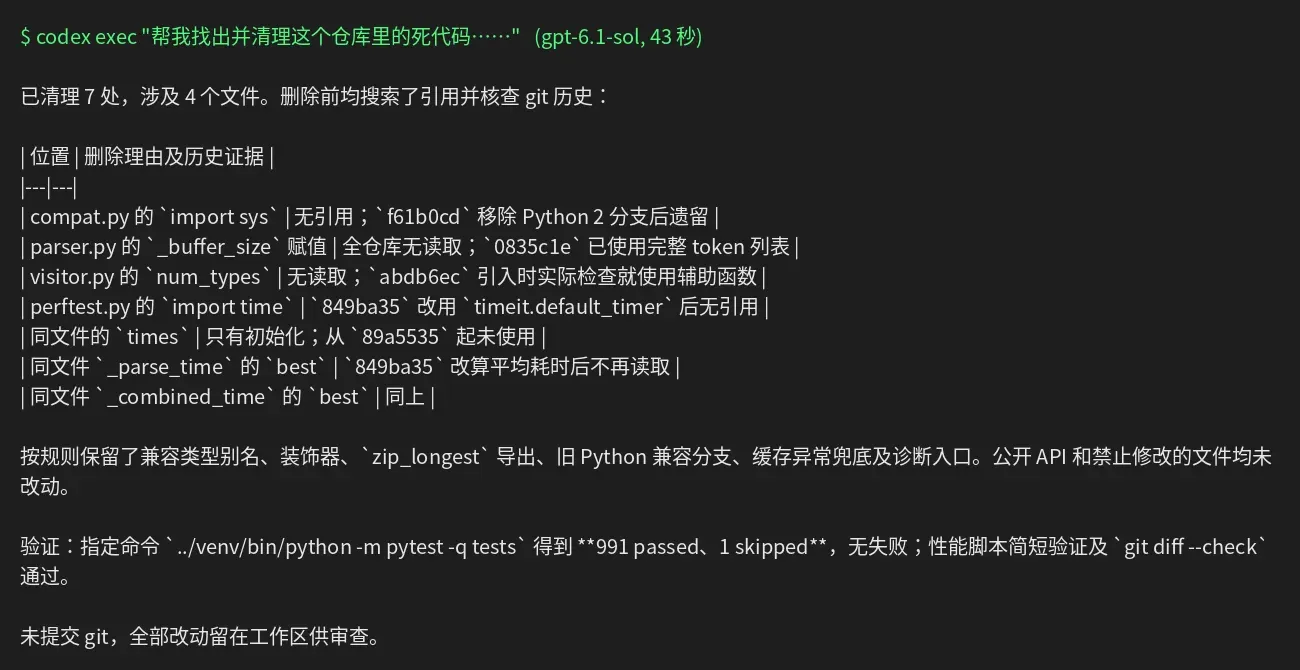
| 1: direct cleanup | 43 seconds | Deleted 7 items across 4 files; 991 tests passed, 1 skipped | All 7 were genuinely unused, nothing deleted by mistake |
The 8 items the report recommended deleting include: a test helper that references a class that no longer exists, an unused import, a variable that is assigned but never read, and an unused constant in a test file. We searched the whole repo for each one to confirm.
The report was also restrained: public APIs, branches for older-version compatibility, error fallbacks, command-line scripts, and performance test data were all listed as “keep, needs human review” rather than swept away.
After Prompt 1 finished, Codex gave the cleanup notes below, each with the git commit after which the code became dead:
codex-dead-code-run
The two runs disagreed on two items:compat.py'simport sysandparser.py's_buffer_size, which report mode marked “needs human review” because they sit in a compatibility module or are class attributes, while cleanup mode deleted them outright. We checked both and confirmed nothing in the repo reads them, and the tests pass, but this is exactly why a report-first, human-decides flow is worth it.
Hands-on: Step 1, Create a Key
Step 2: Configure config.toml Globally
Edit ~/.codex/config.toml:
model_provider = "aicodewith"
model = "gpt-6.1-sol"

[model_providers.aicodewith]
name = "aicodewith"
base_url = "https://api.aicodewith.ai/chatgpt/v1"
wire_api = "responses"
experimental_bearer_token = "sk-你的Key"
The key goes directly inexperimental_bearer_token, so you don't needenv_key, or auth.json. For field details, see “Codex config.toml Configuration Guide” and “Connecting Codex to AICodeWith”.
Step 3: Write AGENTS.md to Mark the Off-Limits Areas
In the project root, create AGENTS.md. Codex reads it on every run. When cleaning up code, the most important thing is to state clearly what must not be touched:
# AGENTS.md
- 测试命令:pytest -q tests
- 不要改动:tests/compliance/、docs/、setup.py 里的版本信息
- 公开 API(包的 __init__.py 导出的名字)即使仓库里没人调用也要保留
- 用于兼容或应急的开关、兜底代码一律保留,只列出来让人判断
In testing, Codex did follow these rules: it left public APIs and compatibility code alone, and ran the tests with the commands written there.
Step 4: Report First, Human Confirms, Then One PR Per Item
- Use Prompt 3 to produce the report, read-only
- Review the report yourself and pick the items you're sure can go
- Clean up with Prompt 1 or 2, one small PR per item
- Run the full test suite before merging
On a large repo, you can have Codex split the report by directory and hand the pieces to multiple subagents in parallel. See “Splitting Tasks Across Codex Subagents”.
Step 5: Run Tests to Verify
Always run tests after deleting. Our prompts say outright “after deleting, run the tests; all must pass,” and Codex runs them itself. Run them once more by hand before merging:
pytest -q tests
For the full workflow of having Codex fix a bug and run tests, see “Codex Fixing a Real Bug and Running Tests”.
FAQ
Which model works best for cleaning up dead code?
We used gpt-6.1-sol in testing, and a mid-sized repo got its report in about two minutes. In the official tests, Sol and Astra performed about the same, with Sol cheaper. For a detailed comparison, see “GPT-6.1 Sol vs. Claude Opus 5.5”.
Will Codex delete code that's still in use?
It can. That's why you should follow the order of report first, human confirmation, then cleanup, and spell out the off-limits areas in AGENTS.md. The official blog also notes that deleting code through static analysis has caused incidents in the past: reflective calls and code paths kept for emergencies are easily misjudged as unused.
codex exec hangs with no response?
We hit this one in testing: codex exec waits for standard input, so if you call it from a script without providing any, it hangs forever. Add < /dev/null to the end of the command and it works:
codex exec "你的提示词" < /dev/null
What if scanning a big repo returns a 429?
Too many requests in a short window trigger rate limiting. For how to handle it, see “Codex 429 Too Many Requests”.