The short answer: Installing a Claude Code plugin takes just two commands. The official knowledge-work-plugins marketplace bundles plugins by role, including sales, customer support, finance, and legal. Once installed, they work right away, even without a CRM connection.
We tested with an AICodeWith Key on a brand-new machine (Claude Code 2.1.302):
- Adding the marketplace and installing the sales plugin took under 3 seconds combined, and throughout the process it never asked us to log in to an Anthropic account
- After installation, type
/sales:to see 36 sales commands - With no CRM, calendar, or mailbox connected, and given only a meeting description and a customer list,
/sales:call-preptook 45 seconds to generate a pre-meeting briefing, and it separately listed "what information it couldn't get"
Here's the order we'll follow: configuring the Key, installing, choosing plugins by role, and test results.
What knowledge-work-plugins is
knowledge-work-plugins is an open-source plugin marketplace from Anthropic on GitHub, built mainly for Claude Cowork and also compatible with Claude Code. Each plugin maps to a role and bundles the skills and external tool connections (MCP connectors) that role commonly uses. Take the sales plugin: installing it is like adding an AI sales assistant to Claude Code.
The repo homepage lists 11 plugins built by Anthropic: productivity, sales, customer-support, product-management, marketing, legal, finance, data, enterprise-search, bio-research, and cowork-plugin-management. As of October 18, 2026, the marketplace actually offers more that you can install, including engineering, human-resources, operations, design, and small-business, plus a batch of plugins from partners.
Plugins consist entirely of Markdown and JSON files, with no code to compile. To adapt one to your company's workflow, just edit the text inside. For how skills themselves work, see "How to Use Claude Code Skills".
Step 1: Create an API Key
Create a Key in the AICodeWith console. You'll need it when configuring Claude Code.
Step 2: Configure the Key in settings.json
Put the endpoint and Key into the global config file ~/.claude/settings.json under the env block, so there's no need to run export in the terminal:
{
  "env": {
    "ANTHROPIC_BASE_URL": "https://api.aicodewith.ai",
    "ANTHROPIC_AUTH_TOKEN": "sk-你的Key"
  }
}
Once they're in settings.json, they apply every time you open a terminal. When installing plugins, Claude Code appends fields such asenabledPluginsand other fields to this file, without overwriting theenvyou wrote. For more ways to configure it, see "How to Connect Claude Code to a Third-Party API".
First, check your version:
claude --version
Step 3: Install the plugin
Option 1: Two commands (works on any version)
Add the marketplace first, then install the plugin you want:
claude plugin marketplace add anthropics/knowledge-work-plugins
claude plugin install sales@knowledge-work-plugins
If you see the two lines below, it's installed:
✔ Successfully added marketplace: knowledge-work-plugins (declared in user settings)
✔ Successfully installed plugin: sales@knowledge-work-plugins (scope: user)
Option 2: One command (2.1.292 and later)
Starting with Claude Code 2.1.292, claude plugin install can add the marketplace at the same time:
claude plugin install sales --marketplace anthropics/knowledge-work-plugins
Note: don't add @knowledge-work-plugins after the plugin name here. In our test, this command finished in 2.2 seconds with the same result as Option 1.
Confirm the install
claude plugin list
Look for sales@knowledge-work-plugins in the list with a status of enabled and you're set. Then open Claude Code and type /sales:call, and you'll see /sales:call-prep in the completion list:
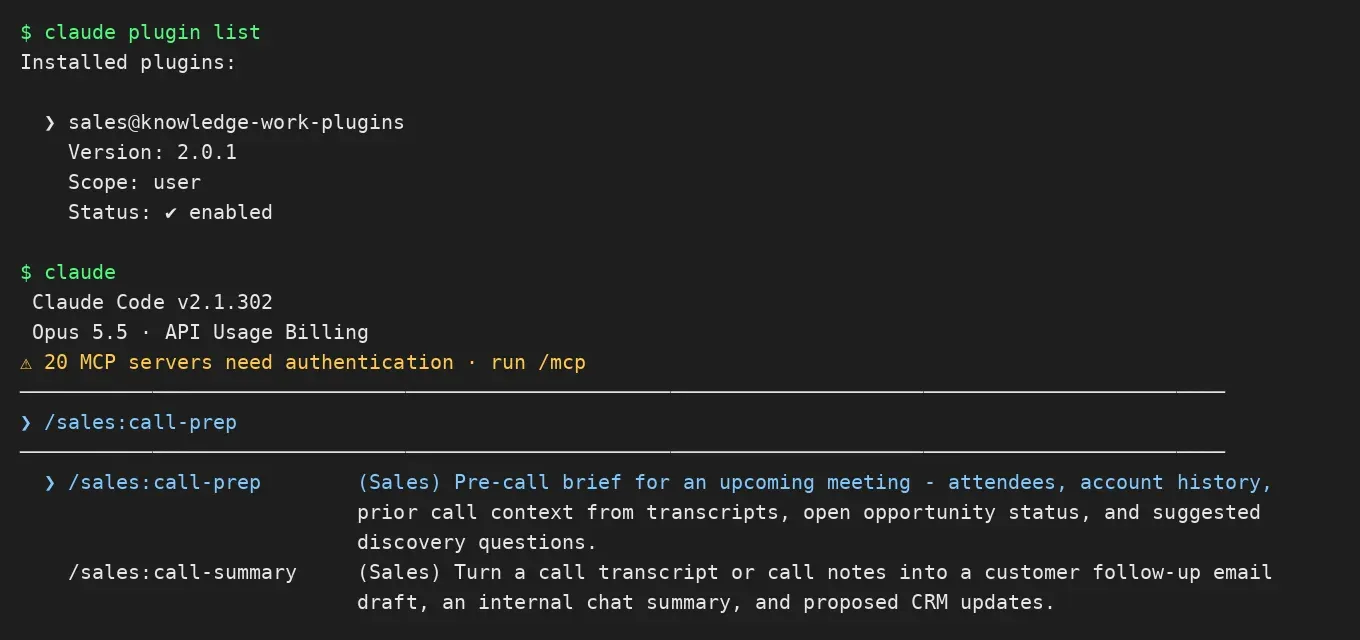
claude-code-plugin-install-sales
Adding a public marketplace just clones a repository from GitHub, so Claude Code doesn't need an Anthropic account login. We configured only the AICodeWith Key throughout, and no login prompt appeared during installation or later use.
Inside a Claude Code session, you can also use/pluginto open the plugin management UI, where you can install, remove, and disable plugins by selecting them. When running scripts withclaude -p,/pluginisn't available, so use theclaude plugincommand above.
Choosing plugins by role
To install a plugin for another role, replace sales with the plugin name, for example:
claude plugin install customer-support@knowledge-work-plugins
| Role | Plugin | Example commands |
|---|---|---|
| Sales | sales | /sales:call-prep pre-meeting briefing, /sales:draft-outreach write outreach emails, /sales:account-research research accounts, /sales:handle-objection handle objections, /sales:pipeline-review review the sales pipeline |
| Customer support | customer-support | /customer-support:ticket-triage ticket triage, /customer-support:draft-response draft replies, /customer-support:kb-article turn solved issues into knowledge base articles |
| Finance | finance | /finance:reconciliation reconciliation, /finance:journal-entry journal entries, /finance:variance-analysis variance analysis |
| Data analysis | data | /data:write-query write SQL, /data:analyze analyze data, /data:create-viz build charts |
| Marketing | marketing | /marketing:draft-content write content, /marketing:campaign-plan campaign planning, /marketing:seo-audit SEO checks |
| Legal | legal | /legal:review-contract review contracts, /legal:triage-nda NDA triage |
| Product management | product-management | /product-management:write-spec write spec docs, /product-management:roadmap-update update the roadmap |
| HR | human-resources | /human-resources:interview-prep interview prep, /human-resources:draft-offer draft offers |
| Personal productivity | productivity | /productivity:task-management task management |
If you want to use the data plugin to work with spreadsheets, you can also start with the scenarios we've put together: AI Data Analysis. The sales plugin's /sales:call-summary can turn meeting notes into follow-up emails. For a similar approach, see AI Meeting Minutes.The sales plugin has 36 commands in total. Each command is really a skill, invoked using the /插件名:技能名 format. If you don't type a command and just say, "Help me prepare for tomorrow's meeting with X company," Claude Code will pick up the matching skill automatically.
Testing the Claude Code sales plugin: running /sales:call-prep without a CRM
Test setup
- Environment: a fresh install of Claude Code 2.1.302, configured with only an AICodeWith Key, using the default Opus 5.5 model
- No CRM, calendar, mailbox, or chat tool connected
- We provided two files:
meeting.txtdescribes tomorrow's meeting time, the attendees, the customer's two concerns from the last meeting, and what we promised to bring;customers.csvis a customer list of 3 companies (company, industry, stage, last contact date, notes), all test data we made up
Command entered:
/sales:call-prep 帮我准备明天和杭州云栈科技的会。会议情况见 meeting.txt,客户名单见 customers.csv。我没有连接任何 CRM、日历或邮箱。用中文输出简报,并把简报保存为 call-prep-brief.md。
Results
| Test item | Time | Result |
|---|---|---|
| /sales:call-prep pre-meeting briefing | 45 seconds | Generated a Chinese-language briefing with complete content, and every item cites its source |
| /sales:draft-outreach follow-up email | 33 seconds | Generated a Chinese-language email draft without sending it, leaving placeholders for missing information |
The briefing generated by call-prep includes these sections:
- Data source notes: It opens by stating that it is based only on meeting.txt and customers.csv, with no CRM, calendar, or email connected. That means no opportunity links, call records, or email history, and the attendee list can't be checked against a calendar
- Meeting info and customer overview: It pulled only this company's row from the customer list. The other two companies didn't get mixed in
- Attendees: It flagged the procurement manager attending for the first time as a "new face," and from the note "procurement requires a bidding process" it inferred what he is likely to care about
- Open items: The first item is "the deployment plan promised last time must be delivered this time"
- Meeting plan: The meeting goal, a 45-minute agenda, 5 questions to ask, likely objections, and ways to respond
- Information still missing: It lists trial data, the full minutes from the last meeting, the expected close date, and whether there are competitors, and recommends filling these in before the meeting
The briefing also includes a very practical line: if the customer hasn't said which sales methodology they use, it falls back on a generic framework and labels that a "default assumption." If you have your own framework, tell it and it will switch.
For the draft-outreach run, we had it write a follow-up email to the IT director of another company on the customer list. Again, it first listed which information it used and which it didn't. The list only said "wants to know if it can integrate with ERP," so the email doesn't promise integration. It only asks to talk through the specific scenario first. Anything not on the list, such as the recipient's email address, the trade show name, and the signature, was left as a placeholder like [收件邮箱] rather than made up.
This matches what the sales plugin's documentation says: every skill works without external tools connected, and when something isn't connected, it tells you clearly what it used and what it can't see.
Do unconnected MCP servers throw errors?
They don't get in the way. The sales plugin's .mcp.json ships with more than 20 preconfigured connectors, including Slack, HubSpot, Salesforce, and Gmail. If you connect none of them, Claude Code just shows one extra yellow line on startup:
⚠ 20 MCP servers need authentication · run /mcp
There's no popup, and startup doesn't hang. Both commands above ran in exactly this state. When you want to connect a tool later, type /mcp in a session, select it, and sign in.
Connectors can read and write, for example updating CRM records or sending email. Before you connect one, think about how much access to give it. The discussion of extension boundaries in "Codex Plugin、Skill、MCP、Internet Access 怎么选" is a useful reference, since the same reasoning applies.
FAQ
Do I need to sign in to an Anthropic account to install plugins?
No. Adding a public plugin marketplace just clones a repository from GitHub. We used only an AICodeWith Key throughout and never saw a login prompt. When a skill in a plugin calls a model, it uses the address and Key you configured in settings.json.
Do plugins update automatically?
By default, knowledge-work-plugins does not auto-update. To update, run:
claude plugin update sales@knowledge-work-plugins
You can also type /plugin in a session, go to the Marketplaces tab, select knowledge-work-plugins, and turn on auto-update.
I installed it, but typing /sales: does nothing?
claude plugin install Plugins installed this way only load the next time Claude Code starts. For a session that's already open, run /reload-plugins.
How do I remove one I don't want?
claude plugin uninstall sales@knowledge-work-plugins
If you just want to stop using it for now, disable it with claude plugin disable sales@knowledge-work-plugins and bring it back later with enable.
Can I adapt it to my company's workflow?
Yes. Each skill in a plugin is a single SKILL.md file. Edit the steps and wording inside, or follow the same structure to build your own. For how to write one, see "怎么写 SKILL.md".