
Presentation due tomorrow and your deck is still blank? Most web-based AI tools give you an outline, an image, or a web page, but can't export a .pptx you can keep editing, so you end up copying and pasting slide by slide.
This post covers an easier way: use Claude Code with Anthropic's official pptx Skill to generate a real .pptx file from one sentence, then edit it in plain language. We ran the whole workflow ourselves: one sentence produced 6 slides, one revision turned it into 7, every slide had speaker notes, and the Chinese content rendered correctly. From setting up the environment to having the file in hand took about 10 minutes.
claude-code-ai-ppt
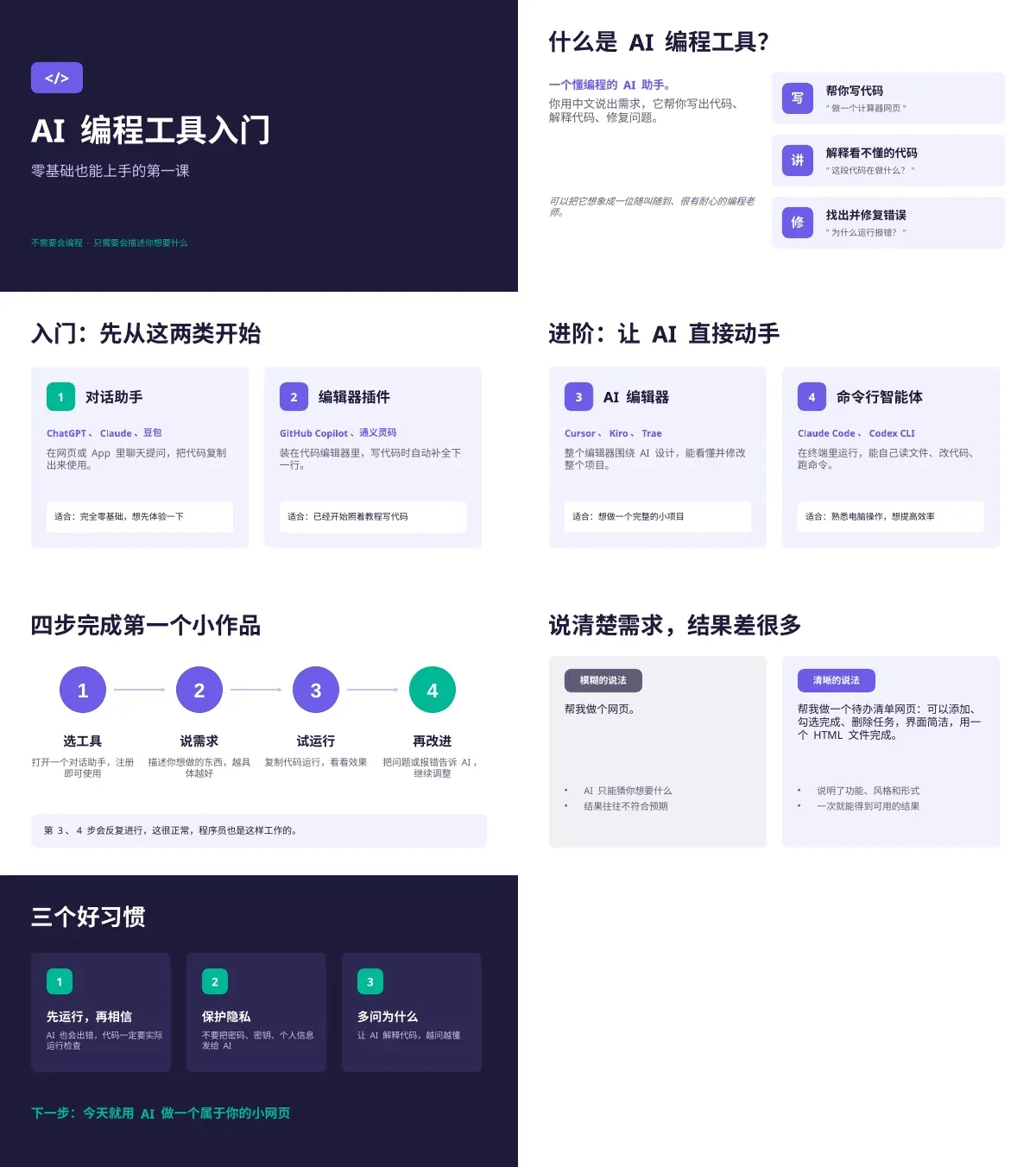
Above are the 7 slides from our test run (the revised version), on the topic "Getting Started with AI Coding Tools."
Get It Running: Three Steps to Set Up the Environment
You only need to set up the environment once. Here are the minimum steps to get it running:
- Install Claude Code: follow the official Claude Code installation docs to install it, then run
claude --versionin the terminal. If you see a version number, you're set. You also need Node.js and Python 3 locally. To preview the deck as images, install LibreOffice too. - Connect to AICodeWith: after logging in, go to "Key Management" in the left sidebar of the console (aicodewith.ai/zh/dashboard/api-keys) and click "Create Key." Then, in the
~/.claude/settings.json'senvsection, set"ANTHROPIC_BASE_URL": "https://api.aicodewith.ai"(don't add/v1) and"ANTHROPIC_AUTH_TOKEN": "你的 Key". For details, see Configuring the API for Claude Code. - Install the pptx Skill: run
claude plugin marketplace add anthropics/skillsin the terminal, then runclaude plugin install document-skills@anthropic-agent-skills. This skill pack includes pptx, as well as docx, xlsx, and pdf.
Step 1: Generate a Deck from One Sentence
Create an empty folder and run claude in it. State your needs clearly in one go: topic, audience, number of slides, sections to include, style, and the filename to save as. For example:
用 pptx skill 帮我做一份 6 页的 PPT,主题是「AI 编程工具入门」,面向零基础的同事。
包含:封面、什么是 AI 编程工具、常见工具类型、上手步骤、提示词对比、注意事项。
风格简洁,深色封面,每页不超过 5 个要点。保存为 ai-coding-intro.pptx。
Claude Code automatically invokes the pptx Skill, writes a generation script, runs it, and leaves a .pptx file in the current folder. In our test, a similar one-sentence prompt produced 6 slides directly.

claude-code-ai-ppt-cover-slide
Cover slide: the title, subtitle, and footer hint are all editable text, not images.
If the run hits a missing npm package, or the system can't find the python command, Claude Code finds a workaround on its own. We ran into both cases in testing, with no manual intervention.
Prompts you can use as-is:
- Turn this
会议纪要.mdinto a 6-slide briefing deck, with a conclusion-style title on each slide. - Based on
销售数据.xlsx, build a monthly sales report deck with charts. - Build a 10-slide course deck on "Intro to Python: Variables and Loops," aimed at absolute beginners.
Step 2: Keep Talking and Let It Revise
You don't need to start over after generation. Just keep making requests in the same session. In our test we made only one revision: split the overcrowded slide into two and add speaker notes to every slide. After the change it had 7 slides, and every one had notes.

claude-code-ai-ppt-slide-3
After the split, "Getting Started: Begin with These Two Types": the four categories of tools that were crammed onto one slide are now divided across a beginner slide and an advanced slide.

claude-code-ai-ppt-slide-6
The slide "Be Clear About What You Need, and Results Differ a Lot" uses a side-by-side comparison layout, and the Chinese typesetting looks fine.
Common revision requests:
- "Slide 3 is too crowded. Split it into two slides."
- "Add speaker notes to every slide, about 100 words each."
- "Change the overall color scheme to our company's primary color, #FF6A00."
- "Convert each slide to an image so I can see how it looks." (requires LibreOffice installed locally)
To use your company's own template: Anthropic's pptx Skill instruction file (SKILL.md) states that it supports generating from template.pptx or .potx templates. Just tell it the template filename.
Tip: change only one or two things at a time, and say which slide and what you want it to look like. That gives the most reliable results.
Common Errors and Self-Checks
| Symptom | What to do |
|---|---|
| 401 or request failure | Check that the Key is complete and the Base URL is https://api.aicodewith.ai (without /v1), then reopen the terminal |
| document-skills not found | Re-run claude plugin marketplace add anthropics/skills, then install again |
| Want to see the result but image preview won't open | Install LibreOffice, then ask it to "convert to images" |
| Slides too crowded, too much text | Limit it in the prompt to "no more than 5 points per slide," or ask it to split slides |
For more on configuring Claude Code with third-party APIs and handling errors, see "How to Connect Claude Code to a Third-Party API". To turn your team's standing requirements into long-term rules, see "How to Write CLAUDE.md for Claude Code". Not sure which model to use? See "Which Model to Use with Claude Code".
View Pricing → View All Models →
FAQ
How is making slides with Claude different from web-based AI?
Web-based tools usually give you only an outline, images, or a web page. Here, what's generated is a .pptx file saved on your computer, and the text and shapes remain editable slide by slide.
How long does it take to make a deck?
In our test, it took about 10 minutes from installing the environment to having the revised 7-slide file. Once the environment is set up, each later run only needs your request and revisions.
Does it support Chinese?
Yes. All 7 slides in our test were in Chinese, and the titles, bullet points, and notes all came out fine.
Can it add speaker notes automatically?
Yes. Just say "add speaker notes to every slide." In our test, all 7 slides had notes after the revision.
Can I use my company's own PPT template?
The pptx Skill's SKILL.md states that it supports generating from template.pptx or .potx templates.
How is it billed?
You're billed by the Tokens actually consumed, deducted from your balance. More slides and more revisions mean more consumption, and the usage log in the console is the source of truth. For per-model prices, see the pricing page.
An English auto mode billing notice appears while it runs. Do I need to deal with it?
No. It doesn't affect generation.
Can I only use Claude Code?
Skills is an open format, and other Agents that support Skills can use similar skills. For how to use Skills with Codex, see "How to Use Codex Skills".
Sign up for AICodeWith and make your first AI deck in 10 minutes → Create an API Key →
References
- Anthropic's official pptx Skill: github.com/anthropics/skills/tree/main/skills/pptx
- Claude Code installation: code.claude.com/docs/en/setup
- Claude Code Skills: code.claude.com/docs/en/skills
Related Use Cases
For more ways to make decks with AI and the full workflow, see the AI slide-making use case page.