When you want to keep up with the latest papers in a field, two things eat the most time: scrolling through new papers on arXiv, then reading abstracts and taking notes one paper at a time. This post covers how to read papers with Claude Code: one prompt has it call the official arXiv API, pick the most relevant papers to read closely, and save Chinese notes locally.
We ran the whole thing end to end: it found 5 new papers from 2026 and read 3 of them closely to write Chinese notes. We opened all 5 paper links one by one to check them, and every one opened with a matching title. The whole process took 281 seconds. No third-party key is needed; Claude Code connected to AICodeWith is enough to run it.
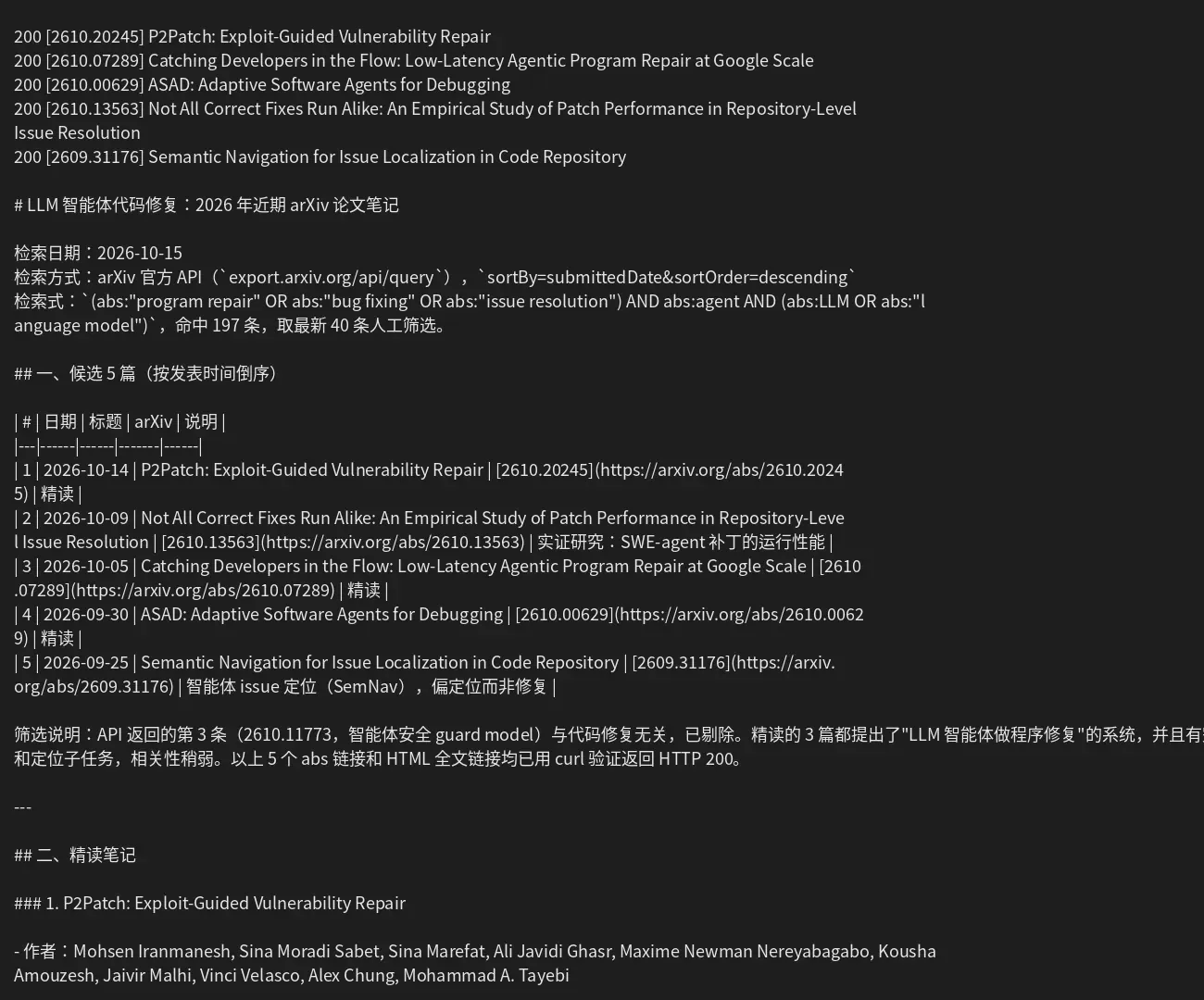
Claude Code 读论文:5 篇 arXiv 论文链接复核与中文笔记
Measured result: we re-checked all 5 arXiv links one by one and each returned 200, with titles matching the notes. Below is the beginning of the papers-notes.md that Claude Code wrote, including the search method, the search query, and a table of candidate papers.
Set up the environment first: connect AICodeWith in two steps
You only configure the environment once, and it works for every scenario afterward:
- Install Claude Code: Follow the official Claude Code installation docs to install it. Type
claude --versionin a terminal, and you're good if you see a version number. - Create a key and edit the global config: After logging in, go to "Key Management" in the console and click "Create Key." Then open the global config
~/.claude/settings.jsonand fill in the Base URL and key underenv:
{
  "env": {
    "ANTHROPIC_BASE_URL": "https://api.aicodewith.ai",
    "ANTHROPIC_AUTH_TOKEN": "sk-你的Key"
  }
}
Do not add/v1to the end of the Base URL. After editing, reopen the terminal and runclaude. If you can chat normally, the connection works. For what each field means and more error handling, see "How to Connect Claude Code to a Third-Party API".
Step 1: Search and read closely with one prompt
Create a new empty folder and run claude inside it. State the topic, the number of papers, the source, and the note format all at once. The prompt we used in our test:
帮我在 arXiv 上找 2026 年最近发表的、关于"LLM 智能体代码修复(automated program repair with LLM agents)"的 5 篇论文。用 arXiv 官方 API 检索,按发表时间排序。挑最相关的 3 篇,把摘要读一遍(有 HTML 全文就读引言和结论),给每篇写中文笔记:标题、作者、arXiv 链接、发表日期、解决什么问题、方法、主要结果(带数字)、局限。最后保存成 papers-notes.md,并写一段三篇之间的对比。不要编造论文,链接必须能打开。
Replace the research topic in quotes with your own and it works as is. Three lines in the prompt matter most:
- "Search with the official arXiv API, sorted by submission date": This makes it fetch real, up-to-date results instead of listing papers from memory.
- "If there's an HTML full text, read the introduction and conclusion": The notes go beyond the abstract.
- "Don't make up papers, and links must open": This gives it a clear bottom line, and it will verify the links on its own.
Step 2: What it actually did
In our test, Claude Code completed the task in the following order, with no manual intervention along the way:
- It built a search query with the official arXiv API (
export.arxiv.org/api/query,sortBy=submittedDate), requiring the abstract to contain both "program repair / bug fixing / issue resolution" and "agent + LLM." - It filtered the latest batch of results, dropped one off-topic paper, and kept 5 candidates.
- It picked the 3 most relevant papers, read the abstracts plus the introduction, evaluation, and conclusion of the HTML full text, and wrote Chinese notes.
- It wrote a comparison across the three papers, saved it as
papers-notes.md, and used curl to check whether the links in the notes would open.
The 5 candidates it ended up with:
| Publication date | Paper | Read closely? |
|---|---|---|
| 2026-10-14 | P2Patch: Exploit-Guided Vulnerability Repair | Read closely |
| 2026-10-09 | Not All Correct Fixes Run Alike | Candidate |
| 2026-10-05 | Catching Developers in the Flow: Low-Latency Agentic Program Repair at Google Scale | Read closely |
| 2026-09-30 | ASAD: Adaptive Software Agents for Debugging | Read closely |
| 2026-09-25 | Semantic Navigation for Issue Localization in Code Repository | Candidate |
Each close-reading note includes the title, authors, link, date, the problem being solved, the method, main results, and limitations. The last section is a side-by-side comparison of the three papers. It also flags inconsistencies in the original text on its own, such as the same system being named differently in the abstract and the body.
The experiment numbers in the notes were extracted from the papers by Claude. If you plan to cite them in a report or paper, go back to the original and verify them. We recommend a human always does this step.
Step 3: Keep asking follow-ups
Once the notes are generated, you can keep going in the same session:
- "Read paper 2 closely too and add it to the notes."
- "Put the methods of the three papers into a comparison table."
- "Keep only the papers with open-source code."
- "Switch to papers from the last 30 days on RAG evaluation and make another set."
An error we hit in testing: curl: (28) Connection timed out
On the first request to the arXiv API, Claude Code used an http address and timed out after 60 seconds:
curl: (28) Connection timed out after 60002 milliseconds
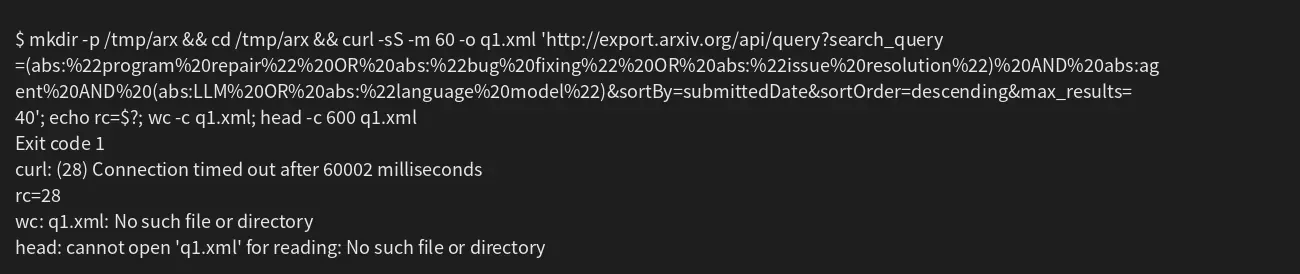
Claude Code 读论文:arXiv 接口 curl 超时报错
Raw output from the timed-out first request to http://export.arxiv.org.It judged on its own that this was a connection problem, switched the address to https, and raised the timeout to 90 seconds, and the next request succeeded. If you hit the same error when calling the arXiv API yourself, you can handle it the same way:
- Use
https://export.arxiv.org/api/query, not http. - Set a longer timeout with curl's
-moption, such as-m 90. - Don't fetch too many results at once; keep
max_resultsto a few dozen.
Common errors and self-checks
| Symptom | What to do |
|---|---|
| curl: (28) Connection timed out | Switch to the https address, raise the timeout, and retry |
| 401 or request failed | Check that the key is complete and that the Base URL is https://api.aicodewith.ai (without /v1), then reopen the terminal after changing it |
| Irrelevant papers show up in the results | Make the keywords in the prompt more specific, or ask it to "drop papers unrelated to XX" |
| Worried the papers are made up | Put "links must open" in the prompt, and click the links yourself to check the titles |
FAQ
Will Claude Code make up papers when reading them?
The prompt requires it to search with the official arXiv API and to "not make up papers, and links must open." We opened all 5 links it gave one by one, and all of them opened, with titles matching the notes. We still recommend checking the specific numbers in the notes against the original.
How long does it take?
In our test, this run took 281 seconds from search to finished notes. The more papers you read closely and the longer the full texts, the longer it takes.
Do I need an arXiv account or another API key?
No. The official arXiv API is publicly available, and the whole process only uses Claude Code connected to AICodeWith.
Can it read other paper sites?
Yes. You can switch to other sites that offer a public API; just state in the prompt which API to use. arXiv is the one we tested.
Can the notes be exported to other formats?
Yes. Just say "convert to Word" or "turn it into a PPT." For how to make a PPT, see "Making a PPT with Claude".
Related reading
- If you want to turn the search into a task that runs automatically every day, see "One cron + codex exec: An Automatic Daily Chinese GitHub Trending Report".
- If you want to turn the "note format" into fixed rules, see "How to Write CLAUDE.md for Claude Code".
- If you're not sure which model to use, see "Which Model to Use with Claude Code".
Sign up for AICodeWith → View pricing →
References
- arXiv API docs: info.arxiv.org/help/api
- Claude Code installation: code.claude.com/docs/en/setup
Similar scenarios
For more ways to read papers with AI and the full workflow, see AI paper reading scenario page.