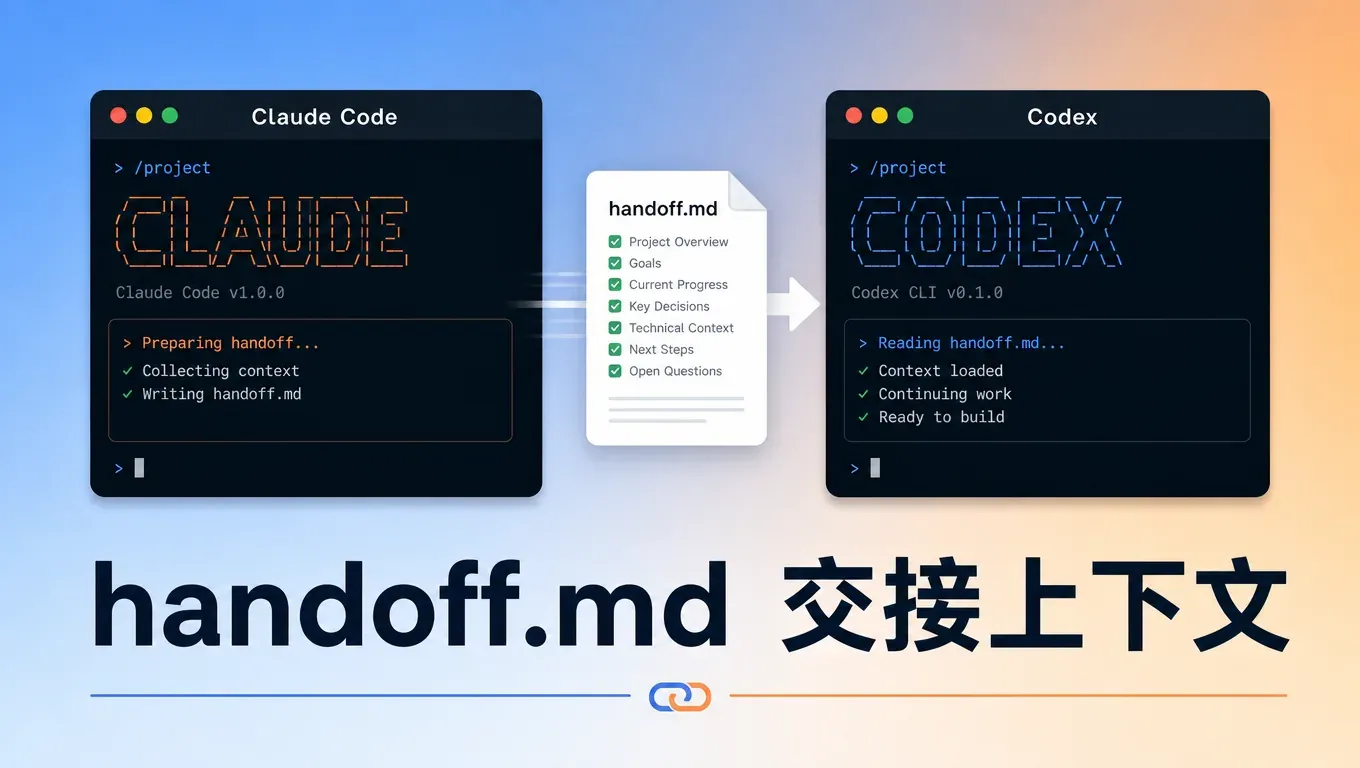
The short version: Claude Code and Codex don't share sessions, so nothing you discussed carries over when you switch tools. The most reliable approach is to have Claude Code write its progress to handoff.md in the project root, then have Codex read only that file and continue.
We tested this with the same AICodeWith Key. Claude Code did the first half and wrote the handoff file in 37 seconds. Codex read the file and finished the rest in 86 seconds, with all tests passing.
Why you need a handoff file
Claude Code keeps its conversation history on its own side, and Codex can't see it. The reverse is also true. If you tell Codex "keep going with what we just did," it has no idea what "just did" refers to.
The only thing both tools can see is the files in your project. So writing progress to a file in the repo is the simplest and most reliable way to share context.
The handoff.md template
Create handoff.md in the project root and fill in the six items below. You can copy it directly:
# Handoff

## 改了哪些文件
-

## 做到哪
-

## 未完成项
-

## 验收标准
-

## 已知坑
-

## 下一步
1.
What goes in each item:
- Files changed: paths of files you added or modified, and whether you've committed to git
- Where you left off: features that already work, ideally with how you verified them
- Unfinished items: what's still not done, listed one by one
- Acceptance criteria: what counts as done, for example "
python -m unittestall pass" - Known pitfalls: gotchas you've hit and things that are easy to misread. This is the item that saves the next tool the most time
- Next steps: what the person taking over should do first, in order
Two prompts
In Claude Code (stop after writing):
把当前进度写到项目根目录的 handoff.md,包含这几项:改了哪些文件、做到哪、未完成项、验收标准、已知坑、下一步。写完就停,不要继续写代码。
In Codex (read only this file and continue):
只读项目根目录的 handoff.md,按里面的未完成项和下一步继续做完,达到验收标准后,更新 handoff.md 的进度。
"Stop after writing" matters. Without it, Claude Code may go ahead and do the rest of the work too, and the handoff file will no longer match the code.
Set up both tools with the same Key
Both tools use a global config that applies to all projects, and one AICodeWith Key covers both.
Claude Code: open ~/.claude/settings.json and fill in the following under env:
{
  "env": {
    "ANTHROPIC_BASE_URL": "https://api.aicodewith.ai",
    "ANTHROPIC_AUTH_TOKEN": "sk-你的Key",
    "CLAUDE_CODE_SKIP_FAST_MODE_ORG_CHECK": "1"
  }
}
Codex: open ~/.codex/config.toml and add:
model_provider = "aicodewith"
model = "gpt-5.6-sol"

[model_providers.aicodewith]
name = "aicodewith"
base_url = "https://api.aicodewith.ai/chatgpt/v1"
wire_api = "responses"
experimental_bearer_token = "sk-你的Key"
experimental_bearer_tokenis an official Codex config option, so you can put the Key directly in the config without setting an environment variable. If your config also has aenv_keyline, delete it. Don't use both at once. For details on each field, see "Codex config.toml Configuration Guide" and "Connecting Codex to AICodeWith". For the Claude Code side, see "How to Connect Claude Code to a Third-Party API".
Test run: handing a small project from Claude Code to Codex
We set up a very small command-line to-do tool. Its README lists four requirements: add to add, list to list, done to mark as done, and unittest coverage for those three commands.
Step 1: Claude Code does the first half. We told it to implement only add and list, then write handoff.md using the prompt above. It took 37 seconds, using claude-opus-5-5. In the handoff file it wrote, the "Known pitfalls" item turned out to be especially useful. For example:
todos.jsonpaths depend on the directory you run the command from, not on the script location- The data file path is read only once when the module is imported, so tests should modify the module variable directly
python -m unittestneedstests/__init__.py
Step 2: Codex picks it up. Using the Codex prompt above, it read handoff.md, then added the done command and error handling for out-of-range numbers, wrote 7 tests that all passed, and finally updated the progress in handoff.md to done. It took 86 seconds, using gpt-5.6-sol.
At no point did we copy any chat history between the two tools. This one file was all it took.
In our test, Codex also made use of the pitfalls in the handoff file on its own: it created tests/__init__.py directly, and its tests modified the module variable instead of an environment variable. That's exactly what the "Known pitfalls" item is for.Keep long-term rules separate from this round's progress
The handoff file should hold only progress for this round. Put the project's long-term, unchanging rules in each tool's own instruction file:
| What to put | Where to put it |
|---|---|
| Long-term rules: code style, test commands, directory conventions | Claude Code reads CLAUDE.md, Codex reads AGENTS.md |
| This round's progress: where you left off, what's left | handoff.md |
That way handoff.md can be rewritten each round and won't keep growing.CLAUDE.md For how to write it, see "A Guide to Writing CLAUDE.md".
If the handoff process becomes routine, you can turn "write handoff.md" into a Skill and generate it with a single command from then on. See "How to Use Claude Code Skills" for how.
Another way to hand off: a GitHub Issue
For team collaboration or work across machines, you can also write the same six items into a GitHub Issue and have the receiving tool read that Issue. The upside is that you get a record and can discuss it. The downside is that the tool needs access to GitHub. If you're just switching tools on your own machine, handoff.md is simpler.
FAQ
Should handoff.md be committed to git?
It depends. If you're just switching tools yourself, you can add it to .gitignore. If a teammate needs to take over, commit it.
Can I go the other way, from Codex to Claude Code?
Yes. Just swap the two prompts. The file format stays the same.
What if Codex still misunderstands after reading handoff.md?
Most likely the acceptance criteria are too vague. Rewrite them as conditions you can check directly, such as "python -m unittest all pass," instead of "feature is polished."
Can both tools edit the same project at the same time?
We don't recommend it. Let only one tool change code at a time, and switch after the handoff is done, so they don't overwrite each other.