Short version:
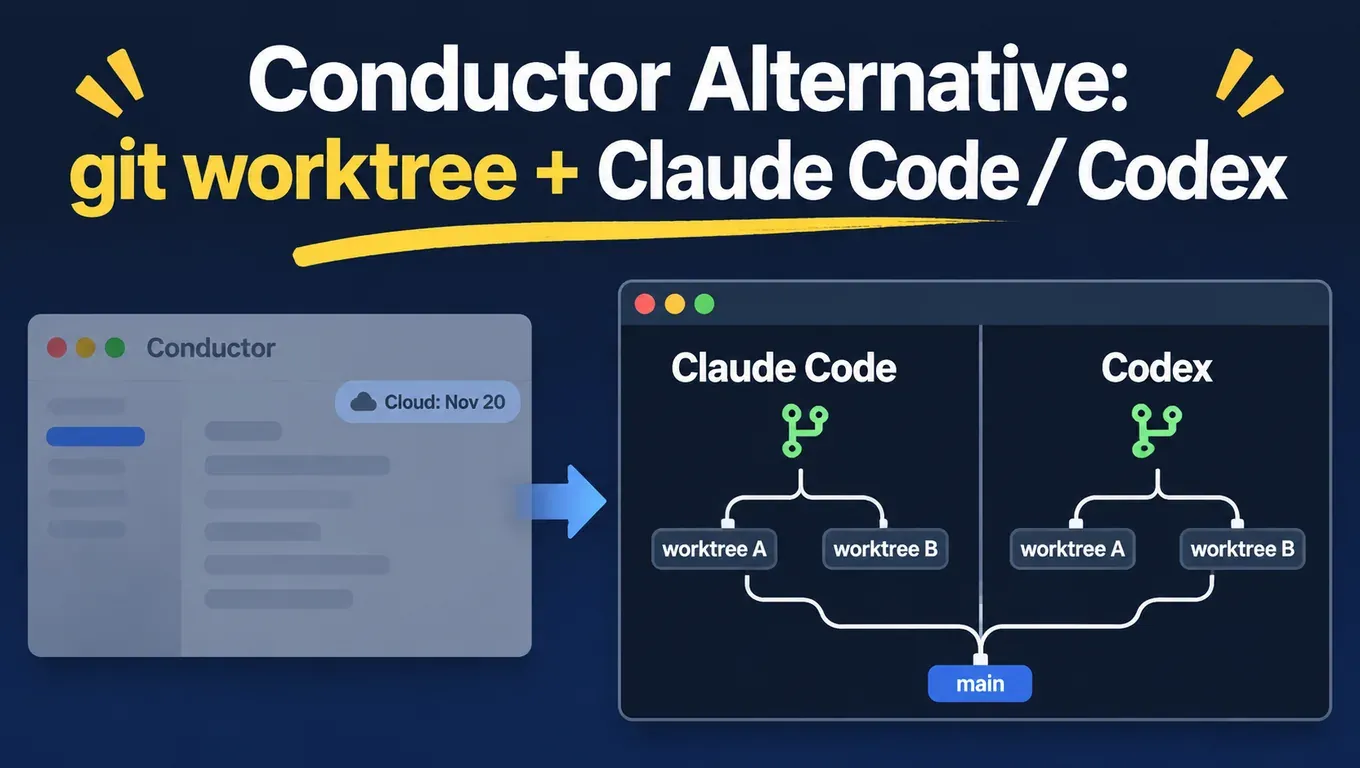
- According to Conductor's announcement, Conductor is joining Meta. New sign-ups and downloads stopped on November 4; Conductor Cloud goes read-only on November 13 and shuts down on November 20, when cloud data starts being deleted. The local Mac app keeps getting new models and critical fixes until early 2027, when it starts winding down.
- If you still use Conductor Cloud, right-click each workspace and choose "Transfer to local" before November 13, or export everything from Settings → Account → Export data.
- Conductor's core mechanism is one git worktree and one branch per workspace, as its own docs state. You can do this without Conductor: create directories with
git worktree add, run Claude Code or Codex in each one, then merge back into your main branch. - In our November 5 test, Claude Code and Codex ran at the same time in two worktrees and each wrote a feature with tests. Total time was 66.3 s (Claude Code 27.0 s, Codex 66.3 s), and all 11 tests passed after the merge.
claude -win Claude Code and--worktreein Codex can also create the worktree for you. - If you want a GUI, look at the open-source Orca (MIT), Emdash (Apache-2.0) and the terminal tool Claude Squad (AGPL-3.0).
Create an API Key and run Claude Code and Codex tasks in parallel →
Official timeline
| Date | What happens | What to do |
|---|---|---|
| Nov 4 (Wed) | Conductor announces it is joining Meta; no new sign-ups or downloads; existing users can no longer upgrade to Pro, current Pro users keep Pro features | New users cannot install it any more; use the approach below |
| Nov 13 (Fri) | Conductor Cloud workspaces become read-only: you can read old chats and export, but not send new messages; active subscribers get a refund | "Transfer to local" your cloud workspaces before this date |
| Nov 20 (Fri) | Conductor Cloud shuts down and user cloud data starts being deleted | Settings → Account → Export data before this date |
| Early 2027 | Local Conductor starts winding down; until then it gets new models and critical fixes | The local app still works, but it is worth moving to a workflow that does not depend on it now |
The dates come from Conductor's announcement and the 0.93.0 changelog. According to TechCrunch, Meta confirmed the acquisition but gave no deal details. According to Axios, Conductor was founded by Charlie Holtz and Jackson de Campos, and financial terms were not disclosed. There is also a trending news summary on X.
What Conductor does, in 4 steps
According to Conductor's docs, each new workspace gets its own git worktree with a branch checked out, usually under ~/conductor/workspaces/<repo name>/<workspace name>. The agent only edits files in that directory, test commands run there, and the branch is what you review, push and turn into a PR.
So without Conductor, you only need to cover 4 steps yourself:
- One task, one directory:
git worktree addgives each task its own directory and branch. - One directory, one session: open a Claude Code or Codex session in each directory.
- Models configured: connect Claude Code and Codex to the same API Key.
- Merge and verify: each branch runs its own tests and is committed, then merged back into main and the worktree removed.
git worktree is built into Git: one repository with several working directories that share the commit history but keep separate files, so two agents editing the same file do not overwrite each other on disk.
Step 0: create an API Key and connect Claude Code and Codex
- Sign up at aicodewith.ai and sign in, then click "Key Management" in the left navigation bar.
- Click "Create key" at the top right and give it a name you will recognise, for example "parallel agents - MacBook".
- After you confirm, copy the full key right away and store it. Once the dialog is closed, the full key cannot be shown again; if you lose it, delete it and create a new one. Details are in the Create API Key docs.
Codex reads the global ~/.codex/config.toml, so every worktree shares one file and you do not configure each directory:
# ~/.codex/config.toml
model = "gpt-6.1-sol"
model_provider = "aicodewith"

[model_providers.aicodewith]
name = "aicodewith"
base_url = "https://api.aicodewith.ai/chatgpt/v1"
wire_api = "responses"
experimental_bearer_token = "YOUR_API_KEY"
Claude Code reads ~/.claude/settings.json, which is also global:
{
  "env": {
    "ANTHROPIC_BASE_URL": "https://api.aicodewith.ai",
    "ANTHROPIC_AUTH_TOKEN": "YOUR_API_KEY"
  }
}
If Codex is not installed yet, see the Codex installation guide. Every config.toml field is explained in the Codex config.toml guide, and other Claude Code setups are in How to connect Claude Code to a third-party API.
Step 1: one worktree per task
Before you start, add build output and the worktrees agents create to .gitignore. We skipped this in our first run and __pycache__ blocked the merge (see step 4):
# In the main checkout, ignore build output and agent-made worktrees first
cat >> .gitignore <<'EOF'
__pycache__/
node_modules/
.claude/worktrees/
EOF
git add .gitignore && git commit -m "ignore build output and agent worktrees"
Then create one worktree per task:
cd ~/code/demo                      # your repo
git switch main && git pull
git worktree add ../demo-wt/slugify  -b feat/slugify
git worktree add ../demo-wt/truncate -b feat/truncate
git worktree list
Output:
~/code/demo              a97cf41 [main]
~/code/demo-wt/slugify   a97cf41 [feat/slugify]
~/code/demo-wt/truncate  a97cf41 [feat/truncate]
With many tasks, a small script helps: pass a name and it creates the directory and an agent/<name> branch, then prints the path:
#!/usr/bin/env bash
# new-task.sh <name> [base]   create a task directory and print its path
set -euo pipefail
name="${1:?usage: new-task.sh <name> [base]}"
base="${2:-main}"
repo="$(git rev-parse --show-toplevel)"
wt="$(dirname "$repo")/$(basename "$repo")-wt/$name"
git -C "$repo" worktree add -q "$wt" -b "agent/$name" "$base"
echo "$wt"
Usage:
cd "$(./new-task.sh fix-login)" && claude
cd "$(./new-task.sh add-export)" && codex
Note: a worktree only contains files Git tracks. Untracked things such as .env or node_modules will not appear in the new directory, so copy them or reinstall dependencies. That is what Conductor's "Configure your project" page sets up.
Step 2: one Claude Code or Codex per directory
Interactive: open two terminal tabs, cd into one worktree in each, then run claude or codex. With tmux you can watch both on one screen:
# Claude Code on the left, Codex on the right
tmux new-session -d -s agents -c ../demo-wt/slugify  "claude"
tmux split-window -h -t agents -c ../demo-wt/truncate "codex"
tmux attach -t agents
In our test, Claude Code and Codex each asked once whether to trust the folder the first time they opened a worktree, because it is a new path to them.
Headless: when the task is well defined and you only want the result, run claude -p and codex exec in the background at the same time:
PA="Add textkit/slug.py with slugify(s) ... Add tests/test_slug.py ... Only create these two files. Then run: python3 -m unittest discover -s tests -v"
PB="Add textkit/truncate.py with truncate(s, width, suffix='...') ... Add tests/test_truncate.py ... Only create these two files. Then run the tests."

(cd ../demo-wt/slugify  && claude -p "$PA" --allowedTools "Write,Edit,Read,Bash(python3:*)") &
(cd ../demo-wt/truncate && codex exec -s workspace-write "$PB") &
wait
The prompts say "Only create these two files", which keeps the two tasks' file boundaries apart so the merge does not conflict. More ways to split work are in How to split tasks with Codex subagents.
Step 3: test results
Test setup: November 5, 2026, 06:16–06:30 (Beijing time, UTC+8), Linux, Claude Code 2.1.318, codex-cli 0.166.0 (model gpt-6.1-sol), our own Key; HOME and CODEX_HOME pointed to an isolated directory, and the test repo was a tiny Python package, textkit, with a single function.
Both tasks started together: Claude Code wrote slugify() in feat/slugify, and Codex wrote truncate() in feat/truncate. Both had to add unit tests and run them.
[Claude Code 2.1.318 · ~/code/demo-wt/slugify · feat/slugify]
All 7 tests pass. I added `textkit/slug.py` and `tests/test_slug.py`,
and those are the only files I created.
[exit 0, 27.0 s]

[Codex 0.166.0 · ~/code/demo-wt/truncate · feat/truncate]
workdir: ~/code/demo-wt/truncate
model: gpt-6.1-sol
provider: aicodewith
sandbox: workspace-write
...
Ran 5 tests in 0.000s
OK
[exit 0, 66.3 s]
| Item | Result | Time |
|---|---|---|
| Claude Code (worktree feat/slugify) | 2 new files, 7 tests passed | 27.0 s |
| Codex (worktree feat/truncate) | 2 new files, 5 tests passed | 66.3 s |
| Total time with both running at once | set by the slower one | 66.3 s |
| Merging both branches | no conflict, 11 tests passed on main | under 1 s |
| claude -w + codex exec --worktree at once | one function and test each, both test runs passed | 16.7 s / 24.4 s |
| Resolving a merge conflict with Claude Code | both sides kept, 13 tests passed | 17.5 s |
The two tasks do not wait for each other, so the total is the slower one. Run one after the other, it would be the two times added up.
Step 4: merge and verify
Each worktree runs its own tests and commits; once everything is committed, go back to the main checkout and merge in order:
# In each worktree: run the tests, then commit
cd ../demo-wt/slugify
git status --short
python3 -m unittest discover -s tests
git add -A && git commit -m "feat: slugify"
# Back in the main checkout, merge
cd ~/code/demo
git merge --no-ff feat/slugify
git merge --no-ff feat/truncate
python3 -m unittest discover -s tests -v
Our merge result:
*   9765c15 merge truncate
|\
| * 55ce497 feat: truncate
* |   b7b9d4c merge slugify
|\ \
| |/
|/|
| * c5c0b99 feat: slugify
|/
* a97cf41 init textkit

Ran 11 tests in 0.000s
OK
On the first merge attempt we hit this error:
$ git merge --no-ff feat/slugify
error: The following untracked working tree files would be overwritten by merge:
	tests/__pycache__/test_core.cpython-313.pyc
	textkit/__pycache__/__init__.cpython-313.pyc
	textkit/__pycache__/core.cpython-313.pyc
Please move or remove them before you merge.
Aborting
The test run had created __pycache__, it was committed into the branch, and untracked files with the same names in the main checkout blocked the merge. Claude Code flagged this at the end of its task too. The fix is the .gitignore from step 1; if the files are already committed, git rm -r --cached them in the branch before merging.
Checklist:
git status --shortin each branch shows only the files you expect;- each branch's own tests pass, and the full suite runs again on main after the merge;
- if two branches changed the same file, handle the conflict as in the next section.
When you are done, remove the worktrees and branches:
git worktree remove ../demo-wt/slugify
git worktree remove ../demo-wt/truncate
git branch -d feat/slugify feat/truncate
git worktree prune
git worktree list
Skip the git commands: claude -w and codex --worktree
Both CLIs can now create worktrees themselves. In the versions we tested, claude --help lists -w, --worktree [name], and both codex --help and codex exec --help list --worktree ("Run the session in a new managed Git worktree"). See the Claude Code docs and the Codex worktree docs.
# Claude Code: run from the repo root
claude -w words                   # = claude --worktree words
# Codex: interactive or headless
codex --worktree
codex exec --worktree -s workspace-write "Add title_case() to textkit/core.py ..."
After running both sessions at once, git worktree list looked like this:
$ git worktree list
~/code/demo                             987a3ea [main]
~/code/demo/.claude/worktrees/words     987a3ea [worktree-words] locked
~/.codex/worktrees/f0c2/demo            987a3ea (detached HEAD)
Three things to watch:
- Different locations: Claude Code creates the worktree inside the repo under
.claude/worktrees/<name>on a branch calledworktree-<name>; Codex creates it under~/.codex/worktrees/as a detached HEAD with no branch. Add.claude/worktrees/to.gitignore, and create a branch in the Codex worktree before merging. - Claude Code locks its worktree: the lock stays after the session ends, so a plain
git worktree removefails until you rungit worktree unlock. - Two tasks touching the same file conflict: this time we had both sides add a function to
textkit/core.pyon purpose.
Commit and merge:
# the Claude Code worktree is already on branch worktree-words
cd ~/code/demo/.claude/worktrees/words
git add -A && git commit -m "feat: count_words"
# the Codex worktree is a detached HEAD, create a branch first
cd ~/.codex/worktrees/f0c2/demo
git switch -c feat/title-case
git add -A && git commit -m "feat: title_case"
cd ~/code/demo
git merge --no-ff worktree-words
git merge --no-ff feat/title-case
The second merge conflicted:
Auto-merging tests/test_core.py
CONFLICT (content): Merge conflict in tests/test_core.py
Auto-merging textkit/core.py
CONFLICT (content): Merge conflict in textkit/core.py
Automatic merge failed; fix conflicts and then commit the result.
You can let an agent resolve it. Note that claude -p needs --permission-mode acceptEdits: on our first try we only passed --allowedTools, Claude Code's file writes were blocked, and the conflict stayed as it was:
claude -p "This repo is in the middle of a git merge with conflicts in textkit/core.py and tests/test_core.py. Keep both sides, remove the conflict markers, run python3 -m unittest discover -s tests, and report the result. Do not commit." \
  --permission-mode acceptEdits \
  --allowedTools "Edit,Read,Bash(python3:*),Bash(git status:*),Bash(git diff:*)"
# commit only after confirming no conflict markers are left
grep -rn '<<<<<<<' textkit tests
git add textkit/core.py tests/test_core.py && git commit -m "merge title_case"
python3 -m unittest discover -s tests -v
Output:
A grep found no conflict markers left in `textkit/` or `tests/`.
I didn't stage or commit anything, so git still lists both files as unmerged (`UU`).
[exit 0, 17.5 s]

Ran 13 tests in 0.001s
OK
The lock we hit during cleanup:
$ git worktree remove .claude/worktrees/words
fatal: cannot remove a locked working tree, lock reason: claude session words (pid ...)
use 'remove -f -f' to override or unlock first

$ git worktree unlock .claude/worktrees/words && git worktree remove .claude/worktrees/words
$ git worktree remove ~/.codex/worktrees/f0c2/demo
$ git branch -d worktree-words feat/title-case
Want a GUI? Tools that can replace Conductor
We only list projects whose license and description we checked on GitHub:
| Tool | What it is | Isolation | Platforms | License |
|---|---|---|---|---|
| Orca | Desktop app for running many CLI agents, including Claude Code, Codex and OpenCode | one git worktree per task | macOS, Windows, Linux, plus a mobile app | MIT |
| Emdash | Desktop app for running coding agents in parallel, with diff review and PRs | one worktree and branch per agent | macOS, Windows, Linux | Apache-2.0 |
| Claude Squad | Terminal app managing several sessions of Claude Code, Codex, OpenCode, Amp and others | tmux sessions + git worktrees | terminal (needs tmux) | AGPL-3.0 |
| claude -w | Built into Claude Code | one worktree per session | wherever Claude Code runs | — |
| codex --worktree | Built into the Codex CLI; the Codex app has worktrees too | one worktree per session | wherever Codex runs | — |
All of them use git worktree underneath, so the 4 steps above still apply: the Key lives in the global Claude Code and Codex config, and any of these front ends can use it directly.
Before going parallel, decide whether you should
More agents is not always better. Tasks that share files conflict, as shown above, and steps inside one task often suit subagents better:
- Run subtasks on a lighter model in Claude Code: How to configure a Haiku 5.5 subagent in Claude Code;
- For fixed workflows, fold them into a Skill instead of piling up subagents: Fold subagents into a Claude Code Skill;
- Splitting work, file boundaries and checks in Codex: How to split tasks with Codex subagents.
A simple rule: unrelated features and fixes go into parallel worktrees; research, code and tests within one feature go to subagents.
Create an API Key and connect Claude Code and Codex →
FAQ
How long will the local Conductor app keep working?
According to the announcement, local Conductor keeps working as normal and keeps getting new models and critical fixes until early 2027, when it starts winding down. Downloads have stopped, so anyone who has not installed it can no longer get it.
How do I export my Conductor Cloud data?
Right-click a workspace and choose "Transfer to local" to move the workspace and its chats to your Mac; export everything from Settings → Account → Export data. You can still export after the November 13 read-only switch; deletion starts November 20.
How is git worktree different from cloning twice?
Worktrees share one .git: commits, branches and remotes are the same, a commit in one directory is visible in the other right away, and you do not download the repo again. The limit is that one branch cannot be checked out in two worktrees at once.
How many agents should I run at once?
As many diffs as you can review. We suggest starting with 2–3 and keeping each task's files separate. All sessions can share one Key, and every request shows up in the console's usage log.
Does this work on Windows?
git worktree, Claude Code and Codex all support Windows; tmux needs WSL. Orca and Emdash both ship Windows builds.