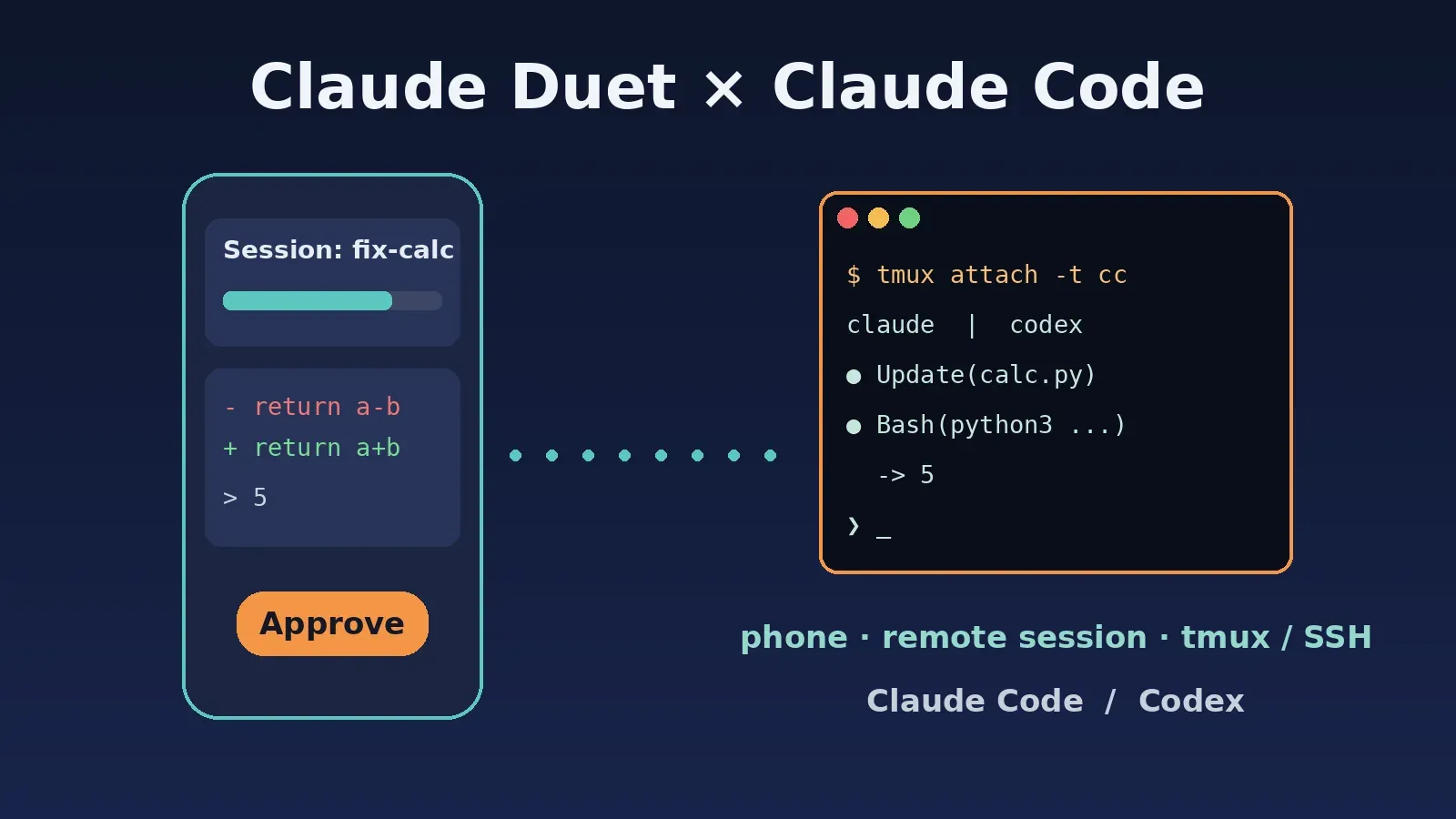
On November 6 (US time), Claude Duet lead David Sutton posted on X: Claude Duet now works with Claude Code sessions. From your phone you can check what is running, approve changes and send updates, and it works with sessions on your computer or in the cloud. @adocomplete from Anthropic's Claude Code community team reposted it, and Duet engineer @navbryce is collecting feedback in the replies.
The short version:
- What it does (per @davidsuttonca): view Claude Code session progress, approve changes and send new instructions inside Duet, for both local and cloud sessions.
- Who can use it (per the official Duet help center): Duet is a research preview for Pro / Max / Ultra users in the US, by waitlist invitation. Team and Enterprise are not supported yet.
- How local sessions connect: in the official Claude Code docs, the phone-to-local-session channel is Remote Control (
claude remote-controlor/remote-control). It requires a claude.ai subscription sign-in and does not support API keys. - Third-party base URL / API key users: the docs state Remote Control is unavailable when
ANTHROPIC_BASE_URLpoints anywhere other thanapi.anthropic.com. We reproduced it with our key:claude remote-controlexits with an error. - Alternative: run Claude Code / Codex inside
tmuxon a server and use any SSH client on your phone to check progress, approve and continue. In our test, Claude Code fixed a bug in a 14-second turn and Codexexecfinished a similar task in about 24 seconds.
What Duet added (public sources)
| Source | Key point |
|---|---|
| @davidsuttonca (Claude Duet co-creator and lead) | "Claude Duet: now with Claude Code sessions": check what's running, approve changes and send updates from your phone; works with sessions on your computer or in the cloud |
| @adocomplete (Anthropic, Claude Code community) | Repost: Claude Code in your Claude Duet |
| @daniel_mac8 (user) | Per user feedback: Duet can access Claude Code sessions in the cloud and locally on connected devices |
| @navbryce (Duet engineer) | Collecting feedback on Claude Code Sessions; also mentions a new in-app view of Duet's cloud browser |
| X trending summary | Reportedly: Duet and Claude Code sessions are linked so you can follow and steer tasks across devices |
Note: at the time of writing, the limitations in the Duet help center still say it "can't see all of your projects or the files on your computer, and it can read your work in Claude but can't change it", and there is no dedicated page for connecting Claude Code sessions yet. The requirements below follow the official Claude Code docs; for the exact entry point inside Duet, go by what the app shows.
Requirements (official docs)
Duet itself
Per Get started with Claude Duet:
- A Pro, Max or Ultra plan;
- A Claude account in the US;
- A waitlist invitation (sent in waves; the email you give must match your Claude account and the Apple / Google account on your phone);
- Usage counts toward your plan limits, including background briefs and check-ins.
Cloud sessions
Per Use Claude Code in the cloud: cloud sessions run on Anthropic-managed infrastructure, need Pro / Max / Ultra / Team (or the matching Enterprise seats) and a GitHub connection. The task keeps running after you close your laptop, and you can check it from your phone. From a terminal, start one with claude --cloud "task description".
Local sessions: Remote Control
Per the Remote Control docs and Claude Code on mobile:
# Server mode: run in your project; it prints a URL, press space for a QR code
claude remote-control

# Normal interactive session that can also be driven remotely
claude --remote-control "My Project"

# Already inside a session
/remote-control
Then open the Code tab in the Claude app and pick the session (online sessions show a computer icon with a green dot). The hard requirements listed in the docs:
- Plan: Pro / Max / Ultra / Team / Enterprise; API keys are not supported;
- Sign-in: use
/loginwith your claude.ai account; long-lived tokens fromclaude setup-tokendo not work; - Endpoint: not available on Bedrock / Google Cloud / Foundry, or when
ANTHROPIC_BASE_URLpoints at a gateway or proxy other thanapi.anthropic.com; - Also unavailable when
CLAUDE_CODE_DISABLE_NONESSENTIAL_TRAFFICorDISABLE_GROWTHBOOKis set; - Your computer must stay on and the
claudeprocess must keep running; on a remote machine the docs recommendtmuxorscreen.
Once connected, your phone shows the conversation and the git diff, lets you switch /model and /effort, and offers Manual / Accept edits / Plan / Auto permission modes (Bypass is not selectable). Terminal-only commands such as /plugin and /resume stay local. Turn on the push toggles in /config to get a notification when a task finishes or needs approval.
Does it work with a third-party API key? Our test
The docs already say no, but we ran it anyway on Claude Code 2.1.316 with ANTHROPIC_BASE_URL set to https://api.aicodewith.ai and our key in ANTHROPIC_AUTH_TOKEN:
$ claude remote-control
Error: You must be logged in to use Remote Control.

Remote Control is only available with claude.ai subscriptions. Run `claude auth login` to sign in with your claude.ai account.
It exited in under a second. Typing /remote-control in an interactive session returned Unknown command: /remote-control: the command is hidden when the requirements are not met.
So the answer is simple: to drive a local Claude Code session from Duet or the Claude app, sign in with a claude.ai subscription and remove the third-party ANTHROPIC_BASE_URL. If you use an API key through a gateway, use the setup below.
Alternative: tmux on a server + SSH from your phone (Claude Code or Codex)
The idea: the agent runs inside a tmux session on an always-on machine (a cloud server or a home box). Your phone connects with any SSH client, runs tmux attach to watch progress, presses Enter to approve and types to continue. Dropped connections and a locked phone do not stop the task; reconnect and the session is still there.
1. Set up the key (once)
First sign up and create an API key (see the Create API Key guide). For Claude Code, put it in ~/.claude/settings.json:
{
  "env": {
    "ANTHROPIC_BASE_URL": "https://api.aicodewith.ai",
    "ANTHROPIC_AUTH_TOKEN": "YOUR_API_KEY"
  }
}
For Codex, put it in the global ~/.codex/config.toml:
model = "gpt-6.1-sol"
model_provider = "aicodewith"

[model_providers.aicodewith]
name = "aicodewith"
base_url = "https://api.aicodewith.ai/chatgpt/v1"
wire_api = "responses"
experimental_bearer_token = "YOUR_API_KEY"
More detail: Claude Code with a third-party API and Codex config.toml guide.
2. Start the agent inside tmux
# Claude Code: interactive session
tmux new -s cc -c ~/project
claude

# Codex: a second session (codex for interactive, codex exec for one-shot tasks)
tmux new -s cx -c ~/project
codex
Press Ctrl-b d to detach; the agent keeps running.
3. Check progress, approve and continue from your phone
ssh you@your-server

# Option 1: attach, same as sitting at the computer
tmux attach -t cc

# Option 2: don't attach, just read the last 40 lines
tmux capture-pane -p -t cc | tail -40

# Approve a prompt / confirm a dialog: send Enter
tmux send-keys -t cc Enter

# Send the agent a new instruction
tmux send-keys -t cc "Run the tests and fix any failures" Enter
On a small screen, option 2 is the easiest: one command to read progress, one to approve or continue.
4. Test results
On a Linux server, in a fresh repo with one bug (add in calc.py written as a-b), using our key throughout:
| Test | Action | Result | Duration |
|---|---|---|---|
| Claude Code (interactive in tmux, claude-sonnet-5-5) | tmux send-keys "fix add and verify with python3" | Changed to return a+b; add(2,3) printed 5 | 14-second turn per the status line |
| Remote approval | An auto mode notice popped up mid-session; confirmed with tmux send-keys Enter | Continued and finished the task | One command |
| Codex 0.167 (codex exec -s workspace-write, gpt-6.1-sol) | Ran "fix mul and verify" inside tmux | Changed to return a*b; mul(2,3) printed 6 | About 24 seconds |
| Claude Code headless | claude -p "summarize the last two commits" (read-only) | Correctly named the file and function each commit added | About 11 seconds |
Real Claude Code output (excerpt):
● Update(calc.py)
  ⎿  Added 1 line, removed 1 line
      2 -    return a-b
      2 +    return a+b
● Bash(python3 -c "from calc import add; print(add(2,3))")
  ⎿  5
  ⎿  Allowed by auto mode
The dialog that appeared was a one-time notice about auto mode classifier billing when going through a gateway (auto mode keeps working). Background: Claude Code auto mode behind a gateway: 403/422.
Real Codex output (excerpt):
apply patch
-    return a+b
+    return a*b
exec
/bin/bash -lc "python3 -c 'from m import mul; print(mul(2,3))'"
 succeeded in 0ms:
6
5. Make it feel more like a phone remote
- Several tasks in parallel: one git worktree and one tmux session per task, see Run several Claude Code / Codex sessions in parallel without Conductor.
- Don't want to watch it: trigger work by event or schedule and only get asked when the agent is unsure, see Agent Autoloop: let Claude Code / Codex pick up work in the background.
- Security: allow SSH key login only and turn off password login; keep the key only in the server's config files, never in the repo or chat logs.
Which one to choose
| Your situation | Recommendation |
|---|---|
| US Pro / Max / Ultra, Duet invite received, Claude Code signed in with claude.ai | Use Duet or the Code tab in the Claude app directly |
| Subscription, but outside the US or no Duet invite | Code tab in the Claude app + Remote Control (also needs claude.ai sign-in) |
| API key or third-party base URL (including ours) | tmux on a server + SSH from your phone; we tested Claude Code / Codex, other CLI agents work the same way |
FAQ
Is Duet the same as the Code tab in the Claude app?
No. Duet is a separate app (research preview). In the official Claude Code docs, the standard phone entry point is the Code tab in the Claude app (cloud sessions + Remote Control). Per @davidsuttonca, Duet can now connect to Claude Code sessions too.
I set ANTHROPIC_BASE_URL. Can I remove it temporarily to use Remote Control?
Per the docs: with an eligible claude.ai subscription sign-in, unset ANTHROPIC_BASE_URL (and the same key in the env block of your settings) and restart the session. Requests then use your subscription, not the third-party key.
Which phone app should I use for the tmux setup?
Any SSH client works; this guide is not tied to a specific app. What matters is an always-on server with the agent inside tmux.
Is there something similar for Codex?
Here we ran Codex CLI inside tmux and took it over from the phone via SSH, exactly like Claude Code.
Summary
Per Claude Duet lead @davidsuttonca, Duet can now connect to local and cloud Claude Code sessions so you can check progress, approve changes and continue from your phone. According to the official docs, this path needs a claude.ai subscription sign-in and does not support API keys or a third-party ANTHROPIC_BASE_URL; with our key, claude remote-control exited with an error. If you use an API key, put Claude Code / Codex inside tmux on a server and SSH in from your phone to watch, approve and continue: in our test Claude Code fixed and verified a bug in a 14-second turn and Codex in about 24 seconds.
Related: Claude Code with a third-party API · Parallel Claude Code / Codex with git worktree · Agent Autoloop in the background · Codex config.toml