
You can spot an AI-written draft at a glance: it opens with "In today's digital age," lines up "first, second, finally," packs in "empower," "it's worth noting," and "in conclusion," then closes with a slogan. Publish it as is, and readers bail after two lines.
This post covers how to remove the AI flavor: use Claude Code with the humanize-ai-text skill to detect AI-sounding phrasing in an article, rewrite it into natural prose, and re-test to compare. We ran it on a typical piece of AI-sounding short text. It finished in 42 seconds, and by the skill's built-in scoring rules the style score dropped from 20 to 3, with the filler, parallel lists, and stock phrases all cleared out. To set up the environment, connect AICodeWith and you're ready to run.
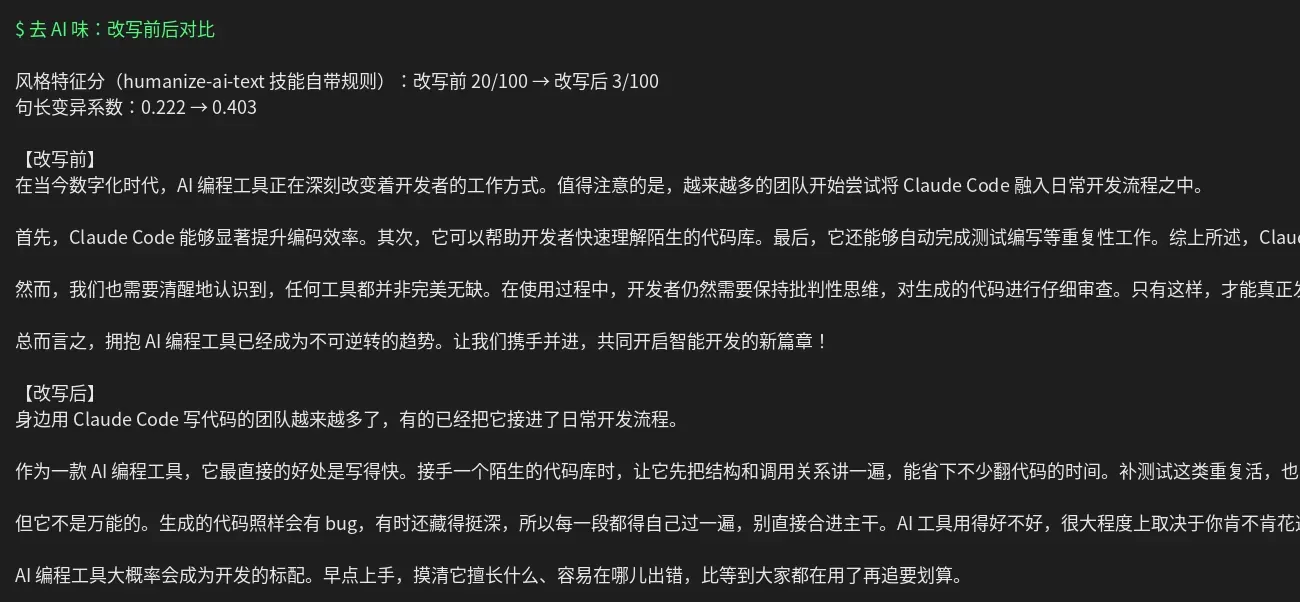
去 AI 味:改写前后对比
The finished result from our run: above is the original AI-sounding text before the rewrite, below is the rewritten version. The scores come from the humanize-ai-text skill's own rule-based counts and don't represent the results of any AI detection platform.
Set Up the Environment First: Connect AICodeWith in Two Steps
You only configure the environment once, and it works for every scenario afterward:
- Install Claude Code: Follow the official Claude Code installation docs to install it. Type
claude --versionin your terminal, and if you see a version number, you're set. - Create a key and edit the global config: After logging in, go to "Key Management" in the console and click "Create Key." Then open the global config file
~/.claude/settings.jsonand fill in the Base URL and key underenv:
{
  "env": {
    "ANTHROPIC_BASE_URL": "https://api.aicodewith.ai",
    "ANTHROPIC_AUTH_TOKEN": "sk-你的Key"
  }
}
Don't add a trailing/v1to the Base URL. After editing, reopen your terminal and runclaude. If you can chat normally, the connection works. For what each field means and more error handling, see "How to Connect Claude Code to a Third-Party API".
You also need to install the humanize-ai-text skill once: download the skill archive from SkillHub and unzip it into Claude Code's skills directory:
mkdir -p ~/.claude/skills/humanize-ai-text
curl -L -o /tmp/humanize-ai-text.zip "https://api.skillhub.cn/api/v1/download?slug=humanize-ai-text"
unzip -o /tmp/humanize-ai-text.zip -d ~/.claude/skills/humanize-ai-text
After unzipping, if you can see SKILL.md in the directory, the install worked. The skill's detection and rewriting scripts run locally in Python, so you need Python 3 on your machine.Step 1: Detect, Rewrite, and Re-test with One Sentence
Save the article you want to fix as a text file, then run claude in the same folder. This is the request we used in our run:
用 humanize-ai-text 技能给 ./原文-AI味.txt 去AI味:先跑检测出报告,再改写成自然的中文,保存为 ./改写后.txt,最后再检测一次对比前后得分,把对比写到 ./对比.md。
The "detect, rewrite, re-test" order matters. You can see exactly which spots were flagged as AI-sounding, and after the rewrite you get a before-and-after comparison instead of just a new draft.
Step 2: What It Changed
The original in our run was a short text of 4 paragraphs and 327 characters. Here are the issues detection flagged and how things looked after the rewrite:
| Issue type | Original | After rewrite |
|---|---|---|
| AI jargon (empower) | 1 instance | 0 |
| Stock phrases (it's worth noting, in conclusion) | 2 instances | 0 |
| Parallel structure (first… second… finally) | 1 instance | 0 |
| Empty transitions (in short) | 1 instance | 0 |
| Sentence length too uniform | Yes | No |
Main changes:
- Cut empty openers like "In today's digital age" so the first sentence gets straight to the point.
- Removed "first/second/finally/in conclusion" and reorganized around actual usage scenarios.
- Replaced slogans like "empower teams to achieve high-quality development" with concrete practices.
- Mixed long and short sentences so the text no longer reads at a single rhythm.
It also checks whether the rewrite dropped key information from the original. In our run, the first rewrite cut "AI" from three mentions down to one, so the check failed, and it only finished after restoring them on its own.
Always Verify After Rewriting: It Adds Claims the Original Didn't Have
This is the most important thing to watch for when removing the AI flavor. To sound specific, the rewritten draft included a few claims that weren't in the original, such as "focuses on structure and call relationships," "sometimes bugs hide pretty deep," and "don't merge it straight into trunk."
These lines read more naturally, but they aren't from the original. Before publishing, check them against the original line by line:
- Do the added details match your actual situation? If not, delete or change them.
- Did any numbers, cases, or conclusions appear that weren't in the original?
- Were any proper nouns or product names changed incorrectly?
You can also add "Do not add facts or details that aren't in the original" to your request, and ask it to list every added sentence in the comparison report so you can check them one by one.
About the Scores: They Reflect Only This Skill's Own Rules
The 20 and 3 here are counts produced by the humanize-ai-text skill under its own rules, such as how many times stock phrases appear and whether sentence lengths are uniform.They are not scores from any AI detection platform, and they don't show that the rewritten article will pass any particular platform. Treat them as a checklist of "where it reads like AI."
Common Errors and Self-Check
| Symptom | What to do |
|---|---|
| The meaning changed after the rewrite | Have it re-run the full integrity check, or tell it to "keep all points from the original" |
| The rewrite added content that wasn't in the original | Add "do not add facts or details that aren't in the original" to your request, and check line by line |
| An academic article came out too casual | Tell it the text is a paper and have it detect against academic writing standards |
| 401 or request failed | Check that the key is complete and that the Base URL is https://api.aicodewith.ai (without a trailing /v1), then reopen your terminal after editing |
FAQ
Can removing the AI flavor guarantee the text won't be detected?
No. The scores from our run are only counts from the humanize-ai-text skill's built-in rules and don't represent any detection platform's results. Its value is in helping you find and fix the parts that read like AI.
How long does it take?
For a short text of a little over 300 characters, detection, rewriting, and re-testing took 42 seconds in our run. Longer articles take longer.
Time and scores vary from run to run. In another run in a clean environment, it took 87 seconds, and the overall score dropped from 42 to 3 (a different metric from the style score above).
Do I need to review the rewrite by hand?
Yes. The rewrite may add claims that weren't in the original, and our run produced several. Check it line by line before publishing.
Can it handle long articles?
Yes. For long articles, we recommend rewriting by section in several passes and reviewing the comparison report after each one.
What types of writing is it suited for?
Our run used blog-style text. You can do the same with official account articles, product descriptions, and work reports. For papers, tell it the text is academic.
Related Reading
- Once the article is polished and you want to turn it into a report deck, see "Making PPTs with Claude".
- To turn your team's writing standards into long-term rules, see "How to Write CLAUDE.md for Claude Code".
- Not sure which model to use? See "Which Model to Use with Claude Code".
Sign Up for AICodeWith → View All Models →
References
- Claude Code Skills: code.claude.com/docs/en/skills
- Claude Code installation: code.claude.com/docs/en/setup
Similar Scenarios
To learn more about lowering AI detection rates, see the page on lowering AI detection rates.