
Tested · 2026-10-16
AI meeting notes: transcript to minutes and action items
Give Claude Code a meeting transcript and it extracts conclusions, action items, and owners. If you only have audio, transcribe it first. Output is Markdown minutes: conclusions, an action table (task, owner, due date), and risks with mitigations.
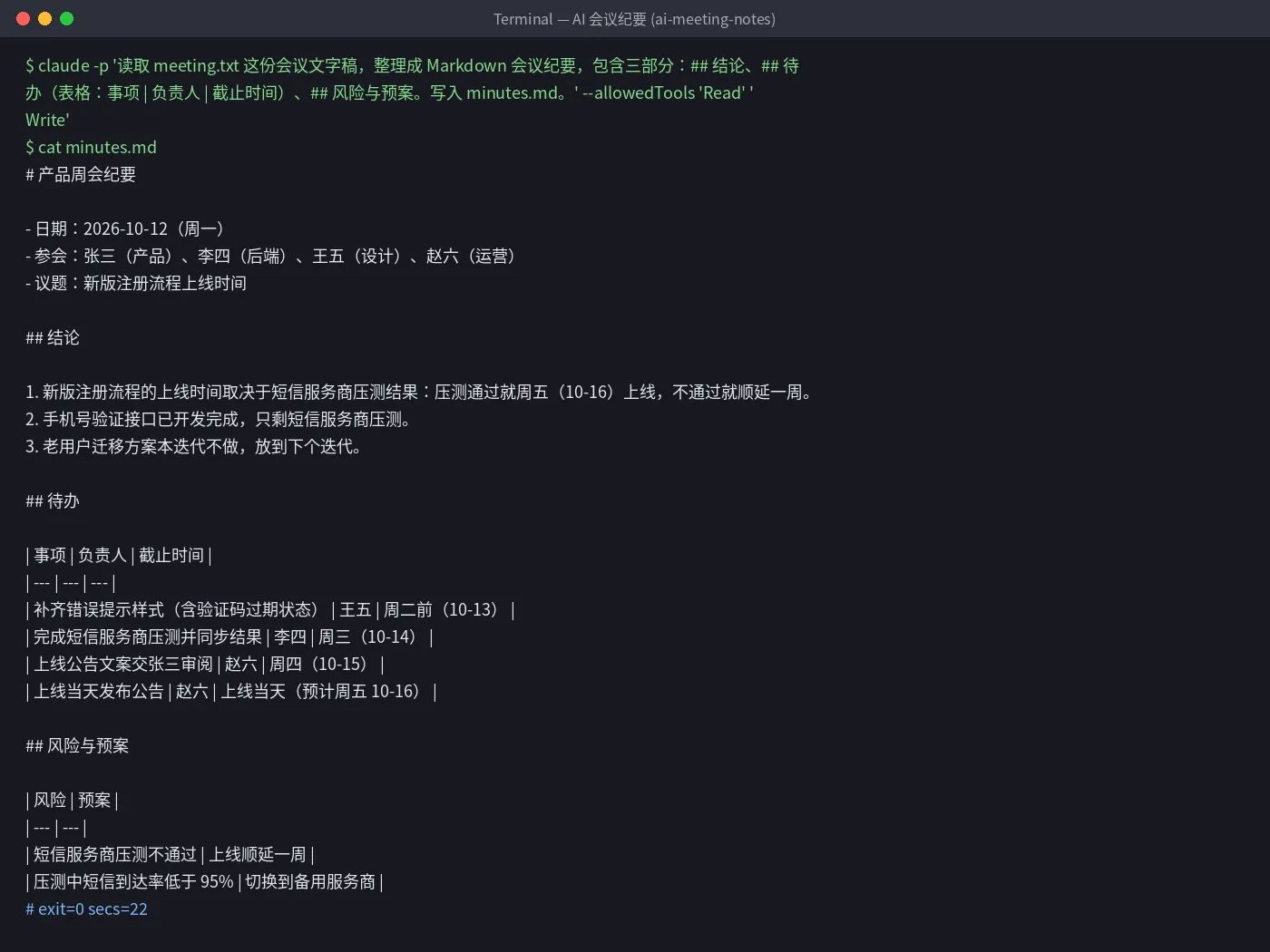
- ✓A product weekly transcript produced minutes in 22 seconds (2026-10-16, Claude Code 2.1.300)
- ✓3 conclusions, 4 action items (each with owner and due date), 2 risks with mitigations
- ✓The transcript only said things like “Wednesday”; it inferred dates from the meeting date and put them in parentheses
Set up once: point the global config at AICodeWith
Do this once; every use case reuses it. Other tools: integration guides. Where to get a key: Get an API key.
1. Install Claude Code
Follow the official Claude Code install docs. You are done when
claude --versionprints a version number.2. Create a key and edit the global config
Sign in, open the dashboard **Key Management** page, and create a key. If you are not sure where that is, see Get an API key.
Open the global config
~/.claude/settings.jsonand set the Base URL and key underenv:~/.claude/settings.json{ "env": { "ANTHROPIC_BASE_URL": "https://api.aicodewith.ai", "ANTHROPIC_AUTH_TOKEN": "sk-YOUR_KEY" } }Do not add /v1 at the end of the Base URL. Reopen the terminal, run claude, and a normal reply means the connection works.
Tested steps
1. Prepare the transcript
Save the transcript as
meeting.txtin a folder.If you only have audio, transcribe it with your usual tool first. We did not test speech-to-text.
2. One command for minutes
In that folder run:
bashclaude -p 'Read the meeting transcript meeting.txt and write Markdown minutes with three sections: ## Conclusions, ## Action items (table: Task | Owner | Due date), ## Risks and mitigations. Write them to minutes.md.' --allowedTools 'Read' 'Write'The terminal may print an English notice about auto mode and api.aicodewith.ai. You can ignore it; it does not affect the result.
3. Check, then send
Open
minutes.mdand check inferred dates, action items, and owners before you send it to attendees.
Troubleshooting
- Due dates are wrong
- Put the meeting date in the command, for example “the meeting date is 2026-10-12”.
- 401 or request failed
- Check that the key is complete and the Base URL is https://api.aicodewith.ai (no /v1). Reopen the terminal after you change it.
FAQ
Can it process meeting audio directly?
This page tested a transcript. Audio needs a transcription tool first. We did not test that step.
Will it invent action items nobody said?
In our run every action item came from the transcript; one was split out of a spoken line and the reply said so. Still check before sending.
What format is the output?
A Markdown file minutes.md. You can paste it into Feishu, Notion, or any Markdown-friendly doc.
Want a one-click version? Leave your email
Don't want to set this up yourself? We are evaluating a one-click tool for “AI meeting notes” and will email you when it is ready.