
Tested · 2026-10-16
AI data analysis: describe the table in plain language, get charts
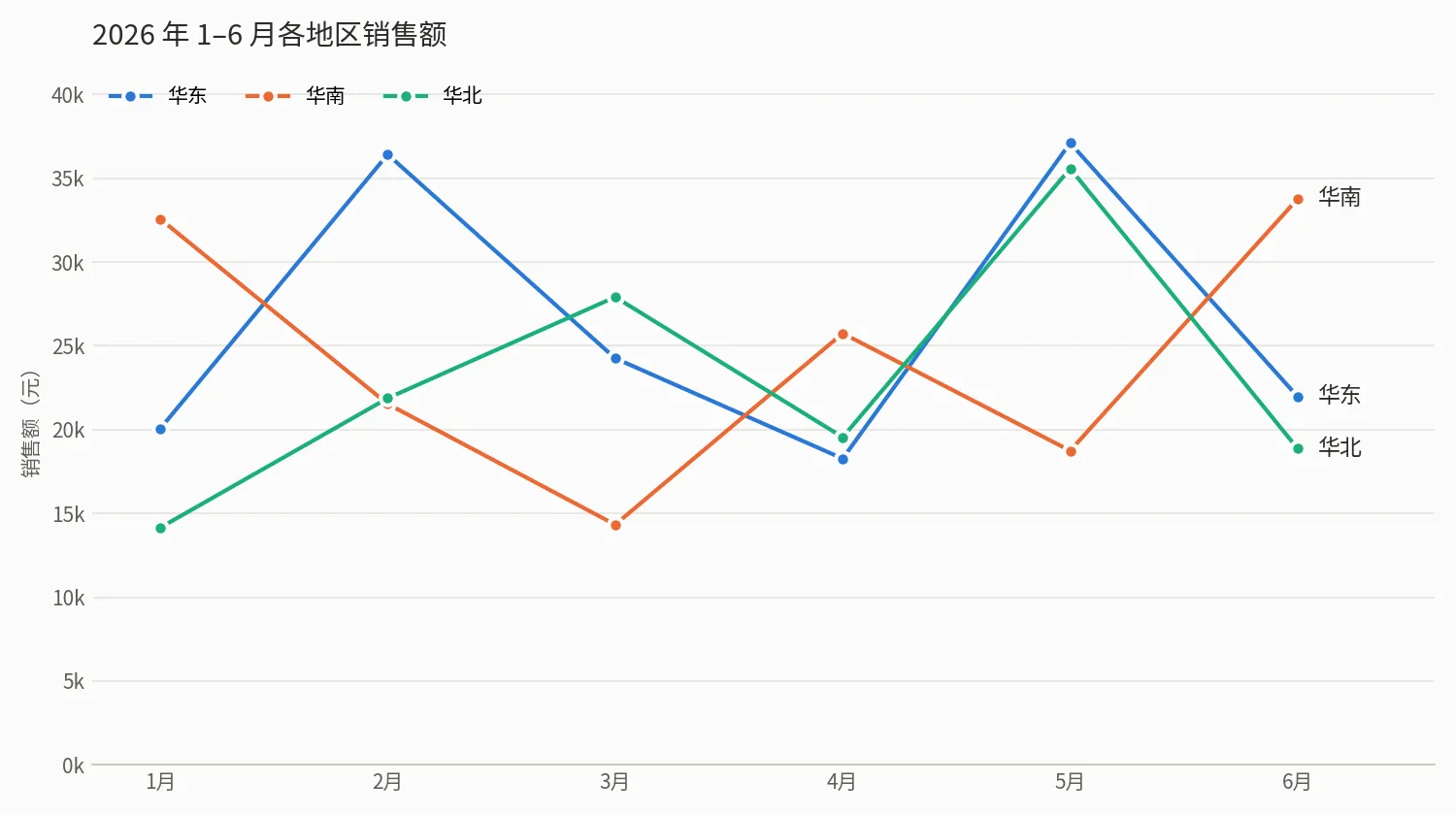
Give Claude Code an Excel or CSV file, say what you want to see, and it computes the answer and draws a chart. No formulas or SQL. We ran a six-month sales CSV: one command, 109 seconds, monthly trend, regional ranking, product growth, and a line chart with readable labels.
- ✓36-row sales CSV (6 months × 3 regions × 2 products), one command, 109 seconds (run on 2026-10-16)
- ✓Answered three questions: monthly sales trend with period-over-period change, best region, fastest-growing product
- ✓Python + matplotlib wrote chart.png (line chart by month and region) and report.md
Set up once: point the global config at AICodeWith
Do this once; every use case reuses it. Other tools: integration guides. Where to get a key: Get an API key.
1. Install Claude Code
Follow the official Claude Code install docs. You are done when
claude --versionprints a version number.2. Create a key and edit the global config
Sign in, open the dashboard **Key Management** page, and create a key. If you are not sure where that is, see Get an API key.
Open the global config
~/.claude/settings.jsonand set the Base URL and key underenv:~/.claude/settings.json{ "env": { "ANTHROPIC_BASE_URL": "https://api.aicodewith.ai", "ANTHROPIC_AUTH_TOKEN": "sk-YOUR_KEY" } }Do not add /v1 at the end of the Base URL. Reopen the terminal, run claude, and a normal reply means the connection works.
3. Confirm Python is installed
Charts need Python and matplotlib. You need Python 3 locally.
python3 --versionshould print a version. If matplotlib is missing, it will handle that.In our run system Python could not install packages directly. Claude Code created a virtualenv, installed matplotlib and pandas there, and left the system environment alone.
Tested steps
1. One command: say what you want to see
Put the CSV (or Excel file) in a folder and run:
bashclaude -p 'Read sales.csv and tell me: monthly total sales (quantity × unit price) trend, which region sold best, and which product grew fastest. Then use Python and matplotlib to draw a sales line chart by month and region, save it as chart.png, and write the conclusions to report.md.'Swap in your filename and questions. The terminal may print an English notice about auto mode and api.aicodewith.ai. You can ignore it; it does not affect the result.
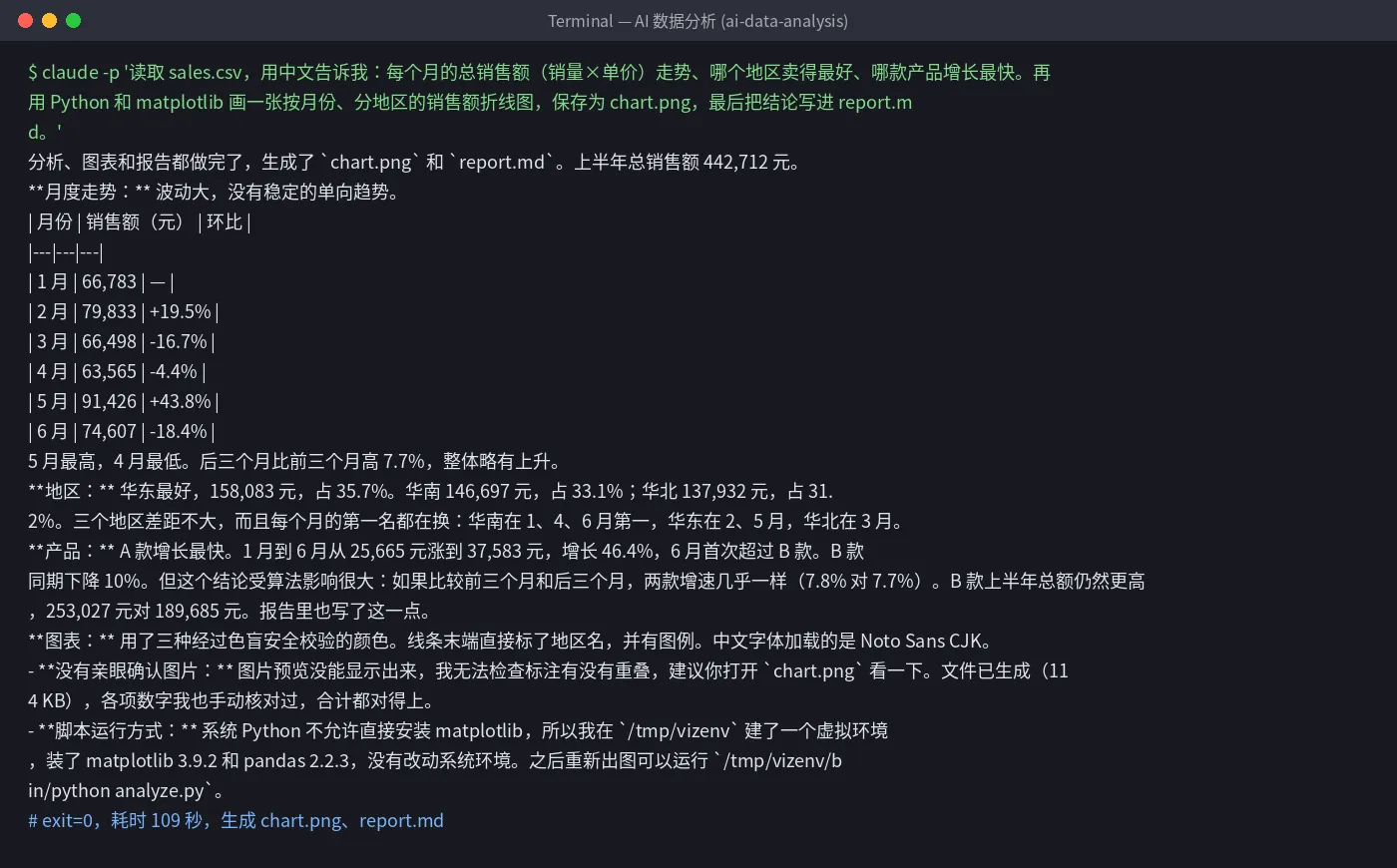
Tested terminal output: 109 seconds, wrote chart.png and report.md. 2. Read the conclusions and the caveats
Besides a month-over-month table, regional share, and product growth, it also warned that “January vs June” and “first three months vs last three months” disagree on which product grew fastest, and that six months of data is description, not a forecast.
It also said it could not see the image itself and suggested opening
chart.pngto check overlapping labels. Open the chart and the report before you send them.3. Ask a follow-up
Keep going in the same folder, for example: “draw a bar chart by product”, “break down why May was high”, “turn the conclusions into 3 sentences for the boss.”
Troubleshooting
- Non-Latin labels show as boxes
- Ask it to redraw with a font already installed on the machine. Our run used a font that rendered correctly.
- It cannot install matplotlib
- Ask it to create a virtualenv and install there (that is what it did). Do not change system Python.
- 401 or request failed
- Check that the key is complete and the Base URL is https://api.aicodewith.ai (no /v1). Reopen the terminal after you change it.
FAQ
Do I need formulas or SQL?
No. Say the dimensions and metrics. It writes and runs the Python itself.
Does Excel work?
This page tested CSV. You can also hand it an Excel file; we did not test that path separately.
Are the numbers trustworthy?
It said it hand-checked the figures and totals matched, and it flagged algorithm-sensitive conclusions. Spot-check a few numbers before you send it.
How long does it take?
36 rows, three questions, one chart: 109 seconds.
Want a one-click version? Leave your email
Don't want to set this up yourself? We are evaluating a one-click tool for “AI data analysis” and will email you when it is ready.