
Tested · 2026-10-16
AI website SEO audit: one prompt, a prioritized report
Install the seo-audit skill in Claude Code, give it a URL, and it checks title, indexing, structured data, and performance, then writes a fix list. seo-audit is an open-source GitHub skill (coreyhaines31/marketingskills, MIT). One command installs it. We ran it on a page on this site: about 7.5 minutes, a 131-line report.
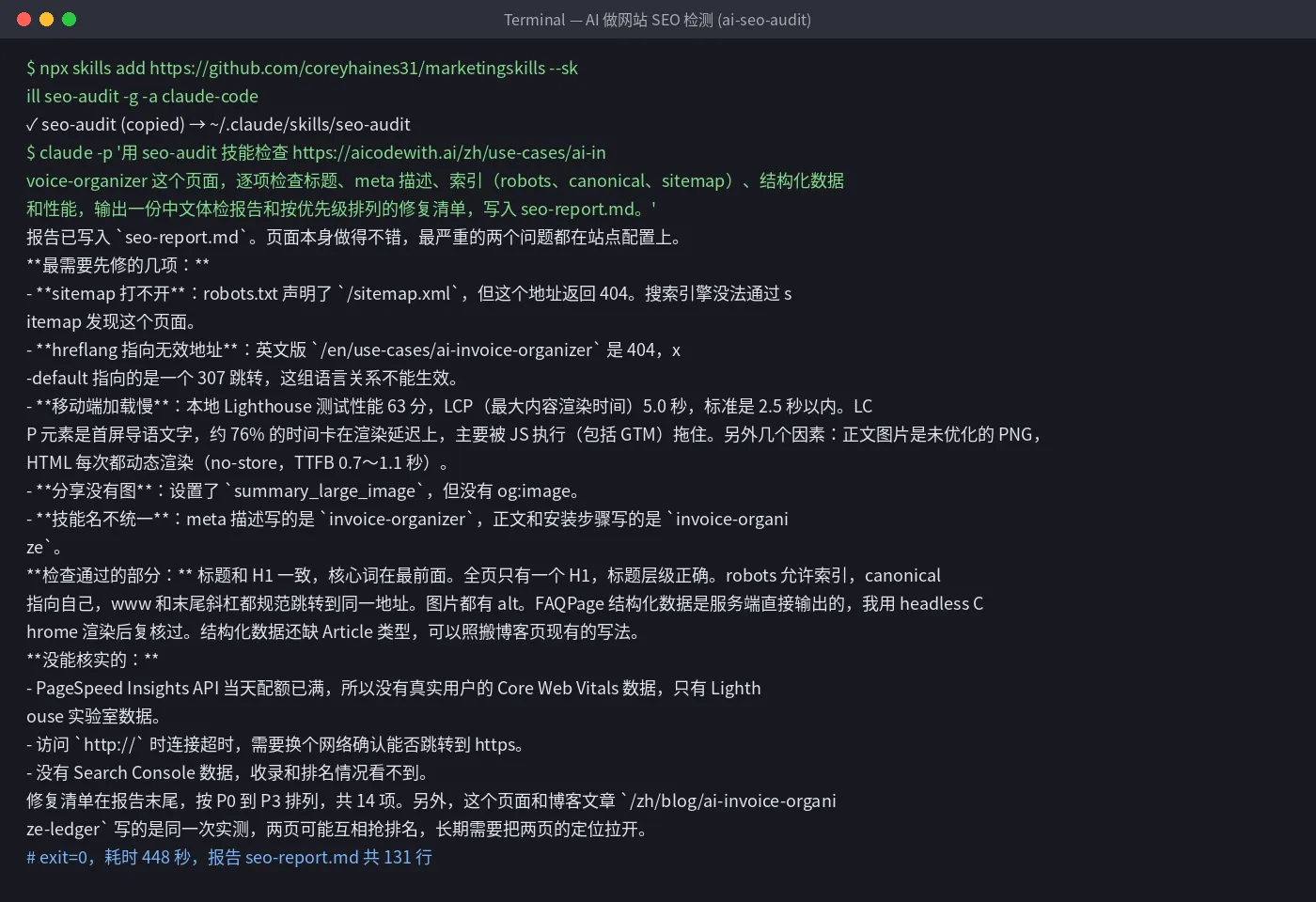
- ✓Skill install 6 seconds; auditing one page ~7.5 minutes (448 seconds), including a local Lighthouse run (2026-10-16)
- ✓131-line report covering title, meta description, indexing, structured data, and performance, with 14 fixes ordered P0–P3
- ✓It caught real issues on our own page: sitemap 404, hreflang pointing at missing English URLs, missing share image, slow mobile LCP
Set up once: point the global config at AICodeWith
Do this once; every use case reuses it. Other tools: integration guides. Where to get a key: Get an API key.
1. Install Claude Code
Follow the official Claude Code install docs. You are done when
claude --versionprints a version number.2. Create a key and edit the global config
Sign in, open the dashboard **Key Management** page, and create a key. If you are not sure where that is, see Get an API key.
Open the global config
~/.claude/settings.jsonand set the Base URL and key underenv:~/.claude/settings.json{ "env": { "ANTHROPIC_BASE_URL": "https://api.aicodewith.ai", "ANTHROPIC_AUTH_TOKEN": "sk-YOUR_KEY" } }Do not add /v1 at the end of the Base URL. Reopen the terminal, run claude, and a normal reply means the connection works.
3. Install the seo-audit skill
You need Node.js locally. In a terminal run:
bashnpx skills add https://github.com/coreyhaines31/marketingskills --skill seo-audit -g -a claude-codeAfter install you should see SKILL.md under
~/.claude/skills/seo-audit/. The skill runs with your permissions; skim SKILL.md first if you want.
Tested steps
1. Ask for an audit in one sentence
Replace
<url>with the page you want to check and run this in any folder:textclaude -p 'Use the seo-audit skill to check <url>. Inspect title, meta description, indexing (robots, canonical, sitemap), structured data, and performance. Write an English audit report and a prioritized fix list to seo-report.md.'One page took about 7.5 minutes in our run, mostly local Lighthouse. Wait for it. The terminal may print an English notice about auto mode and api.aicodewith.ai. You can ignore it.
2. Fix items in order
Open
seo-report.md. Start with P0 (blocks indexing), then P1 (ranking and clicks), then P2 and P3. Rerun the same command after you fix things.The report says what it could not verify. In our run PageSpeed Insights quota was exhausted, so only local Lighthouse data was used. Without Search Console it cannot see indexing or rankings.
The skill notes that JS-injected structured data may be missed when it only fetches HTML. Confirm that item with Google’s Rich Results Test.
Troubleshooting
- npx: command not found
- Install Node.js (it includes npm and npx), then rerun the install command.
- 401 or request failed
- Check that the key is complete and the Base URL is https://api.aicodewith.ai (no /v1). Reopen the terminal after you change it.
FAQ
Do I need Search Console access?
No. It fetches the public page. Without Search Console data it cannot see indexing or rankings, and the report says so.
How long is one audit?
About 7.5 minutes per page in our run, mostly local Lighthouse.
Does this replace a professional SEO tool?
It is a fast issue list. Rankings and backlinks need third-party data it cannot see.
Who made this skill?
seo-audit comes from the MIT GitHub repo coreyhaines31/marketingskills. We did not build it.
Want a one-click version? Leave your email
Don't want to set this up yourself? We are evaluating a one-click tool for “website SEO audit” and will email you when it is ready.