
Tested · 2026-10-16
AI code review: let AI review before you open a PR
Ask Claude Code to review the diff. It lists bugs, security, and readability issues with suggested fixes. One command limits it to git diff and file reads, so it cannot change your code.
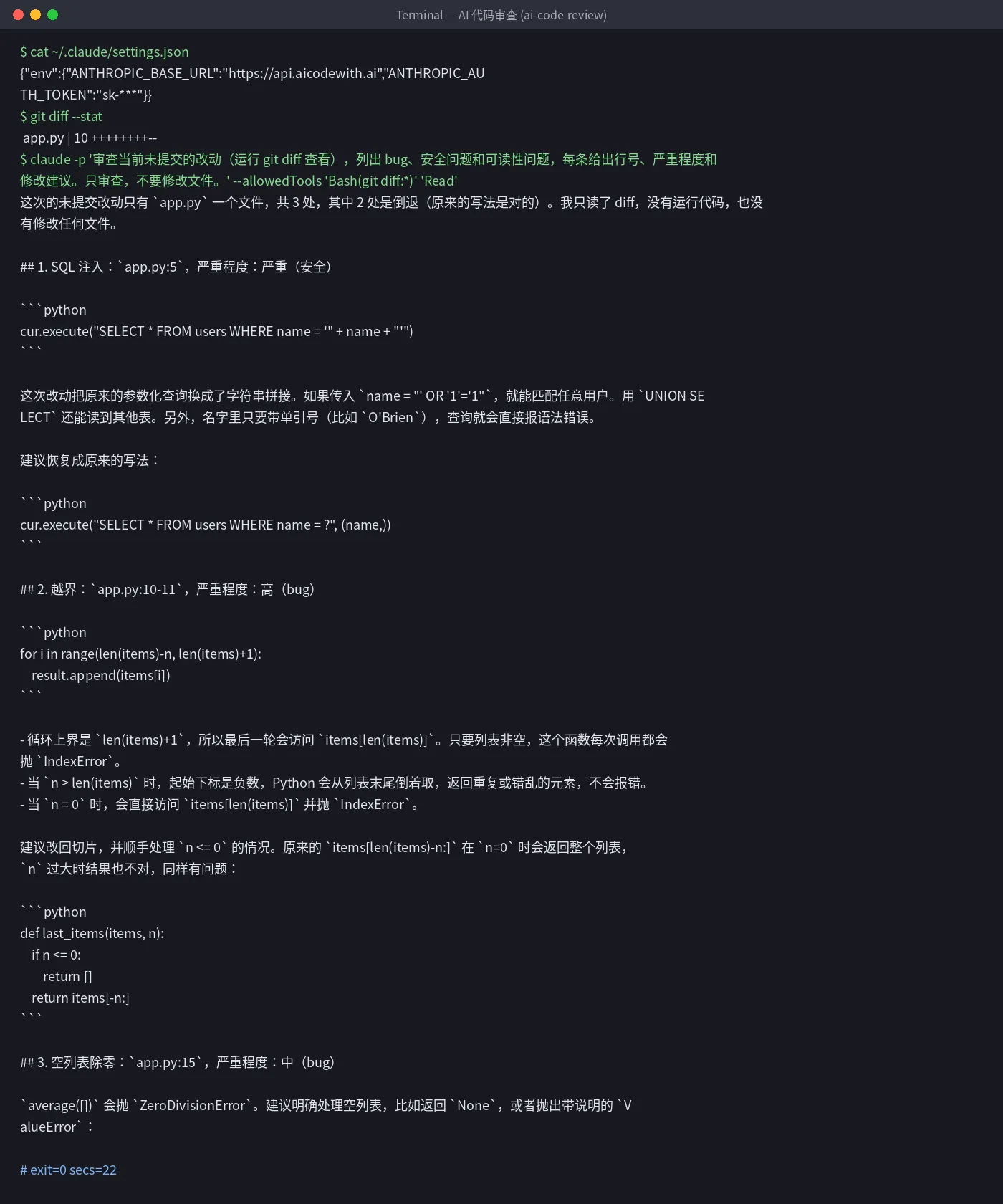
- ✓A diff with 3 planted issues was reviewed in 22 seconds (2026-10-16, Claude Code 2.1.300)
- ✓All 3 issues found: SQL injection, list index out of range, divide-by-zero on an empty list, each with line number, severity, and a suggested fix
- ✓It only read the diff and did not modify any file
Set up once: point the global config at AICodeWith
Do this once; every use case reuses it. Other tools: integration guides. Where to get a key: Get an API key.
1. Install Claude Code
Follow the official Claude Code install docs. You are done when
claude --versionprints a version number.2. Create a key and edit the global config
Sign in, open the dashboard **Key Management** page, and create a key. If you are not sure where that is, see Get an API key.
Open the global config
~/.claude/settings.jsonand set the Base URL and key underenv:~/.claude/settings.json{ "env": { "ANTHROPIC_BASE_URL": "https://api.aicodewith.ai", "ANTHROPIC_AUTH_TOKEN": "sk-YOUR_KEY" } }Do not add /v1 at the end of the Base URL. Reopen the terminal, run claude, and a normal reply means the connection works.
Tested steps
1. Run one command in the repo
After you change code, before you commit, run this at the repo root:
bashclaude -p 'Review the current uncommitted changes (run git diff). List bugs, security issues, and readability issues. For each item give the line number, severity, and a suggested fix. Review only; do not modify files.' --allowedTools 'Bash(git diff:*)' 'Read'--allowedTools only allows git diff and file reads, so it cannot edit code. The terminal may print an English notice about auto mode and api.aicodewith.ai. You can ignore it; it does not affect the result.
2. Apply the suggestions yourself
Output was ordered by severity: SQL injection (critical), out-of-range (high), divide-by-zero (medium), each with a suggested rewrite.
Suggestions are references. You decide what to change. Rerun the same command after you edit.
Troubleshooting
- It says there is nothing to review
- Run it at the repo root while the changes are still uncommitted. For committed work, replace git diff with git diff HEAD~1.
- 401 or request failed
- Check that the key is complete and the Base URL is https://api.aicodewith.ai (no /v1). Reopen the terminal after you change it.
FAQ
Will AI code review change my code?
Not with the command above. --allowedTools only allows git diff and file reads. In our run no files changed.
Can it replace a human review?
Use it to catch obvious bugs and security issues before a PR. Whether the business logic is right still needs a teammate.
How long is one review?
One file with 3 changes took 22 seconds. Larger diffs take longer.
Want a one-click version? Leave your email
Don't want to set this up yourself? We are evaluating a one-click tool for “AI code review” and will email you when it is ready.