
Tested · 2026-10-15
AI invoice organizer: build a ledger, catch duplicates, check totals
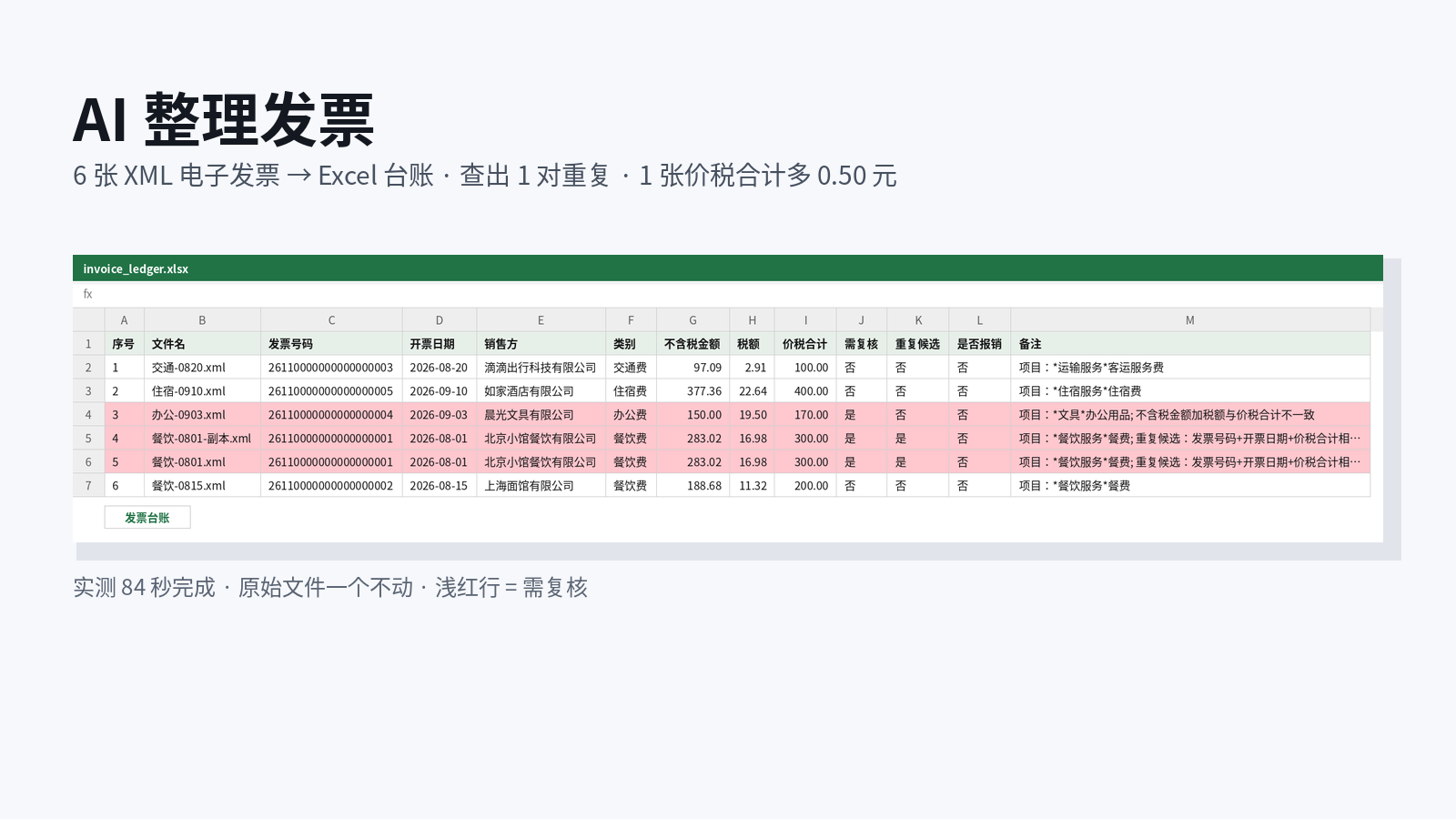
The low-friction way to organize invoices with AI is a one-shot prompt in Claude Code. Install the invoice-organizer skill, put the e-invoices in a folder, and say “build an expense ledger, check for duplicates and amounts, and do not change the original files”. It writes an Excel ledger and flags duplicates plus tax-inclusive totals that do not add up. We ran it on 6 XML e-invoices: 84 seconds, original files unchanged.
- ✓6 XML e-invoices produced an xlsx + csv ledger in 84 seconds (clean-environment run on 2026-10-15)
- ✓Caught 1 duplicate pair and 1 invoice whose tax-inclusive total was 0.50 too high
- ✓Hashes of all 6 original files matched before and after; August meal tickets were 2 invoices totaling 500.00 after de-duplication
Set up once: point the global config at AICodeWith
Do this once; every use case reuses it. Other tools: integration guides. Where to get a key: Get an API key.
1. Install Claude Code
Follow the official Claude Code install docs. You are done when
claude --versionprints a version number.2. Create a key and edit the global config
Sign in, open the dashboard **Key Management** page, and create a key. If you are not sure where that is, see Get an API key.
Open the global config
~/.claude/settings.jsonand set the Base URL and key underenv:~/.claude/settings.json{ "env": { "ANTHROPIC_BASE_URL": "https://api.aicodewith.ai", "ANTHROPIC_AUTH_TOKEN": "sk-YOUR_KEY" } }Do not add /v1 at the end of the Base URL. Reopen the terminal, run claude, and a normal reply means the connection works.
3. Install the invoice-organizer skill
The skill name is invoice-organizer. SkillHub’s download URL uses
slug=invoice-organize(missing an r). That is SkillHub’s download id — copy it as-is.Download the zip from SkillHub and unzip it into Claude Code’s skills directory:
bashmkdir -p ~/.claude/skills/invoice-organize curl -L -o /tmp/invoice-organize.zip "https://api.skillhub.cn/api/v1/download?slug=invoice-organize" unzip -o /tmp/invoice-organize.zip -d ~/.claude/skills/invoice-organizeYou are done when SKILL.md appears in the folder. Keeping the download id invoice-organize as the folder name is fine; SKILL.md still names the skill invoice-organizer.
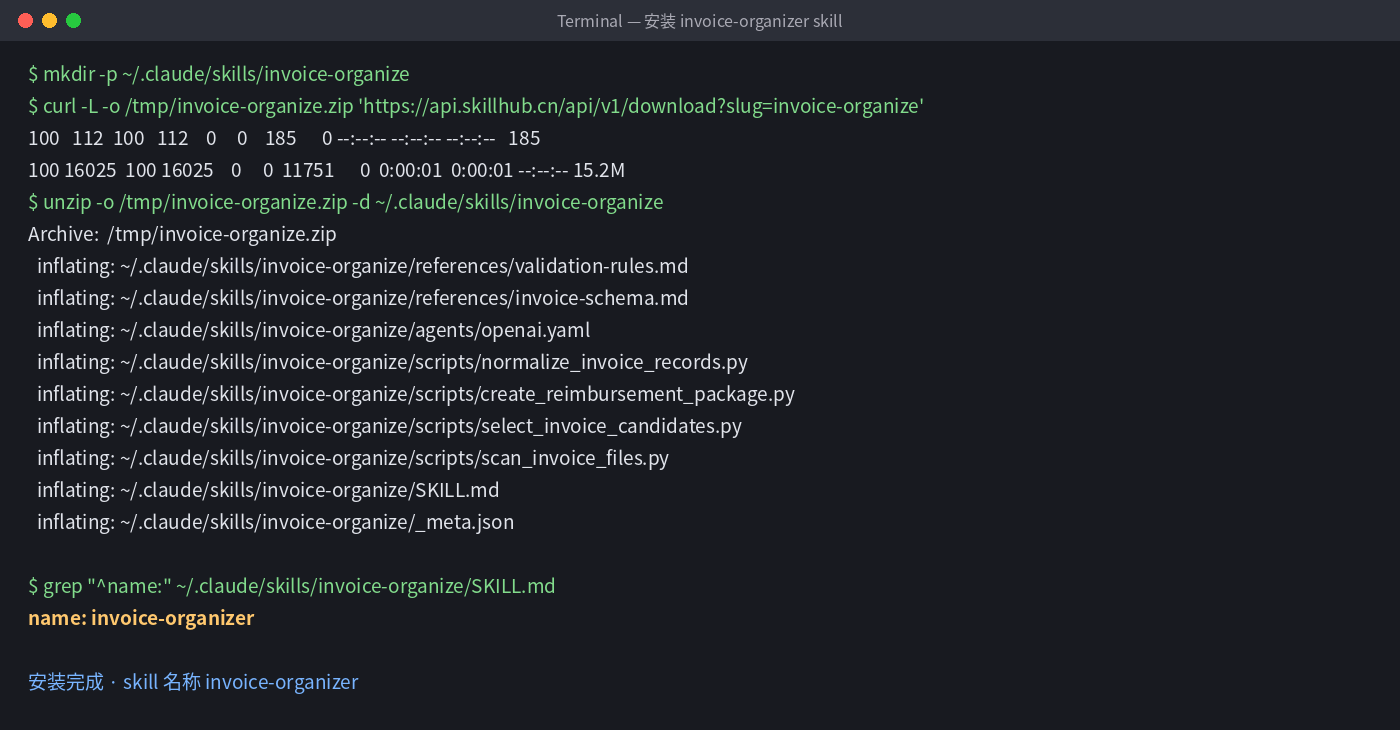
Tested install: curl download, unzip, SKILL.md appears.
Tested steps
1. Ask it to organize in one sentence
Put the XML e-invoices in an
invoicesfolder and runclaudeone level above it:textUse the invoice-organizer skill to organize the invoices in ./invoices, build an expense ledger (check duplicates and amounts), then find the August meal tickets. Do not change the original files.Keep the sentence “Do not change the original files.”
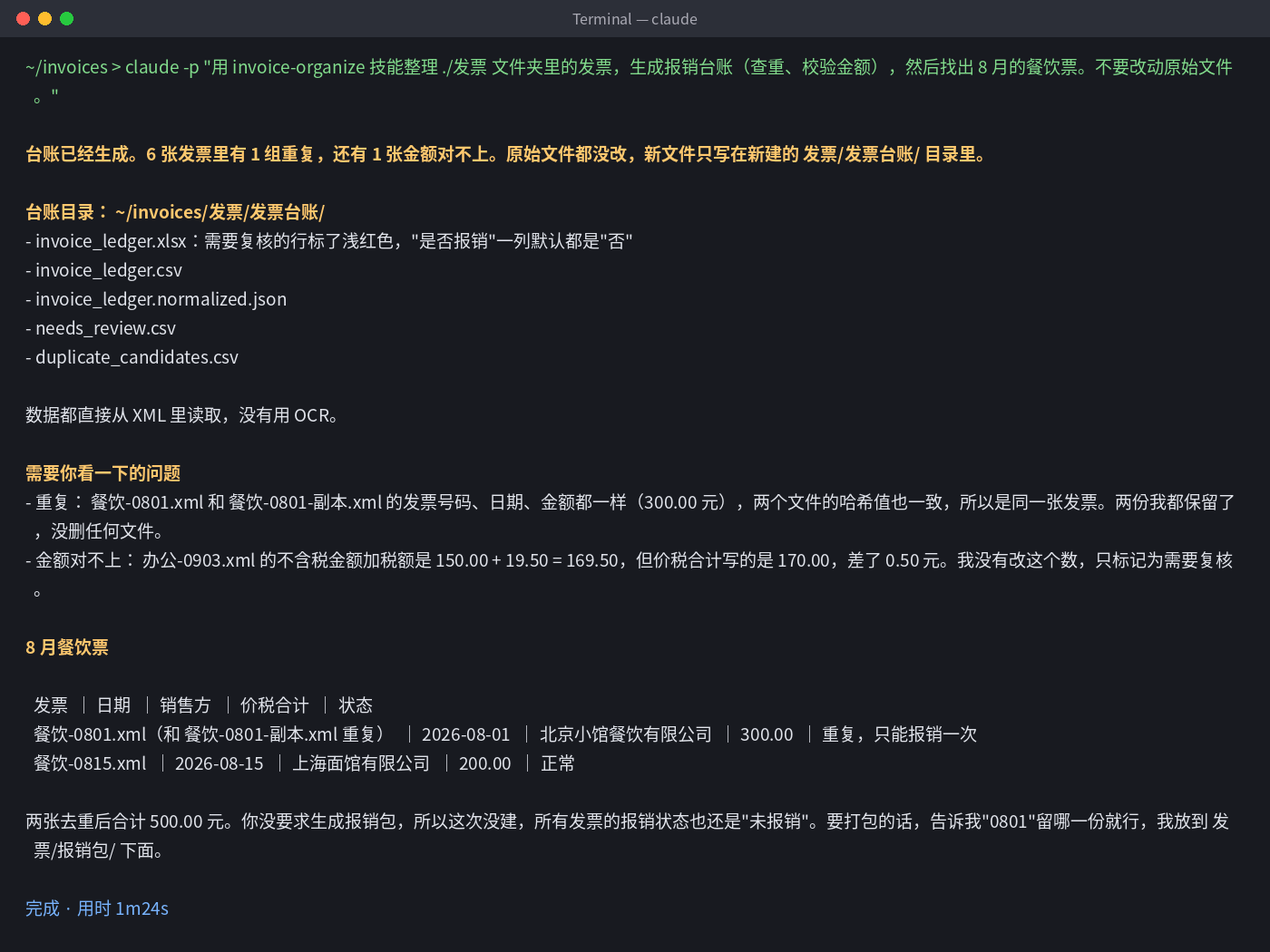
Tested terminal output: 1 duplicate group, 1 amount mismatch, 1 minute 24 seconds, original files unchanged. 2. Open the ledger
It writes
invoice_ledger.xlsx(main ledger, review rows in light red),invoice_ledger.csv,needs_review.csv, andduplicate_candidates.csvunderinvoices/ledger/. Values are read from XML — no OCR.In our run: meal-0801.xml and its copy were the same invoice; office-0903.xml should be 169.50 (150.00 net + 19.50 tax) but the face amount was 170.00.
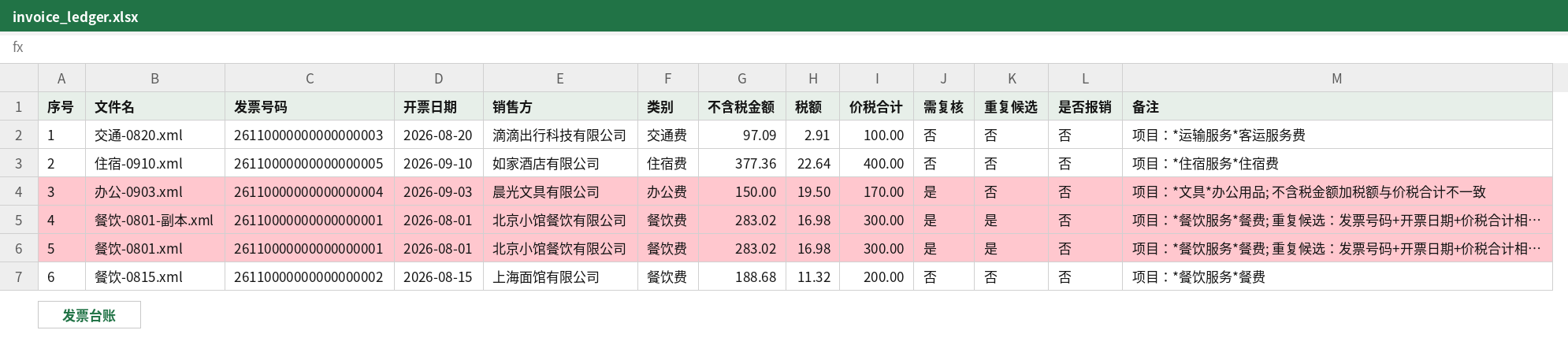
invoice_ledger.xlsx: rows that need review are light red. 3. Keep talking to continue
For example: “build a reimbursement pack from these two August meal tickets”, “sum amounts by category each month”, or “mark these as reimbursed.”
Troubleshooting
- The same invoice appears twice
- Open duplicate_candidates.csv and keep only one copy of that invoice number.
- Tax-inclusive total does not add up
- Read the note in needs_review.csv and confirm with the issuer.
- 401 or request failed
- Check that the key is complete and the Base URL is https://api.aicodewith.ai (no /v1). Reopen the terminal after you change it.
FAQ
Does the AI invoice organizer change original files?
Say “do not change the original files” in the prompt. In our run the hashes of all 6 XML files matched before and after, and duplicates were not deleted.
Which invoice formats are supported?
We tested XML e-invoices. PDF and image invoices have not been tested.
How long does one run take?
6 XML invoices took 84 seconds from organize to ledger. More invoices take longer.
Does it decide what can be reimbursed?
No. “Reimbursed” defaults to no. Duplicates and amount mismatches are flagged for you to decide.
Want a one-click version? Leave your email
Don't want to set this up yourself? We are evaluating a one-click tool for “AI invoice organizer” and will email you when it is ready.